

Llm server
Auto-tuned launcher for GGUF models on llama.cpp / ik_llama.cpp — OpenAI-compatible server with multi-GPU tensor-split, MoE expert placement, measured flag tuning (AI Tune), hardware-matched HuggingFace downloads, and crash recovery. An Ollama alternative for multi-GPU rigs.
**Stop hand-writing `--tensor-split`, `-ot`, and KV-cache flags.** Point llm-server at a GGUF and it measures your GPUs, RAM, and PCIe topology, picks the backend (llama.cpp or the faster ik_llama.cpp fork), computes multi-GPU and MoE expert placement, and serves an OpenAI-compatible API — one command from file to endpoint. The project is written primarily in Go, distributed under the MIT License license, first published in 2026. Key topics include: cuda, gguf, golang, inference-server, llama-cpp.
llm-server




Stop hand-writing --tensor-split, -ot, and KV-cache flags. Point llm-server
at a GGUF and it measures your GPUs, RAM, and PCIe topology, picks the backend
(llama.cpp or the faster ik_llama.cpp fork), computes multi-GPU and MoE expert
placement, and serves an OpenAI-compatible API — one command from file to endpoint.
bashllm-server model.gguf # local GGUF → served llm-server unsloth/Qwen3.6-27B-GGUF --download # HF repo → hardware-matched quant → served llm-server # no args → interactive TUI
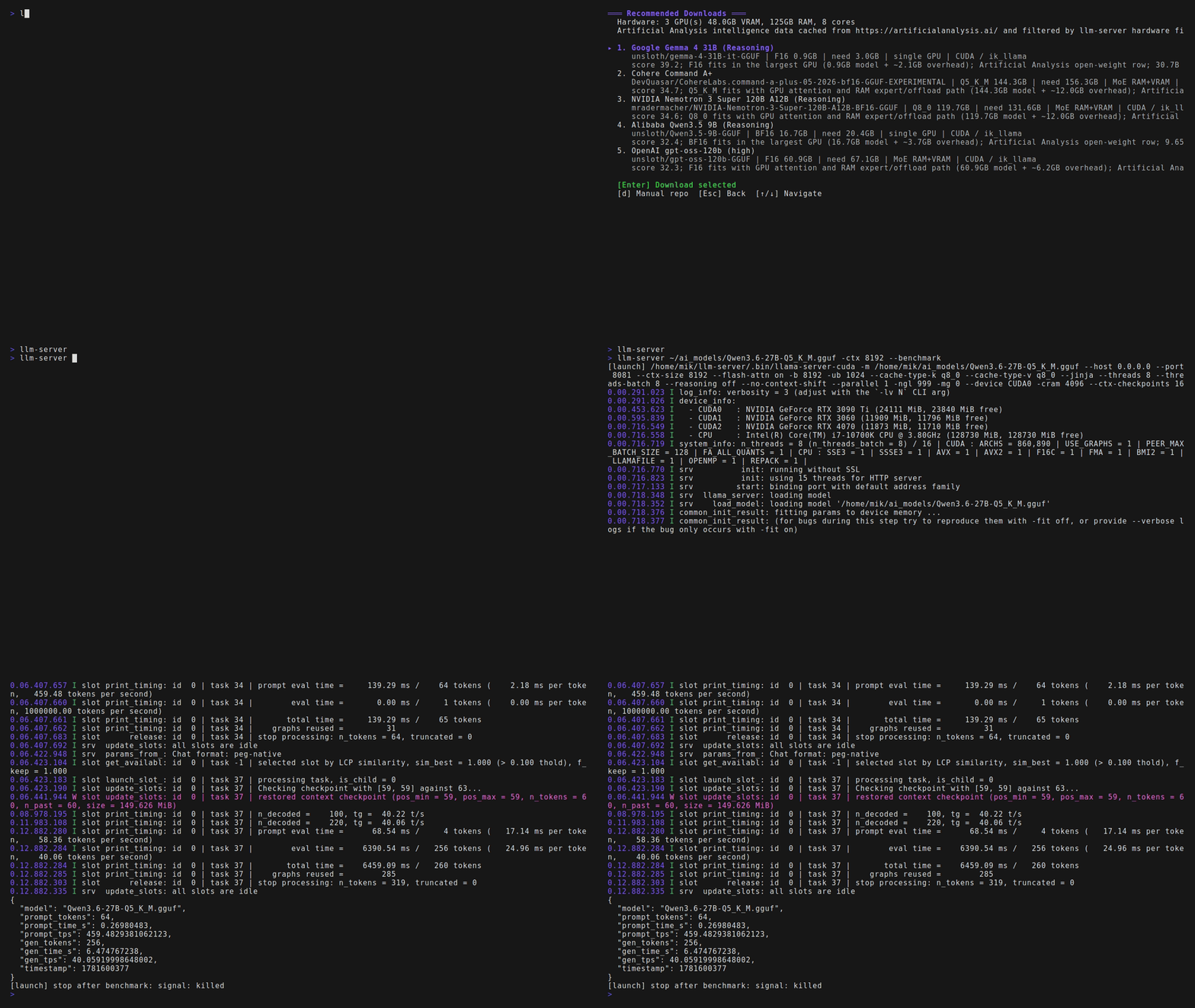
Hardware-matched recommendations → one-command launch → benchmark, all from the same tool.
Just run llm-server with no arguments to open the full arrow-key TUI — browse and
download models, adjust settings, and launch, without writing a single flag. Pass a model
path or flags for one-shot CLI use instead.
Benchmarks
Same rig (RTX 3090 Ti 24GB + 4070 12GB + 3060 12GB), same GGUFs, 32k context,
decode tok/s (256-token generation), slowest backend on the left:
| Model (quant) | Ollama 0.30.8 | llama.cpp --fit | llm-server v3 | v3 --ai-tune | v3 vs Ollama |
|---|---|---|---|---|---|
| Qwen3.5-4B Q4_K_M | 124.8 | 103.3 | 176.6 | 178.8 | +43% |
| Qwen3.6-27B Q5_K_M | 22.8 | 24.3 | 40.3 | 40.3 | +77% |
| Qwen3.5-122B-A10B UD-IQ4_XS (MoE) | 13.5† | 21.0 | 23.6 | 23.6 | +74% |
| MiniMax-M3 UD-IQ3_XXS (MoE) | ✗ won't load | ✗ won't load | 5.47 | 5.50 | Ollama can't load |
† Ollama can't import sharded GGUFs (ollama#5245),
so the 122B was merged to one file before importing; MiniMax-M3 it can't load at all
(minimax-m3 is ik_llama-only). Where models load, llm-server is 43–77% faster than
Ollama — including +74% on the 122B MoE at heavy VRAM+RAM offload (60 GB, ~18 GB spilled
to RAM). Driving the same llama.cpp master binary (no ik_llama), llm-server still beat raw
--fit — so the gain is the placement, not just the backend swap. Full methodology,
exact commands, and artifacts: docs/performance.md. Numbers are
reproducible with scripts/bench-v3-comparison.sh —
regressions against these tables are treated as bugs.
Install
Linux / macOS — self-contained app home under ~/llm-server:
bashcurl -fsSL https://raw.githubusercontent.com/raketenkater/llm-server/main/setup.sh | bash
Windows (PowerShell); add -Backend cuda for native NVIDIA CUDA:
powershelliwr -useb https://raw.githubusercontent.com/raketenkater/llm-server/main/install.ps1 | iex
From a clone:
bashgit clone https://github.com/raketenkater/llm-server.git && cd llm-server && ./setup.sh
Since v3, prebuilt release bundles
(Linux CPU/Vulkan, macOS arm64 Metal, Windows x86_64 CPU) install without compiling,
verified against SHA256SUMS; Linux CUDA/ik_llama.cpp builds from source for your GPU.
Run llm-server with no arguments to open the TUI. Installer options and the app-home
layout are in docs/install.md.
Quick start
bashllm-server ~/models/model.gguf # launch a local model llm-server unsloth/Qwen3.6-27B-GGUF --download # download a fitting quant, then launch llm-server model.gguf --ai-tune # benchmark flag sets, cache the fastest llm-server model.gguf --dry-run # print the backend command without running llm-server model.gguf --benchmark # load, measure tok/s, exit
Common flags: --backend ik_llama|llama|vulkan, --gpus 0,1, --ctx-size,
--kv-quality, --kv-placement, --vision, --spec auto. Unknown flags pass straight
through to llama-server, so nothing upstream is out of reach. Full list:
docs/usage.md.
How it compares
vs raw llama.cpp. Upstream --fit auto-picks GPU layers, tensor-split, and context.
If that covers you, raw llama.cpp may be enough. llm-server goes further: it selects the
backend (ik_llama.cpp is meaningfully faster on CUDA), picks KV-cache type and batch sizes
from measured probes, benchmarks candidate flag sets (--ai-tune), finds/validates vision
projectors and speculative drafts, and recovers from crashes.
vs Ollama. Ollama wins on one-command simplicity and ecosystem on common hardware.
llm-server targets where Ollama's conservative heuristics leave performance behind:
mismatched multi-GPU rigs, MoE models split across VRAM/RAM, ik_llama.cpp speed, and full
flag access. One GPU and want zero config? Use Ollama.
vs llama-swap. llama-swap hot-swaps between model commands you write yourself;
llm-server computes those commands. They compose — point llama-swap at llm-server dry-run
output, or use llm-server daemon for single-model swapping.
| Capability | raw llama.cpp | llm-server |
|---|---|---|
| Multi-GPU / heterogeneous split | --fit (recent) | automatic, PCIe/bandwidth-weighted |
| MoE expert placement | --fit / manual -ot | exact per-GPU ledger, backend-aware |
| Backend selection (ik_llama / llama / Vulkan) | manual | automatic, dialect-aware |
| KV-cache type / batch sizing | manual | probe-measured |
| AI Tune (measured flag search) | no | yes, cached per model+hardware |
| Hardware-matched quant download | no | yes (HF search + intelligence ranking) |
| Vision projector / speculative decoding | manual | automatic, validated |
| Crash recovery / backend fallback | no | yes |
Features
- One Go binary; Linux, macOS, and native Windows. CUDA / Vulkan / Metal / CPU.
- Exact-ledger multi-GPU + MoE expert placement (
--tensor-split+-otfrom measured
VRAM and GGUF sizes), with adaptive retry on out-of-memory. - AI Tune — benchmarks candidate flag sets and caches the fastest valid result per
model + hardware; a community tune pool seeds first launches (LLM_COMMUNITY_TUNES=off). - Hugging Face downloader with hardware-aware quant selection and a GUI recommendation
picker ranked by intelligence-per-fit. - Speculative decoding (MTP, EAGLE-3, validated draft GGUFs) and vision (
mmproj) support. - OpenAI-compatible server, arrow-key TUI, crash recovery with backend fallback.
Backends
ik_llama.cpp (CUDA, source build) · llama.cpp (Vulkan, Metal, CPU) · native Windows CUDA
via install.ps1 -Backend cuda. The backend binary is pluggable via LLAMA_SERVER.
Requirements
- Linux:
curl,git,python3;cmake/compiler + NVIDIA CUDA toolkit for CUDA
source builds;vulkaninfofor Vulkan detection. - macOS: Apple Silicon; Xcode command-line tools for source builds.
- Windows: Windows 10/11 x86_64, PowerShell 5+, Python; CUDA Toolkit + VS C++ Build
Tools for-Backend cuda.
Documentation
Install ·
Usage ·
Architecture ·
Performance ·
Speculative decoding ·
Model recommendations ·
Changelog
License
MIT
Contributors
Showing top 2 contributors by commit count.
![github-actions[bot]](https://avatars.githubusercontent.com/in/15368?v=4)

Related Repositories

vllm-project/vllm
A high-throughput and memory-efficient inference and serving engine for LLMs

jamiepine/voicebox
The open-source AI voice studio. Clone, dictate, create.

sgl-project/sglang
SGLang is a high-performance serving framework for large language models and multimodal models.

hashcat/hashcat
World's fastest and most advanced password recovery utility

NVIDIA/nvidia-docker
Build and run Docker containers leveraging NVIDIA GPUs

NVlabs/instant-ngp
Instant neural graphics primitives: lightning fast NeRF and more