

DND 5e LaTeX Template
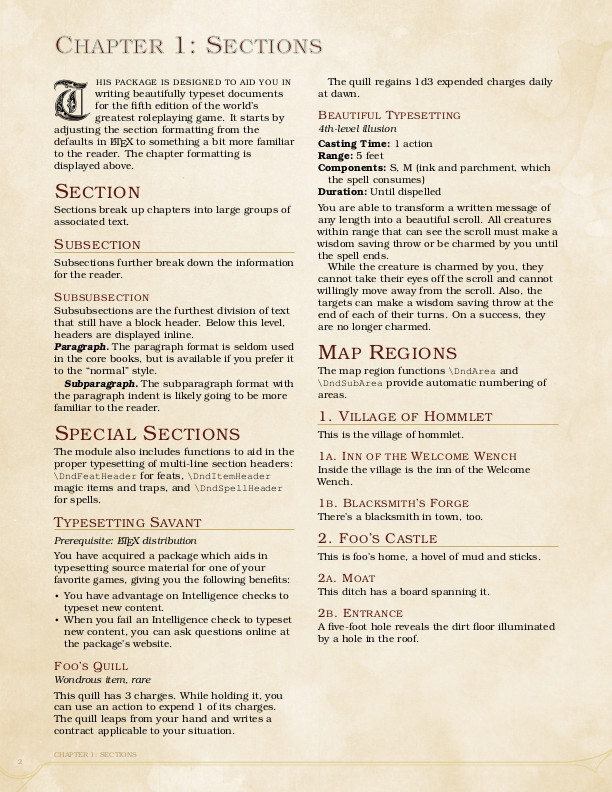
LaTeX package to typeset material for the fifth edition of the "world's greatest roleplaying game".
This is a LaTeX template for typesetting documents in the style of the fifth edition of the "world's greatest roleplaying game". The project is written primarily in TeX, distributed under the MIT License license, first published in 2015. It has gained significant community traction with 1,608 stars and 332 forks on GitHub. Key topics include: dnd, dnd5e, dungeons-and-dragons, latex, latex-template.
DnD 5e LaTeX Template


This is a LaTeX template for typesetting documents in the style of the fifth edition of the "world's greatest roleplaying game".
Features
- Color schemes, fonts, and layout are close to the core books (but not exactly the same).
- TeX Live includes the default fonts.
- Works with pdfTeX, LuaTeX, and XeTeX.
Installation
There are three options for using this project; choose the one that's
right for you.
User install using TEXMFHOME (recommended)
This will install the template for your current user in one of the following locations:
- Linux:
~/.texmf/tex/latex - OS X / macOS:
~/Library/texmf/tex/latex - Windows:
C:\Users\{username}\texmf\tex\latex
LaTeX will find the package automatically.
-
Prepare your
TEXMFHOMEdirectory.shmkdir "$(kpsewhich -var-value TEXMFHOME)/tex/latex/" -
Download the latest release and extract it in
$TEXMFHOME/tex/latex/.shwget https://github.com/rpgtex/DND-5e-LaTeX-Template/archive/master.zip unzip -d "$(kpsewhich -var-value TEXMFHOME)/tex/latex/" master.zip cd "$(kpsewhich -var-value TEXMFHOME)/tex/latex/" mv DND-5e-LaTeX-Template-master dndAlternatively, clone the repo to the same location:
shgit clone https://github.com/rpgtex/DND-5e-LaTeX-Template.git "$(kpsewhich -var-value TEXMFHOME)/tex/latex/dnd"
Using Overleaf
Overleaf is an online TeX editor -- think
about it like Google Docs for TeX documents. This option does not
require a local TeX installation and is an ideal approach for one-off
projects.
- Download this GitHub repository as a ZIP archive using the Clone
or download link above. - On Overleaf, click the New Project button and select Upload
Project. Upload the ZIP archive you downloaded from this
repository.
Project install using TEXINPUTS
You can also clone a copy of the repository to each LaTeX project. For example, to clone the repository to a lib/ directory in your project:
shmkdir lib/ git clone https://github.com/rpgtex/DND-5e-LaTeX-Template.git lib/dnd
LaTeX will not find the template automatically. Set TEXINPUTS when compiling your project to locate the package:
shTEXINPUTS=./lib//: pdflatex project.tex
Usage
Class (recommended)
Load the dndbook class in your preamble:
tex\documentclass[10pt,twoside,twocolumn,openany,nodeprecatedcode]{dndbook} \usepackage[english]{babel} \usepackage[utf8]{inputenc} \begin{document} % ...
Package
You can also load the dnd package directly to use it with another class.
Note that the package has only been tested with the book class.
tex\documentclass[10pt,twoside,twocolumn,openany]{book} \usepackage[english]{babel} \usepackage[utf8]{inputenc} \usepackage[layout=true]{dnd} \begin{document} % ...
Options
| Option | Package dnd | Class dndbook |
|---|---|---|
bg | ✓ | ✓ |
justified | ✓ | ✓ |
layout | ✓ | |
nomultitoc | ✓ | ✓ |
nodeprecatedcode | ✓ | ✓ |
The dndbook class also supports all the options of the book class.
bg
Declare how to load background and footer images. This is a key-value option with the following possible values:
full: Load both background and footer images. (default)none: Removes both background and footer images.print: Loads only the footer images.
justified
Justify column copy.
layout
Controls whether loading the dnd package also modifies the document layout (geometry, colors, typography, etc.).
This is a boolean option with the following possible values:
true: Modify the document layout.false: Do not modify the document layout.
The default value is true for backwards compatibility with early releases.
This will change in a future release.
nomultitoc
Disable multi-column table of contents.
nodeprecatedcode
Excludes all deprecated code from the build process.
Dependencies
If you don't have LaTeX installed, we recommend installing a complete TeX Live distribution.
Ubuntu
shsudo apt-get install texlive-full
Arch
shsudo pacman -S texlive-bin texlive-core texlive-latexextra
OSX
MacTex has its own installer, but you can install it through brew cask:
Full version
shbrew cask install mactex
Slightly smaller version without GUI
shbrew cask install mactex-no-gui
Minimal version
Use tlmgr to install packages as needed, see this answer for more information
shbrew cask install basictex brew cask install tex-live-utility
After any of this, use the following such that the texlive directory doesn't require admin rights.
shsudo chown -R myuser:mygroup /usr/local/texlive
For more information about MacTex permissions, see the following StackExchange post
Known issues and solutions
Stat block text color does not survive page breaks
This is a known issue in tcolorbox. According to the tcolorbox 4.12 manual (p. 363):
If your text content contains some text color changing commands, your color will not survive the break to the next box.
You can use LuaTeX to compile the document.
shlualatex main.tex
Wrapping monsterbox in float disrupts spacing inside stat block
Wrapping a monsterbox (or monsterboxnobg) in a floating figure adds extra space between stat block elements:
latex\begin{figure}[b] \begin{monsterbox}{Orc Warden} % ... \end{monsterbox} \end{figure}
Instead, use the tcolorbox float parameter:
latex\begin{monsterbox}[float=b]{Orc Warden} % ... \end{monsterbox}
Refer to the tcolorbox documentation (section 4.13) for more float parameters.
Contributing
Style
We use EditorConfig to enforce consistent formatting.
Install the appropriate plugin for your editor.
Preparing a new release
-
Run
./bin/bump-versionto tag the new version.sh./bin/bumpversion <version> -
Compile the example PDF.
-
Save the first page of the PDF as scrot.jpg.
-
Update the change log for the new release; commit your changes.
-
Push changes.
shgit push && git push --tags -
Create a new release and attach the PDF and scrot.
Credits
- Background image from Lost and Taken
License
MIT
Contributors
Showing top 12 contributors by commit count.


![dependabot[bot]](https://avatars.githubusercontent.com/in/29110?v=4)


Related Repositories

atlassian/react-beautiful-dnd
Beautiful and accessible drag and drop for lists with React
atlassian/pragmatic-drag-and-drop
Fast drag and drop for any experience on any tech stack

haltu/muuri
Infinite responsive, sortable, filterable and draggable layouts

hello-pangea/dnd
💅 Beautiful and accessible drag and drop for lists with React. ⭐️ Star to support our work!

dflex-js/dflex
The sophisticated Drag and Drop library you've been waiting for 🥳

tajo/react-movable
🔀 Drag and drop for your React lists and tables. Accessible. Tiny.