

Dynmotd
Dynamic Motd (Message of the Day)
Dynamic Message of the Day — a single Bash script that displays system information on login. The project is written primarily in Shell, first published in 2015. Key topics include: bash, bash-script, dynamic, logging, login-screen.
dynmotd
Dynamic Message of the Day — a single Bash script that displays system information on login.
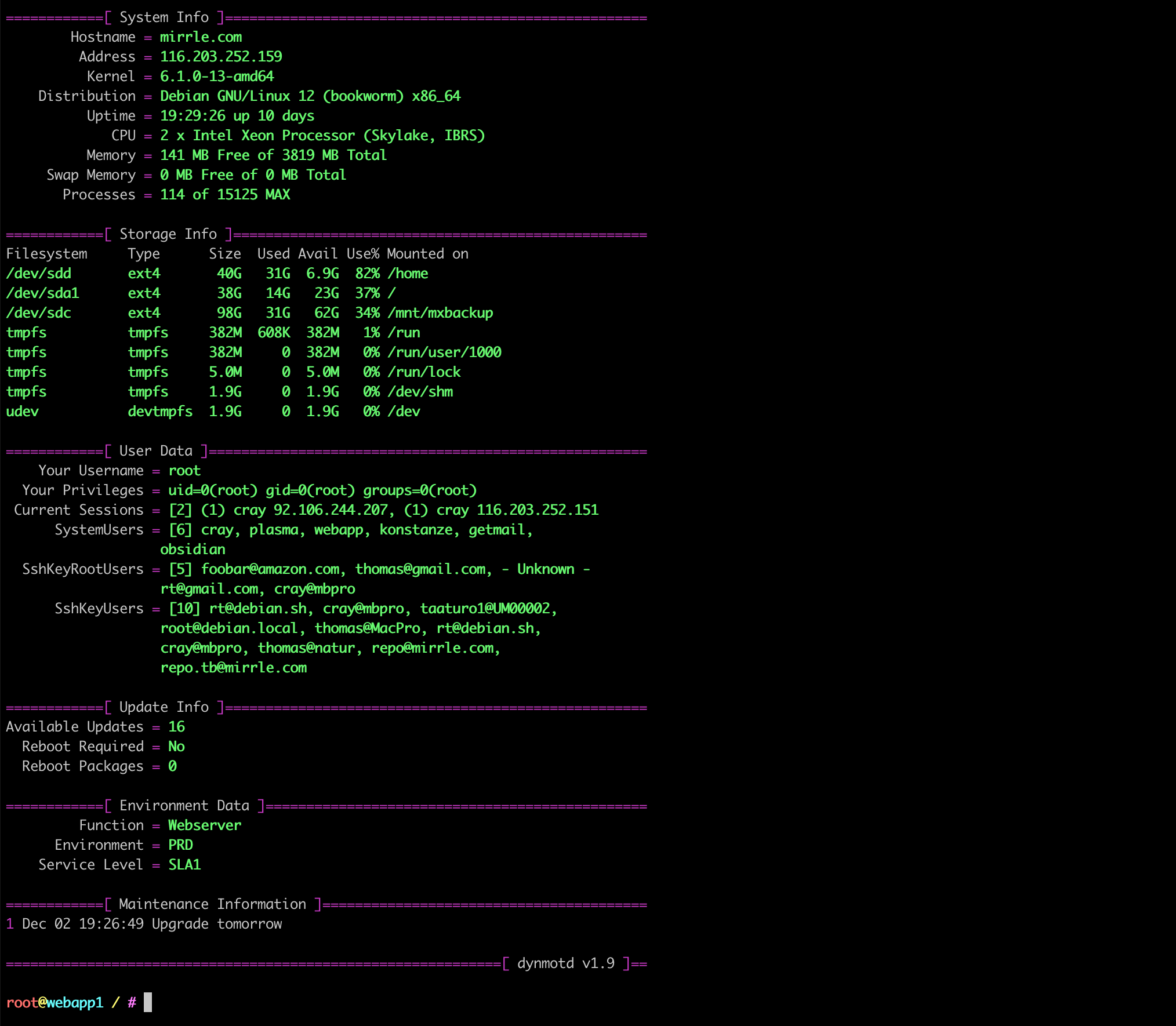
Features
- Color schemes (switchable via config block at top of script)
- Enable/disable individual information sections
- Per-host description, environment label and SLA tag
- Maintenance log with add/delete/list support
- Automatic dependency installation on
--install --updatefor non-interactive binary updates (Ansible / Puppet / cron)- Multi-distribution support (Debian, RHEL, SUSE, Arch, Alpine families)
- All IPv4 addresses + optional IPv6 from all active interfaces
- Load average (1m / 5m / 15m) and realistic available memory (
MemAvailable) - Graphical utilization bars for memory, swap and disk
- Network interface state and link speed
- Optional Fail2Ban section — summary, per-jail IP list, parallel reverse DNS
- Optional Failed Systemd Services section (auto-hidden when all services are healthy)
- Parallel section rendering for fast output
- Update count cache to avoid slow package manager queries on every login
- LDAP / AD / NIS user support via
getent - Single self-contained shell script, no external dependencies beyond coreutils
Supported Linux Distributions
Distributions actively supported (last ~10 years, 2015 – 2026):
Debian family
| Distribution | Versions / Releases | Status |
|---|---|---|
| Debian | 8 (Jessie) – 12 (Bookworm) | Tested |
| Ubuntu | 16.04 LTS – 24.04 LTS | Tested |
| Linux Mint | 18 – 22 | Tested |
| Raspberry Pi OS | Bullseye, Bookworm | Tested |
| Kali Linux | Rolling (2020+) | Tested |
| Pop!_OS | 20.04 – 22.04 | Compatible |
| Elementary OS | 6 – 7 | Compatible |
| MX Linux | 19 – 23 | Compatible |
| Devuan | 3 – 5 | Compatible |
| Zorin OS | 16 – 17 | Compatible |
RHEL family
| Distribution | Versions | Status |
|---|---|---|
| CentOS | 7, 8, Stream 8/9 | Tested |
| RHEL | 7, 8, 9 | Tested |
| Rocky Linux | 8, 9 | Tested |
| AlmaLinux | 8, 9 | Tested |
| Fedora | 35 – 41 | Tested |
| Oracle Linux | 7, 8, 9 | Compatible |
| CloudLinux | 7, 8 | Compatible |
SUSE family
| Distribution | Versions | Status |
|---|---|---|
| openSUSE Leap | 15.x | Tested |
| openSUSE Tumbleweed | Rolling | Tested |
| SLES | 12, 15 | Compatible |
Arch family
| Distribution | Versions | Status |
|---|---|---|
| Arch Linux | Rolling | Compatible |
| Manjaro | Rolling | Compatible |
| EndeavourOS | Rolling | Compatible |
Other
| Distribution | Versions | Status |
|---|---|---|
| Alpine Linux | 3.x | Compatible |
"Tested" = verified by the author. "Compatible" = dependency auto-install supported, not explicitly tested.
Tell me if you have verified it on a distribution not listed here.
Installation
The script must run as root.
bashsudo -i git clone https://github.com/rtulke/dynmotd.git cd dynmotd ./dynmotd.sh --install
--install automatically:
- Detects your Linux distribution
- Installs any missing dependencies via your native package manager
- Copies the script to
/usr/local/bin/dynmotd - Creates
/etc/profile.d/motd.shso dynmotd runs on every login - Runs first-time environment setup (function, environment label, SLA)
To verify the installation, log out and back in:
bashexit sudo -i
Manual dependency installation
If you prefer to install packages yourself before running --install:
Debian / Ubuntu / Raspberry Pi OS / Mint
bashapt update && apt install -y coreutils procps hostname sed gawk grep dnsutils lsb-release
CentOS 7 / RHEL 7
bashyum install -y hostname procps-ng gawk bind-utils
CentOS Stream 8-9 / Rocky / AlmaLinux / RHEL 8-9
bashdnf install -y hostname procps-ng gawk bind-utils
Fedora
bashdnf install -y hostname procps-ng gawk bind-utils
openSUSE / SLES
bashzypper install -y hostname procps gawk bind-utils lsb-release
Arch / Manjaro
bashpacman -Sy inetutils procps-ng gawk bind
Alpine Linux
bashapk add bind-tools busybox-extras procps gawk
Usage
Usage: dynmotd [OPTION] [value]

  e.g.  dynmotd -a "deployed new SSL certificate"

Options:

  -a | --addlog "..."           Add a maintenance log entry
  -d | --rmlog  [line-number]   Delete a log entry by line number
  -l | --log                    List all log entries
  -c | --config                 Reconfigure environment settings
  -i | --install                Install dynmotd and its dependencies
  -U | --update                 Update binary only (no setup, safe for Ansible/cron)
  -u | --uninstall              Uninstall dynmotd (log deletion is optional)
  -v | --version                Show version and exit
  -h | --help                   Show this help
Uninstall
bashdynmotd --uninstall
The uninstaller asks two separate questions:
- Whether to delete the log and configuration data in
/root/.dynmotd/ - Final confirmation before removing the binary and profile hook
System packages that were installed as dependencies are never removed automatically. Remove them with your package manager if desired.
Update
To update an already-installed dynmotd to a newer version without running the full setup again:
bashcd dynmotd git pull sudo bash dynmotd.sh --update
--update only replaces the binary at /usr/local/bin/dynmotd. It does not ask setup questions, does not touch logs or configuration, and does not reinstall packages — safe to run from Ansible, Puppet, or a cron job.
Configuration
Edit the config block at the top of the installed script:
bashvim /usr/local/bin/dynmotd
Enable / disable sections
Each section has an _INFO toggle and an optional _ALWAYS override:
| Variable | Default | Description |
|---|---|---|
SYSTEM_INFO | 1 | System info (hostname, IP, kernel, CPU, memory, load) |
STORAGE_INFO | 1 | Storage / disk usage with utilization bars |
NETWORK_INFO | 1 | Network interfaces — state and link speed |
USER_INFO | 1 | User sessions and SSH keys |
UPDATE_INFO | 1 | Available package updates |
UPDATE_ALWAYS | 0 | Show Update section even when UPDATE_INFO="0" |
ENVIRONMENT_INFO | 1 | Environment label (function, env, SLA) |
FAILED_SERVICES_INFO | 1 | Failed systemd services (auto-hidden when none failed) |
FAILED_SERVICES_ALWAYS | 0 | Always show Failed Services, even when all healthy (= none) |
FAIL2BAN_INFO | 1 | Fail2Ban summary — total banned + jail overview |
FAIL2BAN_ALWAYS | 0 | Always show Fail2Ban, even if not installed |
SHOWFAIL2BAN_IPS | 1 | List banned IPs per jail (no DNS, no delay) |
RESOLVEFAIL2BAN_IPS | 1 | Resolve banned IPs via reverse DNS (parallel, requires SHOWFAIL2BAN_IPS="1") |
MAINTENANCE_INFO | 1 | Maintenance log entries |
MAINTENANCE_ALWAYS | 0 | Show Maintenance section even when MAINTENANCE_INFO="0" |
WEATHER_INFO | 1 | Weather via wttr.in (auto-hidden if curl unavailable or fetch fails) |
WEATHER_ALWAYS | 0 | Always show Weather section, even if fetch fails (= unavailable) |
WEATHER_CITY | (empty) | City for weather lookup — empty = auto-detect from server IP |
WEATHER_CACHE_HOURS | 1 | Hours before weather data is re-fetched (0 = always live) |
WEATHER_UNITS | (empty) | Unit system: m = metric, u = USCS, M = wind in m/s (empty = wttr.in default) |
VERSION_INFO | 1 | Version banner |
1 = enabled, 0 = disabled.
Section display order
Sections are rendered in this fixed order:
- System Info
- Weather
- Storage Info
- Network Interfaces
- User Data
- Update Info
- Environment Data
- Failed Services
- Fail2Ban
- Maintenance Information
- Version banner
Maintenance log display
bashLIST_LOG_ENTRY="2" # number of log lines shown in the MOTD
Update cache
bashUPDATE_CACHE_HOURS="6" # hours before the update count is refreshed (0 = always live)
The update cache avoids running a full package manager check on every login. The cached count is stored in /root/.dynmotd/update_cache and refreshed automatically when it expires.
Color schemes
Seven schemes are pre-defined. Uncomment exactly one block to activate it (F1 = labels, F2 = borders, F3 = values, F4 = warnings):
| # | Name | Character |
|---|---|---|
| 1 | DOT (default) | grey labels · pink borders · green values |
| 2 | Retro Hacker | all green, Matrix style |
| 3 | Retro Alert | all red, maximum urgency |
| 4 | Ocean | cyan/blue, cool and professional |
| 5 | Solarized Dark | grey with warm yellow accent |
| 6 | Nord | ice blue, clean and modern |
| 7 | Amber | brown/yellow, classic CRT terminal |
Example — switching to Nord:
bashvim /usr/local/bin/dynmotd
Comment out the active scheme and uncomment Nord:
bash## 1. DOT - day of the tentacle (default) #F1=${C_GREY} #F2=${C_PINK} #F3=${C_LGREEN} #F4=${C_RED} ## 6. nord — ice blue, clean and modern F1=${C_LBLUE} F2=${C_LCYAN} F3=${C_WHITE} F4=${C_YELLOW}
Known Issues
Hostname not displayed correctly
The Hostname field uses hostname --fqdn. If /etc/hostname contains only the short name, only the short name is shown. Fix:
bashhostname mail.example.com hostname > /etc/hostname
Also check /etc/hosts:
127.0.1.1 mail.example.com
Note: The
Address v4/Address v6fields are read directly from network interfaces viaip -brief addr showand are not affected by hostname resolution.
SSH key shows "- Unknown -"
This happens when the key has no comment field. Either add a comment to the end of the key line in ~/.ssh/authorized_keys, or generate keys with:
bashssh-keygen -C "your.name@example.com"
Contributors
Showing top 2 contributors by commit count.


Related Repositories

jlevy/the-art-of-command-line
Master the command line, in one page

nvm-sh/nvm
Node Version Manager - POSIX-compliant bash script to manage multiple active node.js versions

junegunn/fzf
:cherry_blossom: A command-line fuzzy finder

warpdotdev/warp
Warp is an agentic development environment, born out of the terminal.

starship/starship
☄🌌️ The minimal, blazing-fast, and infinitely customizable prompt for any shell!

acmesh-official/acme.sh
A pure Unix shell script ACME client for SSL / TLS certificate automation