

Tablecn
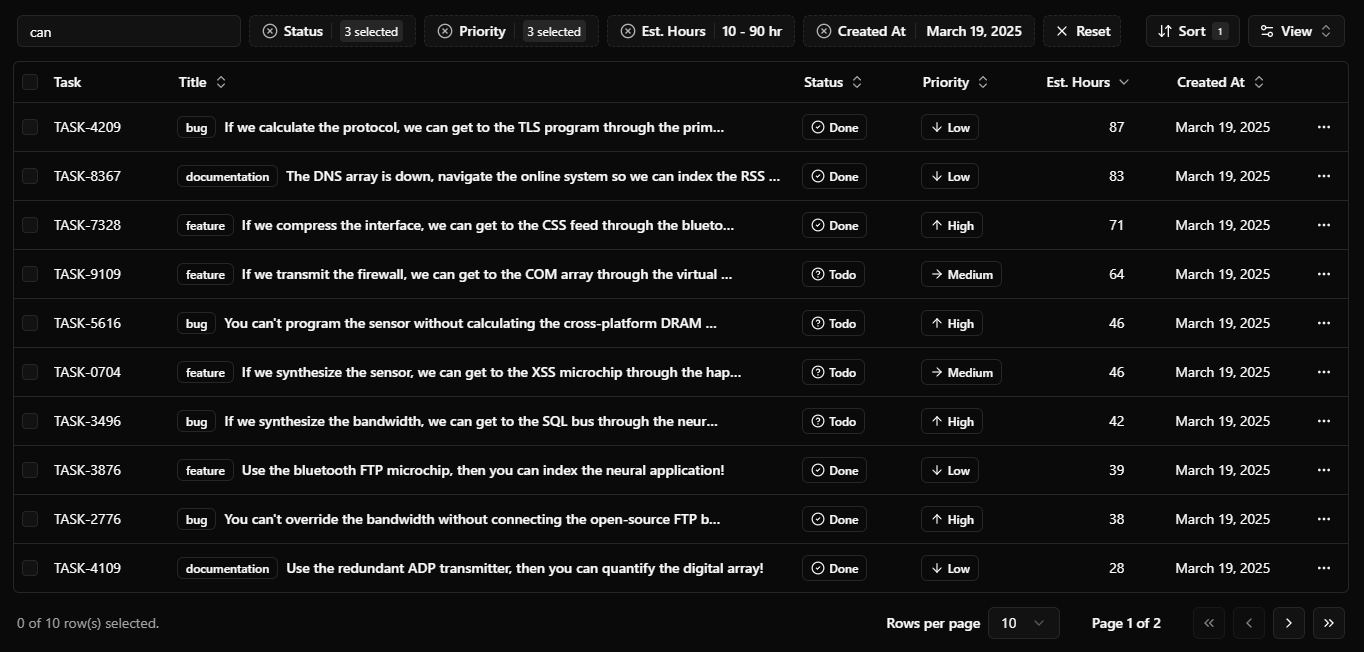
Data table and data grid components built with shadcn/ui, featuring sorting, filtering, pagination, infinite scrolling, and real-time collaboration.
Data table and data grid components built with shadcn/ui, featuring sorting, filtering, pagination, infinite scrolling, and real-time collaboration. The project is written primarily in TypeScript, distributed under the MIT License license, first published in 2023. It has gained significant community traction with 6,146 stars and 549 forks on GitHub. Key topics include: data-grid, data-table, multiplayer, nextjs, partykit.
tablecn
Data table and data grid components built with shadcn/ui, featuring sorting, filtering, pagination, infinite scrolling, and real-time collaboration.
Documentation
See the documentation to get started.
Tech Stack
- Framework: Next.js
- Styling: Tailwind CSS
- UI Components: shadcn/ui
- Table: TanStack Table
- Reactive store: TanStack DB
- Database: PostgreSQL
- ORM: Drizzle ORM
- Validation: Zod
- Multiplayer: PartyKit
Features
- Server-side pagination, sorting, and filtering
- Customizable columns
- Auto generated filters from column definitions
-
Notion/Airtablelike advanced filtering -
Linearlike filter menu for command palette filtering - Action bar on row selection
- Infinite scrolling with virtualization
- Real-time collaboration
Running Locally
Quick Setup (with Docker)
-
Clone the repository
bashgit clone https://github.com/sadmann7/tablecn cd tablecn -
Copy the environment variables
bashcp .env.example .env -
Run the setup
bashpnpm ollieThis installs dependencies, starts the Docker PostgreSQL instance, pushes the schema, and seeds sample data.
Manual Setup
-
Clone the repository
bashgit clone https://github.com/sadmann7/tablecn cd tablecn -
Install dependencies
bashpnpm install -
Set up environment variables
bashcp .env.example .envUpdate
.envwith your database credentials. -
Start the database and dev server
bashpnpm db:start # start the PostgreSQL container pnpm db:setup # push schema and seed data pnpm dev # start the Next.js dev server
Multiplayer
To run the multiplayer demo locally:
bashpnpm dev:multiplayer
This starts both the Next.js and PartyKit dev servers concurrently.
Deployment
Follow the deployment guides for Vercel, Netlify, and Docker.
The multiplayer demo uses PartyKit as a separate deployment:
bashpnpm deploy:multiplayer
Set NEXT_PUBLIC_PARTYKIT_HOST in your deployment environment variables after deploying.
Credits
- shadcn/ui - For the initial implementation of the data table.
Contributors
Showing top 12 contributors by commit count.
![renovate[bot]](https://avatars.githubusercontent.com/in/2740?v=4)


Related Repositories

handsontable/handsontable
JavaScript Data Grid / Data Table with a Spreadsheet Look & Feel. Works with React, Angular, and Vue. Supported by the Handsontable team ⚡

jspreadsheet/ce
Jspreadsheet is a lightweight JavaScript data grid component for creating interactive data grids with advanced spreadsheet controls.

mui/mui-x
MUI X: Build complex and data-rich applications using a growing list of advanced React components, like the Data Grid, Date and Time Pickers, Charts, and more!

radzenhq/radzen-blazor
Radzen Blazor is the most sophisticated free UI component library for Blazor, featuring 110+ native components including DataGrid, Scheduler, Charts, and advanced theming with full support for Material Design and Fluent UI. If Radzen Blazor is useful to you, a ⭐ on GitHub helps other Blazor developers find it.

revolist/revogrid
Powerful virtual data table smartsheet with advanced customization. Best features from excel plus incredible performance 🔋

keenthemes/reui
Design-forward shadcn kit for interfaces that stand out. 1000+ free patterns!