

Plastic
This project provides encapsulation of things like Domain, Application Rules, Business Rules or Business Logic in Application.
This project provides encapsulation of things like Domain, Application Rules, Business Rules or Business Logic in Application. For this, Command pattern is used. The project is written primarily in C#, distributed under the MIT License license, first published in 2021. Key topics include: application, application-rules, business-logic, business-rules, clean-architecture.


Abstract
This project provides encapsulation of things like Domain, Application Rules, Business Rules or Business Logic in Application. For this, Command pattern is used.
All applications such as Web, CLI, GUI application can use this project.
This can be part of the Usecase Layer, Domain Service Layer or CQRS.
The source generator introduced in .Net 5 is used to implement this Idea. If metaprogramming such as Source generator is properly used, it's possible to provide flexible source code that has not been provided by traditional programming.
Generated source code has the same effect as the source code you wrote yourself because it will be injected at compile time.
The name of this project is Plastic Command.
Blog post <br>
Blog post(한국어)
Flow of the plastic command
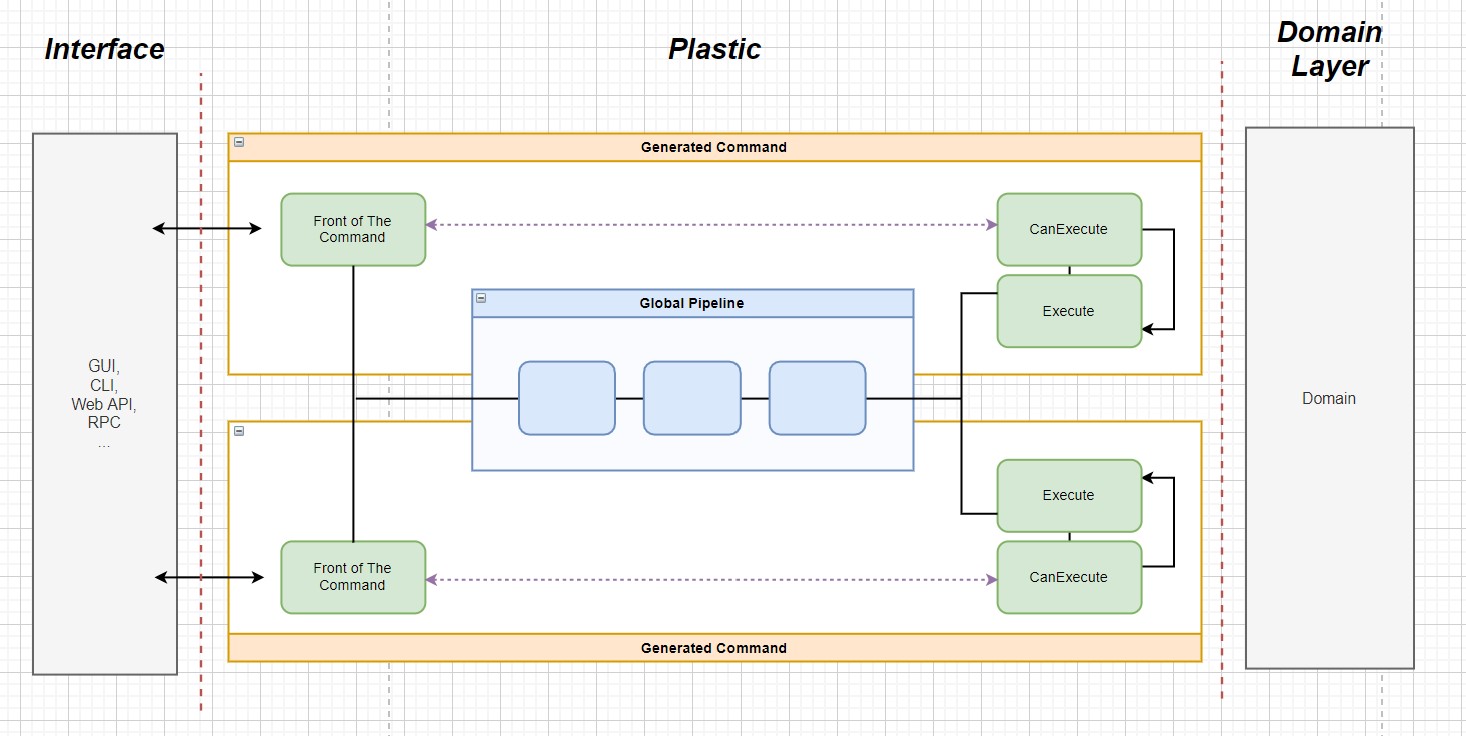
Plastic Command
Quick Start
Step 1. Specify The Command
cs// [CommandName("AddCommand")] class AddCommandSpec : ICommandSpecification<int, int> { public AddCommandSpec(IMyCalculator calculator) { ... } public Task<int> ExecuteAsync(int param, CancellationToken token = default) { ... } }
Step 2. Add Plastic to IServiceCollection
csvoid Configure(IServiceCollection services) { var pipelineBuilder = new BuildPipeline(...); services.UsePlastic(pipelineBuilder); }
Step 3. Use a Generated Command
csclass AddController : ControllerBase { public AddController(AddCommand addCommand) { ... ... int result = addCommand.ExecuteAsync( 1 ); } }
Contributors
Showing top 2 contributors by commit count.

![dependabot[bot]](https://avatars.githubusercontent.com/in/29110?v=4)
Related Repositories

jaywcjlove/awesome-mac
This project is dedicated to collecting high-quality macOS software and organizing them systematically by different categories for easy search and use.

mem0ai/mem0
Universal memory layer for AI Agents

lencx/ChatGPT
🔮 ChatGPT Desktop Application (Mac, Windows and Linux)

run-llama/llama_index
LlamaIndex is the leading document agent and OCR platform

GyulyVGC/sniffnet
Comfortably monitor your Internet traffic 🕵️♂️

mahmoud/awesome-python-applications
💿 Free software that works great, and also happens to be open-source Python.