NuklearDotNet
.NET binding for the Nuklear immediate mode GUI
LICENSE: Dual-licensed under MIT and The Unlicense. Your choice. The project is written primarily in C#, distributed under the Other license, first published in 2018. Key topics include: binding, csharp, dotnet, dotnet-framework, gui.
NuklearDotNet
LICENSE: Dual-licensed under MIT and The Unlicense. Your choice.
.NET binding for the Nuklear immediate mode GUI
https://github.com/vurtun/nuklear
NuklearSharp ( https://github.com/leafi/NuklearSharp ) was my original inspiration for this.
No original nuklear source files were modified. A project was created with some support code
to build Nuklear.dll (x64) with all API functions exported and ready to be used from .NET
Updating should be as easy as updating the submodule and rebuilding the project.
Currently this binding is used in my game engine project, so i implement stuff as i need it.
https://github.com/sbarisic/libTech
Contributions welcome.
Implemented devices
-
Raylib
In the example project, this binding was directly included
https://github.com/ChrisDill/Raylib-cs -
SFML
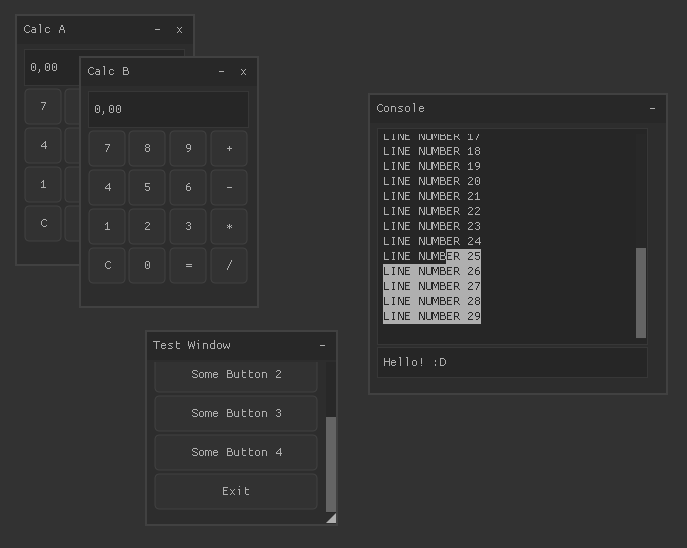
Screenshots
Code samples
The custom device class implements actual drawing functions,
it has to inherit from at least NuklearDevice.
NuklearDeviceTex<T> allows you to specify your custom texture class which
replaces the internal texture handle integers, just for convenience. You can return
your own texture handle integers in NuklearDevice and handle textures manually.
Optionally it can implement the IFrameBuffered interface which calls the Render
function only when the GUI actually changes. It it supposed to be rendered to a framebuffer
which is in turn rendered to the screen every frame in RenderFinal
csclass Device : NuklearDeviceTex<Texture>, IFrameBuffered { public override Texture CreateTexture(int W, int H, IntPtr Data) { // Create a texture from raw image data return null; } void IFrameBuffered.BeginBuffering() { // Begin rendering to framebuffer } public override void SetBuffer(NkVertex[] VertexBuffer, ushort[] IndexBuffer) { // Called once before Render, upload your vertex buffer and index buffer here } public override void Render(NkHandle Userdata, Texture Texture, NkRect ClipRect, uint Offset, uint Count) { // Render to either framebuffer or screen // If IFrameBuffered isn't implemented, it's called every frame, else only when the GUI actually changes // Called multiple times per frame, uses the vertex and index buffer that has been sent to SetBuffer } void IFrameBuffered.EndBuffering() { // End rendering to frame buffer } void IFrameBuffered.RenderFinal() { // Called each frame, render to screen finally } }
Sending events; just call these when you capture the events from your input API. It's irrelevant when they're called.
They are internally queued and dispatched to Nuklear on every frame.
csDevice.OnMouseButton(Button, X, Y, Down) Device.OnMouseMove(X, Y) Device.OnScroll(X, Y) Device.OnText(Text) Device.OnKey(Key, Down)
Using the GUI, note that the while loop represents an OnRender function in your renderer code. At the end of the Frame
call, the actual rendering functions are dispatched.
csNuklearAPI.Init(Device); while (true) { // Optional NuklearAPI.SetDeltaTime(Dt); NuklearAPI.Frame(() => { NuklearAPI.Window("Test Window", 100, 100, 200, 200, Flags, () => { NuklearAPI.LayoutRowDynamic(35); if (NuklearAPI.ButtonLabel("Some Button")) Console.WriteLine("You pressed Some Button!"); }); }); }
TODO
- Demo application
- Higher level binding
- Support for multiple contexts, want to draw a GUI and some example on a 3D in-game screen at the same time?
Contributors
Showing top 6 contributors by commit count.


Related Repositories

PyO3/pyo3
Rust bindings for the Python interpreter

rusterlium/rustler
Safe Rust bridge for creating Erlang NIF functions

RxSwiftCommunity/RxDataSources
UITableView and UICollectionView Data Sources for RxSwift (sections, animated updates, editing ...)

veandco/go-sdl2
SDL2 binding for Go

zeromq/cppzmq
Header-only C++ binding for libzmq

vizia/vizia
A declarative GUI library written in Rust