

Portfolio
🔥 A sleek portfolio built with React and Tailwind CSS to showcase your skills, projects, and experience in a modern design.
_____ _ __ _ _ | __ \ | | / _| | (_) | |__) |__ _ __| |_| |_ ___ | |_ ___ | ___/ _ \| '__| __| _/ _ \| | |/ _ \ | | | (_) | | | |_| || (_) | | | (_) | |_| \___/|_| \__|_| \___/|_|_|\___/ The project is written primarily in JavaScript, first published in 2025. Key topics include: developer-portfolio, modern-portfolio, personal-portfolio, personal-website, portfolio.
Portfolio Website
<div align="center"> <pre> _____ _ __ _ _ | __ \ | | / _| | (_) | |__) |__ _ __| |_| |_ ___ | |_ ___ | ___/ _ \| '__| __| _/ _ \| | |/ _ \ | | | (_) | | | |_| || (_) | | | (_) | |_| \___/|_| \__|_| \___/|_|_|\___/ </pre> </div>Welcome to my portfolio website! This site showcases my skills, experience, education, projects, and how to get in touch with me. It's built with React and Vite for a fast, modern web experience. You can explore my work, learn about my journey, and contact me directly.
Demo
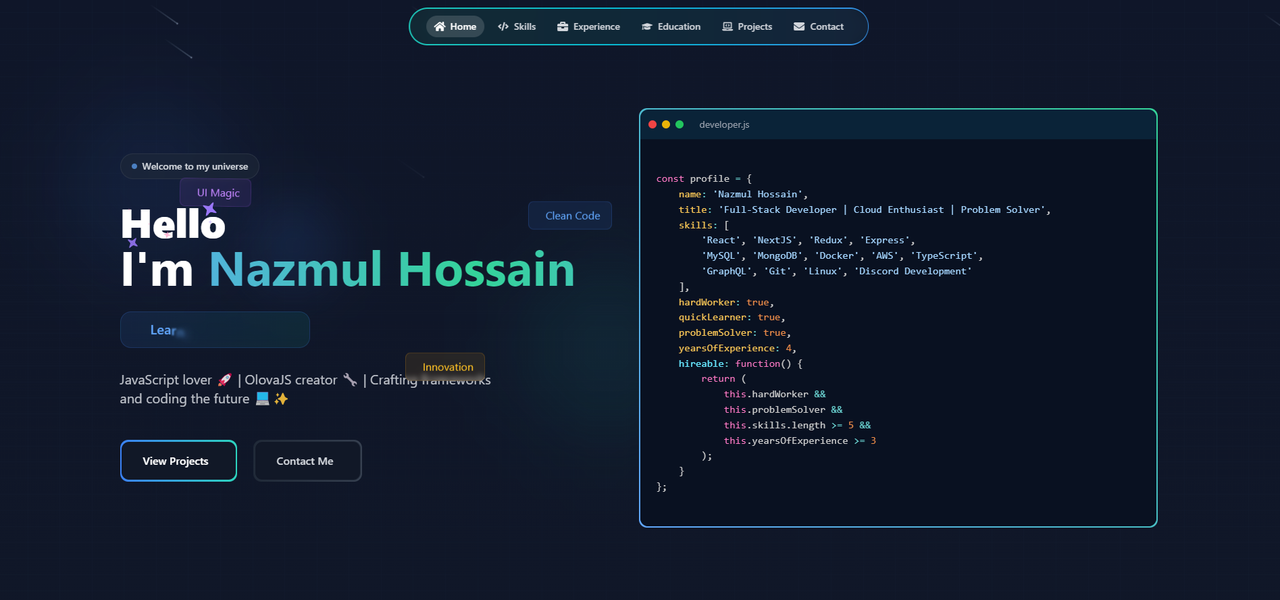
Live Preview
Check out the live preview of the portfolio website here:
Live Demo
🎯 Project Structure
bashportfolio/ ├── node_modules/ ├── public/ ├── src/ │ ├── assets/ │ │ ├── css/ │ │ │ ├── index.css │ │ │ └── tomorrow.css │ │ └── images/ │ ├── components/ │ │ ├── ui/ │ │ │ ├── Reusable Components/ │ │ │ │ ├── badge.jsx │ │ │ │ ├── button.jsx │ │ │ │ ├── card.jsx │ │ │ │ ├── EducationLoader.jsx │ │ │ │ ├── evervault-card.jsx │ │ │ │ ├── flip-words.jsx │ │ │ │ ├── icon-cloud.jsx │ │ │ │ ├── meteors.jsx │ │ │ │ ├── sparkles-text.jsx │ │ │ │ └── tooltip.jsx │ │ │ │ │ │ │ ├── Main Components/ │ │ │ │ ├── AnimatedGrid.jsx │ │ │ │ ├── Contact.jsx │ │ │ │ ├── Education.jsx │ │ │ │ ├── enhanced-portfolio-card.jsx │ │ │ │ ├── Experience.jsx │ │ │ │ ├── global.jsx │ │ │ │ ├── Header.jsx │ │ │ │ ├── Hero.jsx │ │ │ │ ├── Home.jsx │ │ │ │ ├── PortfolioPage.jsx │ │ │ │ ├── Projects.jsx │ │ │ │ └── Skills.jsx │ │ └── lib/ │ │ └── utils.js │ ├── pages/ │ │ ├── About/ │ │ │ └── About.jsx │ │ ├── Contact/ │ │ │ └── Contact.jsx │ │ ├── Experience/ │ │ │ └── Experience.jsx │ │ ├── Header/ │ │ │ └── Header.jsx │ │ ├── Hero/ │ │ │ └── Hero.jsx │ │ ├── Projects/ │ │ │ ├── Projects.jsx │ │ │ └── testProjects.jsx │ │ └── Skills/ │ │ └── Skills.jsx │ ├── App.jsx │ └── main.jsx ├── Configuration Files/ │ ├── .eslintrc.js │ ├── .gitignore │ ├── components.json │ ├── index.html │ ├── jsconfig.json │ ├── package-lock.json │ ├── package.json │ ├── postcss.config.js │ ├── README.md │ ├── tailwind.config.js │ ├── vercel.json │ └── vite.config.js
Sections of the Portfolio
The portfolio website consists of the following sections:
- Home: Introduction and a brief overview.
- Skills: A detailed list of my technical skills.
- Experience: My professional journey and work experience.
- Education: Academic background and certifications.
- Projects: A showcase of the projects I've worked on.
- Contact: Information on how to reach out to me.
💻 Technologies Used
- Frontend: React.js with Vite
- Styling: Tailwind CSS
- Animations: Framer Motion
- Icons: React Icons
- Deployment: Vercel
Installation ⬇️
You will need to download Git and Node to run this project.
Git
- Download and install Git from the official website: Git Downloads
- Verify the installation:
bash
git --version
Node
- Download and install Node.js from the official website: Node.js Downloads
- Make sure you have the latest version of both Git and Node on your computer.
- Verify the installation:
bash
node --version
Getting Started 🎯
Fork and Clone the Repository 🚀
- Click the Fork button at the top-right corner of the page to create your own copy of the repository.
- After forking, open your terminal and run the following commands to clone the repo:
bashgit clone https://github.com/seraprogrammer/portfolio.git
Navigate to the Project Directory 📂
Once the repository is cloned, change your directory to the project folder:
bashcd portfolio
Install Dependencies ⚙️
From the root directory of your project, install the necessary packages:
bashnpm install
Run the Development Server 🚀
Start the development server to see your project live:
bashnpm run dev
View the Project 🌐
Open your browser and visit http://localhost:5173/ to see the result! 🎉
📝 License
This project is licensed under the MIT License - see the LICENSE file for details.
🤝 Contributing
- Fork the Project
- Create your Feature Branch (
git checkout -b feature/AmazingFeature) - Commit your Changes (
git commit -m 'Add some AmazingFeature') - Push to the Branch (
git push origin feature/AmazingFeature) - Open a Pull Request
<div align="center"> Made with ❤️ by Nazmul Hossain </div>
Contributors
Showing top 2 contributors by commit count.


Related Repositories

Ileriayo/markdown-badges
The largest curated collection of markdown badges for your personal developer branding, profile, and projects.

saadpasta/developerFolio
🚀 Software Developer Portfolio Template that helps you showcase your work and skills as a software developer. (This is currently not being actively maintained)

soumyajit4419/Portfolio
My self coded personal website build with React.js

Evavic44/portfolio-ideas
A curation of awesome portfolio website ideas for developers and designers to draw inspiration from. Raise a pull request to add more. 💜

ashutosh1919/masterPortfolio
🔥 The Complete Customizable Software Developer Portfolio Template which lets you showcase your work and provides each and every detail about you as Software Developer.

said7388/developer-portfolio
Software Developer Portfolio Website built with next.js and tailwind CSS that helps you showcase your work and skills as a software developer.