

Rqueue
Rqueue: Job Queue and Scheduler for Spring and Spring Boot (Redis & NATS)
Rqueue: Job Queue and Scheduler for Spring and Spring Boot (Redis & NATS) The project is written primarily in Java, distributed under the Apache License 2.0 license, first published in 2019. Key topics include: asynchronous-tasks, delayed-jobs, delayed-queue, java, nats.




Rqueue is a job queue and producer-consumer system for Spring and Spring Boot with pluggable
broker backends — Redis (default) and NATS JetStream. It supports producers and consumers
for background jobs, scheduled tasks, and event-driven workflows, similar to Sidekiq or Celery,
fully integrated into the Spring programming model with annotation-driven APIs and minimal setup.

Features
-
Job execution
- Run background jobs asynchronously
- Schedule jobs for any future time
- Run periodic jobs at fixed intervals
- Guarantee at-least-once delivery
- Retry failed jobs automatically with fixed or exponential backoff
-
Queues and routing
- Deduplicate messages using message IDs
- Process priority workloads such as high, medium, and low
- Prioritize workloads with group-level queue priority and weighted, strict, or hard strict
ordering - Fan out the same message to multiple listeners
- Poll messages in batches for higher throughput
-
Consumers and scale
- Use annotation-driven listeners with Spring beans
- Get started with just the dependency in Spring Boot applications
- Run multiple competing consumers in parallel
- Configure listener concurrency per worker
- Support long-running jobs with periodic check-ins
- Serialize and deserialize message payloads automatically
-
Operations and extensibility
- Add middleware before listener execution
- Use callbacks for dead-letter, discard, and related flows
- Subscribe to bootstrap and task execution events
- Monitor in-flight, queued, and scheduled messages with metrics
- Use the built-in web dashboard for queue visibility and latency insights
-
Backend and platform support
- Switch backends with a single property (
rqueue.backend=redis|nats) - Use a separate Redis setup for Rqueue if needed
- Support Redis standalone, Sentinel, and Cluster setups
- Work with Lettuce for Redis Cluster
- Support reactive Redis and Spring WebFlux
- Use NATS JetStream as a drop-in Redis replacement (add
rqueue-natsand setrqueue.backend=nats)
- Switch backends with a single property (
Requirements
- Spring 5+, 6+, 7+
- Java 1.8+, 17, 21
- Spring Boot 2+, 3+, 4+
- Redis backend (default): Lettuce client; read-master preference for Redis Cluster
- NATS backend: NATS Server 2.2+ with JetStream enabled (
nats-server -js);rqueue-natson the classpath
Getting Started
Dependency
Release Version: Maven central
Spring Boot
NOTE:
- For Spring Boot 3.x use Rqueue 3.x
- For Spring Boot 4.x use Rqueue 4.x
Get the latest one
from Maven central
-
Add dependency
- Gradle
groovy
implementation 'com.github.sonus21:rqueue-spring-boot-starter:4.0.0-RELEASE' - Maven
xml
<dependency> <groupId>com.github.sonus21</groupId> <artifactId>rqueue-spring-boot-starter</artifactId> <version>4.0.0-RELEASE</version> </dependency>
No additional configurations are required, only dependency is required.
- Gradle
Spring Boot with NATS backend
To use NATS JetStream instead of Redis, add rqueue-nats alongside the starter and set
rqueue.backend=nats in application.properties:
- Gradle
groovy
implementation 'com.github.sonus21:rqueue-spring-boot-starter:4.0.0-RELEASE' implementation 'com.github.sonus21:rqueue-nats:4.0.0-RELEASE' - Maven
xml
<dependency> <groupId>com.github.sonus21</groupId> <artifactId>rqueue-spring-boot-starter</artifactId> <version>4.0.0-RELEASE</version> </dependency> <dependency> <groupId>com.github.sonus21</groupId> <artifactId>rqueue-nats</artifactId> <version>4.0.0-RELEASE</version> </dependency>
Then in application.properties:
propertiesrqueue.backend=nats rqueue.nats.connection.url=nats://localhost:4222
No RedisConnectionFactory bean is required. Start a JetStream-enabled NATS server with
nats-server -js and the application is ready. See the NATS backend section
below for streams, KV buckets, and advanced configuration.
Spring Framework
NOTE
- For Spring Framework 6.x use Rqueue 3.x
- For Spring Framework 7.x use Rqueue 4.x
Get the latest one
from Maven central
- Add Dependency
- Gradle
groovy
implementation 'com.github.sonus21:rqueue-spring:4.0.0-RELEASE' - Maven
xml
<dependency> <groupId>com.github.sonus21</groupId> <artifactId>rqueue-spring</artifactId> <version>4.0.0-RELEASE</version> </dependency>
- Gradle
- Add annotation
EnableRqueueon application config class - Provide a RedisConnectionFactory bean
Configuration
java@EnableRqueue public class Application { @Bean public RedisConnectionFactory redisConnectionFactory() { // return a redis connection factory } }
Message publishing/Task submission
All messages need to be sent using RqueueMessageEnqueuer bean's enqueueXXX, enqueueInXXX
and enqueueAtXXX methods. It has handful number of enqueue, enqueueIn, enqueueAt methods, we
can use any one of them based on the use case.
javapublic class MessageService { @AutoWired private RqueueMessageEnqueuer rqueueMessageEnqueuer; public void doSomething() { rqueueMessageEnqueuer.enqueue("simple-queue", "Rqueue is configured"); } public void createJOB(Job job) { rqueueMessageEnqueuer.enqueue("job-queue", job); } // send notification in 30 seconds public void sendNotification(Notification notification) { rqueueMessageEnqueuer.enqueueIn("notification-queue", notification, 30 * 1000L); } // enqueue At example public void createInvoice(Invoice invoice, Instant instant) { rqueueMessageEnqueuer.enqueueAt("invoice-queue", invoice, instant); } // enqueue with priority, when sub queues are used as explained in the queue priority section. enum SmsPriority { CRITICAL("critical"), HIGH("high"), MEDIUM("medium"), LOW("low"); private String value; } public void sendSms(Sms sms, SmsPriority priority) { rqueueMessageEnqueuer.enqueueWithPriority("sms-queue", priority.value(), sms); } // Index chat every 1 minute public void sendPeriodicEmail(Email email) { rqueueMessageEnqueuer.enqueuePeriodic("chat-indexer", chatIndexer, 60_000); } }
Worker/Consumer/Task Executor/Listener
Any method that's part of spring bean, can be marked as worker/message listener
using RqueueListener annotation
java@Component @Slf4j public class MessageListener { @RqueueListener(value = "simple-queue") public void simpleMessage(String message) { log.info("simple-queue: {}", message); } @RqueueListener(value = "job-queue", numRetries = "3", deadLetterQueue = "failed-job-queue", concurrency = "5-10") public void onMessage(Job job) { log.info("Job alert: {}", job); } @RqueueListener(value = "push-notification-queue", numRetries = "3", deadLetterQueue = "failed-notification-queue") public void onMessage(Notification notification) { log.info("Push notification: {}", notification); } @RqueueListener(value = "sms", priority = "critical=10,high=8,medium=4,low=1") public void onMessage(Sms sms) { log.info("Sms : {}", sms); } @RqueueListener(value = "chat-indexing", priority = "20", priorityGroup = "chat") public void onMessage(ChatIndexing chatIndexing) { log.info("ChatIndexing message: {}", chatIndexing); } @RqueueListener(value = "chat-indexing-daily", priority = "10", priorityGroup = "chat") public void onMessage(ChatIndexing chatIndexing) { log.info("ChatIndexing message: {}", chatIndexing); } // checkin job example @RqueueListener(value = "chat-indexing-weekly", priority = "5", priorityGroup = "chat") public void onMessage(ChatIndexing chatIndexing, @Header(RqueueMessageHeaders.JOB) com.github.sonus21.rqueue.core.Job job) { log.info("ChatIndexing message: {}", chatIndexing); job.checkIn("Chat indexing..."); } }
Dashboard
Link: http://localhost:8080/rqueue
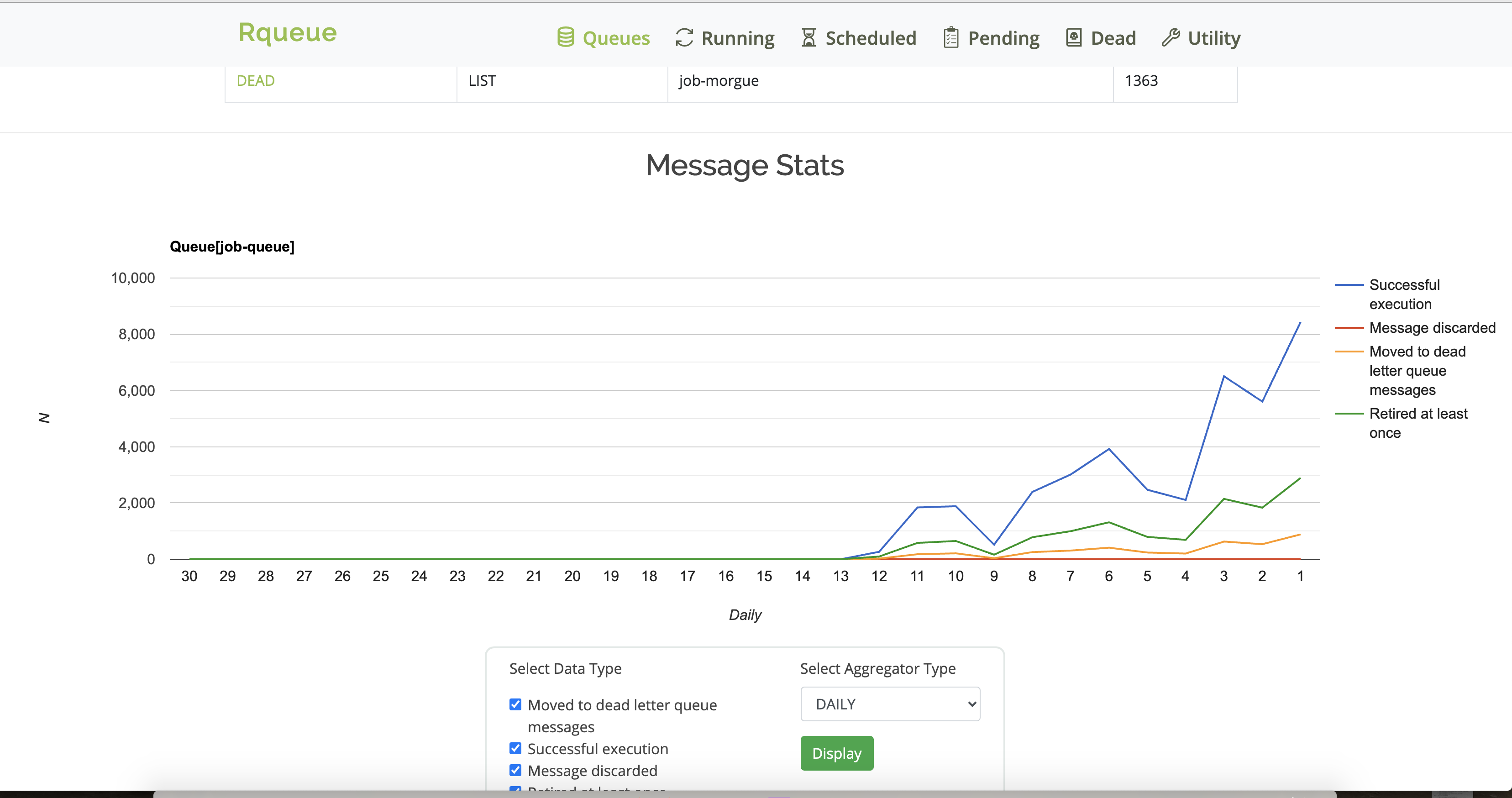
Queue Statistics
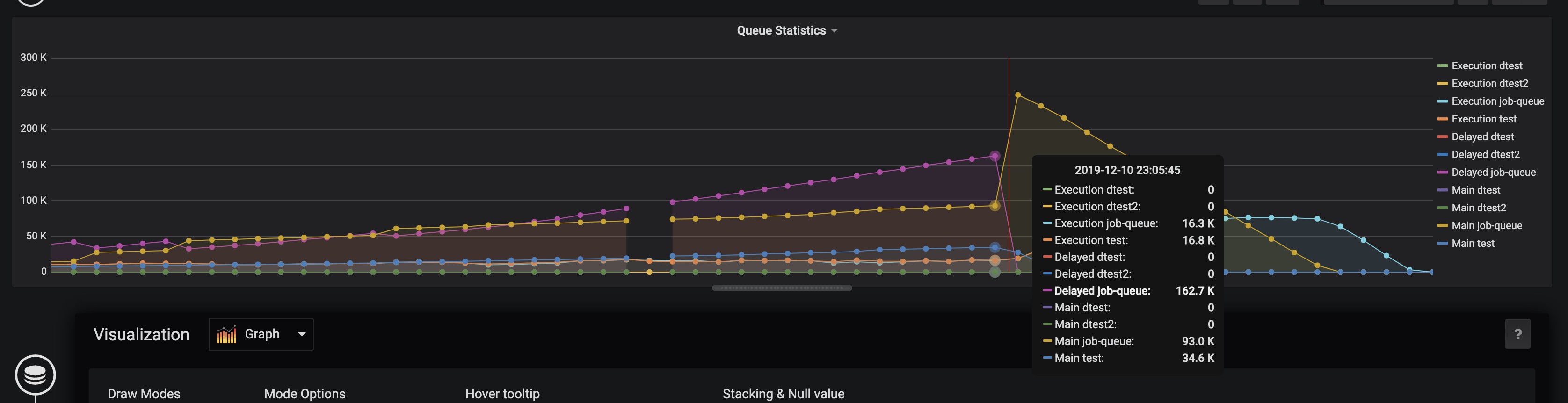
Micrometer based dashboard for queue
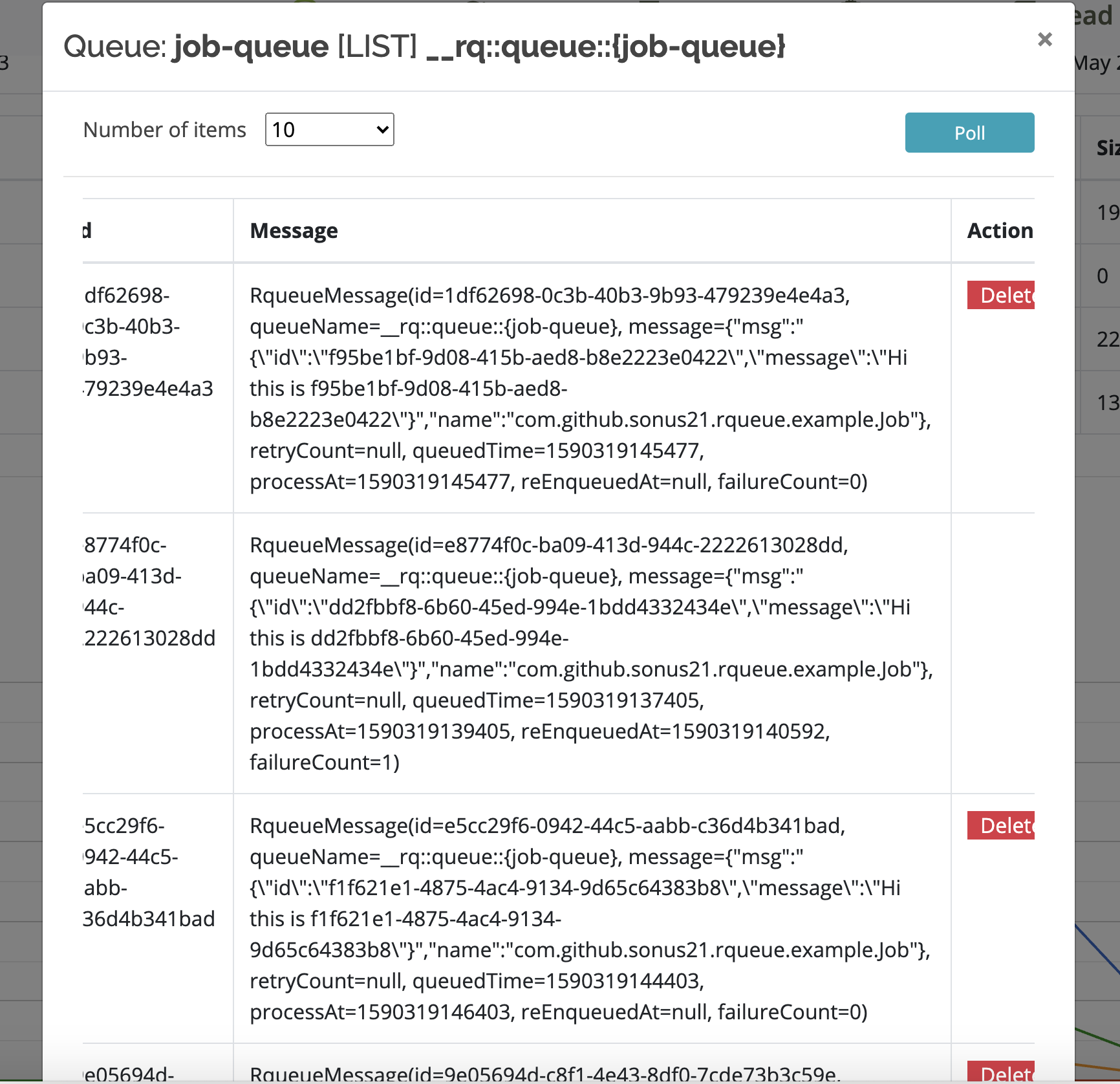
Message Waiting For Execution
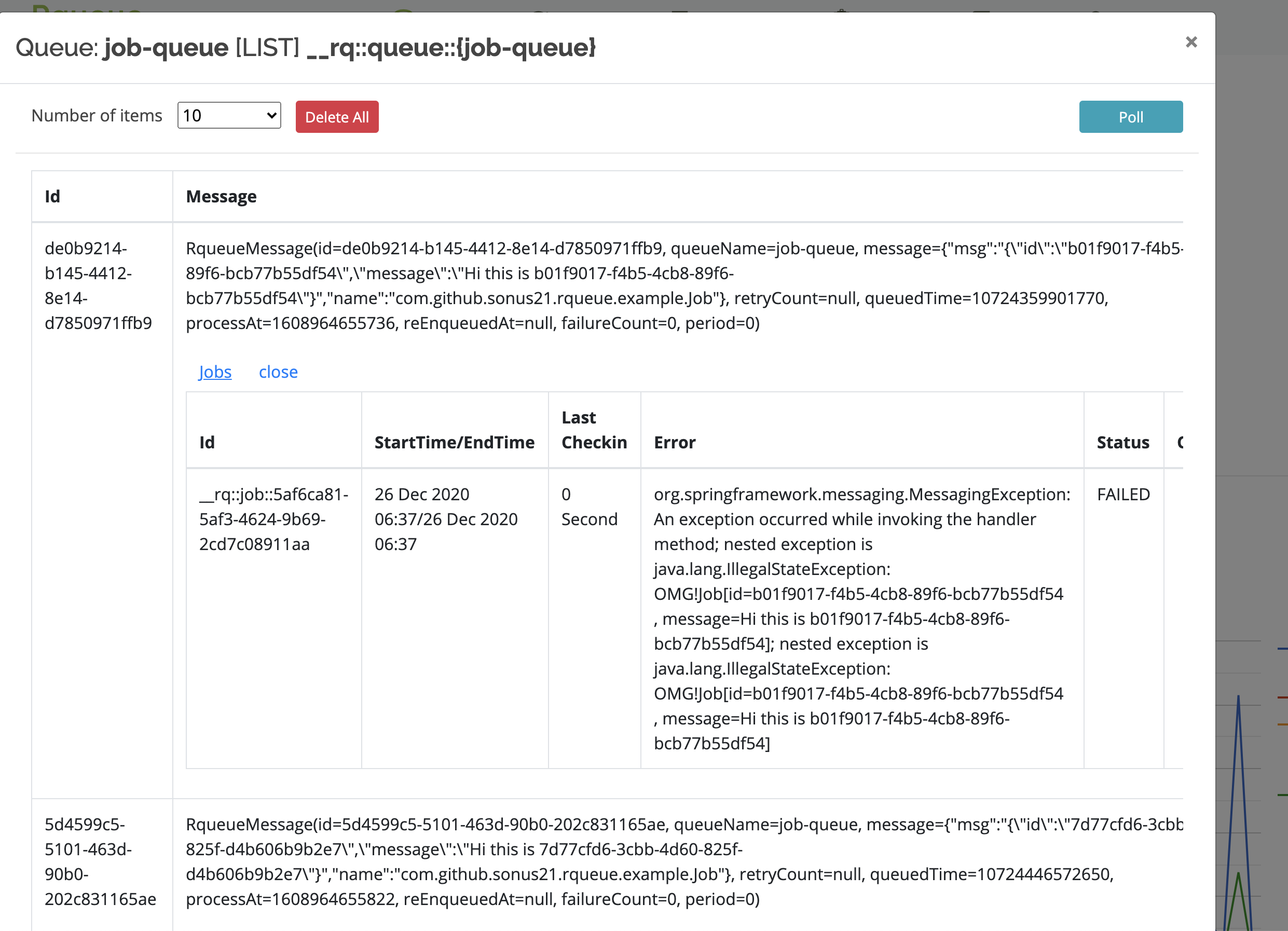
Recent jobs details
NATS backend
Rqueue can use NATS JetStream as the message broker instead of Redis by setting
rqueue.backend=nats and including the rqueue-nats module on the classpath. State that Redis
stores in keys, hashes, and sorted-sets is mapped onto JetStream streams (for messages) and
JetStream KV buckets (for everything else). Both are provisioned once at startup —
streams by NatsStreamValidator on RqueueBootstrapEvent, KV buckets by NatsKvBucketValidator
on the Connection bean — so the publish / pop hot path never pays a getStreamInfo round-trip
to confirm the stream exists. As long as the JetStream credentials allow add_stream /
kv_create, nothing needs to be created ahead of time. For locked-down accounts see the
"Pre-creating streams" / "Pre-creating buckets" subsections below.
Streams per queue
Each registered queue produces one main stream, one DLQ stream (when
rqueue.nats.autoCreateDlqStream=true, the default), and one extra stream per priority
sub-queue the queue declares. Only the main queue has a DLQ — priority sub-queues fan out to
their own streams but share the parent queue's DLQ wiring through RqueueExecutor.
| Queue shape | Stream count | Names (with default prefixes) |
|---|---|---|
| Plain queue, DLQ on (default) | 2 | rqueue-js-<queue>, rqueue-js-<queue>-dlq |
| Plain queue, DLQ off | 1 | rqueue-js-<queue> |
| Queue with N priorities, DLQ on | N + 2 | rqueue-js-<queue>, rqueue-js-<queue>-<p1> … rqueue-js-<queue>-<pN>, rqueue-js-<queue>-dlq |
The naming scheme is <streamPrefix><queueName>[-<priority>][<dlqStreamSuffix>], configurable via
rqueue.nats.naming.streamPrefix (default rqueue-js-) and rqueue.nats.naming.dlqSuffix
(default -dlq). The -js- segment makes Rqueue's message streams easy to distinguish at a
glance from the JetStream-backed KV buckets below (which keep the plain rqueue- prefix because
that's the operator-facing bucket name, not a stream name) and from anything else sharing the
JetStream account. Subjects follow the same shape with . separators:
<subjectPrefix><queueName>[.<priority>][<dlqSubjectSuffix>] (default subject prefix
rqueue.js.). Stream defaults (replicas, storage, retention, duplicate window, max msgs/bytes)
come from rqueue.nats.stream.*.
Pre-creating streams (restricted JetStream accounts)
For deployments where the application credentials cannot run add_stream at runtime, set
rqueue.nats.autoCreateStreams=false and pre-create every stream the application needs.
NatsStreamValidator walks EndpointRegistry on RqueueBootstrapEvent and verifies that
every main stream, every priority sub-queue stream, and every DLQ stream (for queues whose
listener declared a DLQ) exists. If any are missing it aborts boot with one
IllegalStateException listing all of them — operator-actionable failure at startup, not a
"stream not found" on first enqueue.
The streams to pre-create follow the table above. For a queue orders with priorities
high / low and a DLQ:
shnats stream add rqueue-js-orders --subjects rqueue.js.orders ... nats stream add rqueue-js-orders-high --subjects rqueue.js.orders.high ... nats stream add rqueue-js-orders-low --subjects rqueue.js.orders.low ... nats stream add rqueue-js-orders-dlq --subjects rqueue.js.orders.dlq ...
Consumers (durable pull consumers) are still created lazily — the broker calls
ensureConsumer once per (stream, consumerName) pair on the cold path of the first pop and
caches the bind in-process, so there's no per-pop RTT after warm-up. Set
rqueue.nats.autoCreateConsumers=false to fail-fast on missing consumers instead of creating
them.
KV buckets (one set, shared across all queues)
State that Redis stores in keys, hashes, and sorted-sets is mapped onto JetStream KV buckets —
one bucket per concern, not per queue (per-queue scoping is done via key prefix). All buckets
use the default replicas / storage settings of the JetStream account unless noted; per-entry TTL
relies on the bucket's ttl (NATS' name for maxAge), which is set once at bucket creation.
| Bucket name | Purpose | TTL behaviour | Created in |
|---|---|---|---|
rqueue-queue-config | Per-queue QueueConfig records (registered queues, DLQ wiring, flags). | No TTL. Entries persist until explicitly overwritten. | NatsRqueueSystemConfigDao (@Conditional(NatsBackendCondition)) |
rqueue-jobs | RqueueJob execution history per message id. | TTL captured from the first createJob/save call's expiry argument; bucket-level so it applies uniformly. | NatsRqueueJobDao |
rqueue-locks | Distributed locks (scheduler leadership, message-level locks). | TTL captured from the first acquireLock call's duration argument. | NatsRqueueLockManager |
rqueue-message-metadata | Per-message metadata (delivery status, retry count, dead-letter flags). | No TTL at the bucket. Per-write ttl arguments are ignored on this v1 impl. | NatsRqueueMessageMetadataService |
rqueue-workers | Worker process info (host, pid, version, last-seen). | TTL = rqueue.workerRegistry.workerTtl (captured on first heartbeat). | NatsWorkerRegistryStore |
rqueue-worker-heartbeats | Per-(queue, worker) heartbeats. Keys flattened as <queue>__<worker>. | TTL = rqueue.workerRegistry.queueTtl (captured on first refresh; falls back to 1 h if registry not enabled). | NatsWorkerRegistryStore |
How buckets are configured
- Lazy, code-driven creation. Each store / dao calls
kvm.create(KeyValueConfiguration...)
the first time it is touched after startup. There is noapplication.ymlswitch to disable
this, and there is no provisioning step you need to run by hand — but the JetStream account
used by yourConnectionbean must have permission to create KV buckets (i.e. JetStream must
be enabled and account limits must allow it). - TTL is fixed at bucket creation. All buckets that take a
ttlsnapshot the value at
creation. Changing the corresponding rqueue property after the bucket exists has no effect
until the bucket is deleted out-of-band and recreated. This matches NATS KV semantics — the
bucket'smaxAgeis immutable. - No bucket per queue. All queues share the same buckets above; per-queue scoping is done
via the key prefix (rqueue.workerRegistry.queueKey(queueName), etc.). - Connection wiring. The
io.nats.client.Connectionbean comes from
RqueueNatsAutoConfig
(Spring Boot) whenrqueue.backend=natsandio.nats.client.JetStreamis on the classpath.
All KV stores receive that sameConnectionand callconnection.keyValueManagement()/
connection.keyValue(name)against it.
Pre-creating buckets (restricted JetStream accounts)
In managed or locked-down JetStream deployments the credentials your application uses may not
have permission to create KV buckets at runtime. In that case the lazy kvm.create(...) call
on first use will fail with JetStreamApiException ("permission violation" or "stream not
found"), and depending on the call site the failure may be logged and swallowed (registry,
metadata) or surface as a missing record.
For these deployments, set rqueue.nats.autoCreateKvBuckets=false and pre-create the
buckets manually. With the flag off, Rqueue's NatsKvBucketValidator walks every bucket in
NatsKvBuckets.ALL_BUCKETS via kvm.getStatus(name) and aborts boot with an
IllegalStateException listing every missing bucket — converting a late-binding "permission
violation on first use" failure into a deterministic startup failure with operator-facing
remediation. Two independent mechanisms guarantee it runs before any KV-touching bean:
- Inline call in
natsConnection(Spring Boot path). The auto-config invokes
NatsKvBucketValidator.validate(connection, ...)inside theConnectionbean factory
method, so the bean cannot be returned — and no dependent bean instantiated — until
validation has succeeded. @DependsOn("natsKvBucketValidator")on every NATS-backed bean
(NatsRqueueSystemConfigDao,NatsRqueueJobDao,NatsRqueueLockManager,
NatsRqueueMessageMetadataService,NatsWorkerRegistryStore, plus the@Beanfactory
forWorkerRegistryStore). Spring resolves@DependsOnbefore constructor injection, so
the validator'sInitializingBean#afterPropertiesSetfires before any KV bean is built.
The validator bean itself is declared inRqueueNatsAutoConfigand reads the flag from
RqueueNatsProperties—rqueue-natsnever readsrqueue.nats.*keys directly. Plain
(non-Boot) Spring users who skip the auto-config can declare an equivalent bean themselves
passingnew NatsKvBucketValidator(connection, autoCreate).
Spring's @Order/@Priority only affect collection injection ordering, not bean creation
order, so anchoring on the dependency root (Connection) and on @DependsOn is what
guarantees the right run order.
yamlrqueue: backend: nats nats: autoCreateKvBuckets: false # validate only; never call kvm.create() at runtime
The commands below assume the nats CLI
is configured against the same account and creds your application uses. Substitute your own
values for replicas, storage, and TTL; the values shown match the defaults Rqueue would use if
it created the bucket itself.
bash# State that must persist (no TTL). nats kv add rqueue-queue-config --replicas=3 --storage=file nats kv add rqueue-message-metadata --replicas=3 --storage=file # Job history. Use the same value as rqueue.job.durability (default 7 days). nats kv add rqueue-jobs --replicas=3 --storage=file --ttl=7d # Distributed locks. Use a value at least as large as your longest expected lock hold. nats kv add rqueue-locks --replicas=3 --storage=file --ttl=10m # Worker registry. Match rqueue.workerRegistry.workerTtl / queueTtl exactly. nats kv add rqueue-workers --replicas=3 --storage=file --ttl=5m nats kv add rqueue-worker-heartbeats --replicas=3 --storage=file --ttl=10m
Once the buckets exist, Rqueue's lazy initialiser short-circuits — kvm.getStatus(name) returns
non-null and the existing bucket is opened, no create call is made. The application
credentials only need read/write on the buckets, not management privileges.
Re-creating a bucket with new settings
If you need to change a bucket's TTL or replication settings after deployment, delete the
bucket via the NATS CLI and either let Rqueue recreate it on the next startup (open accounts)
or recreate it yourself with the new flags (restricted accounts):
bashnats kv del rqueue-worker-heartbeats --force nats kv add rqueue-worker-heartbeats --replicas=3 --storage=file --ttl=20m
Be aware that any data in the bucket is lost (which is acceptable for the worker registry and
locks, but not for rqueue-queue-config — back it up first if you have configured queues
through the dashboard).
Status
Rqueue is stable and production ready, processing millions of messages daily in production
environments.
Some of the Rqueue Users
We would love to add your organization name here, if you're one of the Rqueue users, please raise
a
PR/issue
.
<!---- Signing Key ~/.gradle/gradle.properties file sonatypeUsername=xyz sonatypePassword=xyz signing.keyId=371EDCC6 signing.password=xyz signing.secretKeyRingFile=/Users/sonu/.gnupg/secring.gpg For signing generate gpg key using gpg tool using `gpg --gen-key` signing.password is gpg key password signing.keyId is last 8 character of gpg key, find using `gpg -K` signing.secretKeyRingFile=/Users/sonu/.gnupg/secring.gpg generate this as `gpg --keyring secring.gpg --export-secret-keys > ~/.gnupg/secring.gpg` --->
Support
- Please report bug,question,feature(s)
to issue tracker.
Contribution
You are most welcome for any pull requests for any feature/bug/enhancement. You would need Java8 and
gradle to start with. In root build.gradle file comment out spring related versions, or set
environment variables for Spring versions. You can
use module, class and other diagrams
to familiarise yourself with the project.
Please format your code with Palantir Java Format using ./gradlew formatJava.
Links
- Documentation: https://sonus21.github.io/rqueue
- Releases: https://github.com/sonus21/rqueue/releases
- Issue
tracker: https://github.com/sonus21/rqueue/issues - Maven Central:
License
© Sonu Kumar 2019-Instant.now
The Rqueue is released under version 2.0 of the Apache License.
Contributors
Showing top 12 contributors by commit count.

![dependabot[bot]](https://avatars.githubusercontent.com/in/29110?v=4)


Related Repositories

hibiken/asynq
Simple, reliable, and efficient distributed task queue in Go

resque/resque
Resque is a Redis-backed Ruby library for creating background jobs, placing them on multiple queues, and processing them later.

microsoft/cpprestsdk
The C++ REST SDK is a Microsoft project for cloud-based client-server communication in native code using a modern asynchronous C++ API design. This project aims to help C++ developers connect to and interact with services.

FabrizioBrancati/Queuer
Queuer is a queue manager, built on top of OperationQueue and Dispatch (aka GCD).

wakatime/wakaq
Background task queue for Python backed by Redis, a super minimal Celery

cjrh/aiorun
A "run" function for asyncio-based apps that does all the boilerplate.