

Attack range
A tool that allows you to create vulnerable instrumented local or cloud environments to simulate attacks against and collect the data into Splunk
The Splunk Attack Range builds instrumented cloud environments (AWS, Azure, GCP), simulates attacks, and forwards data into Splunk for detection development and testing. The project is written primarily in Python, distributed under the Apache License 2.0 license, first published in 2019. It has gained significant community traction with 2,507 stars and 411 forks on GitHub. Key topics include: adversary, attack-range, attack-simulation, detection, lab.
Splunk Attack Range v5

The Splunk Attack Range builds instrumented cloud environments (AWS, Azure, GCP), simulates attacks, and forwards data into Splunk for detection development and testing.
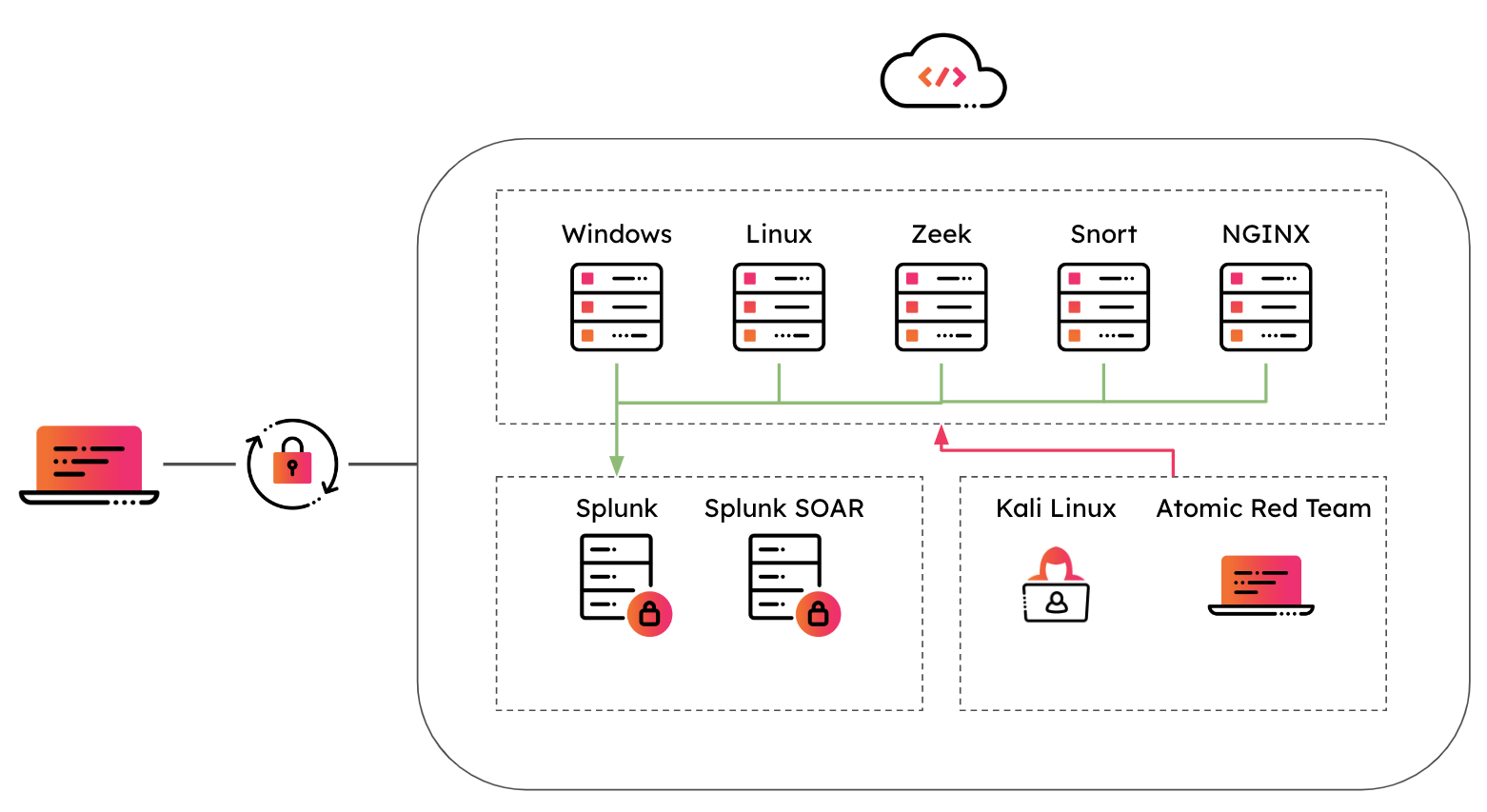
What it does:
- Build labs — Deploy a small, production-like lab (Splunk, Windows/Linux servers, optional Kali, Zeek, etc.) via Terraform and Ansible.
- Simulate attacks — Run Atomic Red Team (and other) techniques to generate real telemetry.
- Share access — Use WireGuard VPN; generate additional client configs to share the range with others.
Click the picture to watch the demo 👇
<a href="https://youtu.be/FkDiiYGKjKg" target="_blank"> <img src="docs/attack_range_demo.png" alt="Watch the demo" /> </a>Getting started
Preferred: Docker Compose
-
Prerequisites: Docker and Docker Compose. Configure your cloud provider (AWS, Azure, or GCP) and mount credentials as below.
-
Clone and start:
bashgit clone <repo-url> cd attack_range_2 docker compose -f docker/docker-compose.yml up -
Use the app or API:
- Web app: open http://localhost:4321 — build/destroy ranges, view status, run simulations, share access.
- API: http://localhost:4000 — REST API; interactive docs at http://localhost:4000/openapi/swagger.
-
Build a range (two steps):
- In the app: pick a template (e.g.
aws/splunk_minimal_aws) and start the build. When status is Waiting for VPN, download the WireGuard config, connect with WireGuard, then continue the build. - Or via API:
POST /attack-range/buildwith{"template": "aws/splunk_minimal_aws"}, pollGET /attack-range/status/<id>, use the returned WireGuard config, connect, thenPOST /attack-range/buildwith{"attack_range_id": "<id>"}.
- In the app: pick a template (e.g.
-
CLI in Docker (optional):
bashdocker compose --profile cli -f docker/docker-compose.yml run --rm attack_range build -t aws/splunk_minimal_awsOther actions:
destroy,simulate,apply-role,share. See Detailed documentation for CLI usage and flags.
Ways to run
| Method | Use case |
|---|---|
| Docker Compose (recommended) | Run API + web app + optional CLI with one docker compose; no local Python/Ansible/Terraform. |
| Web app | Build, destroy, simulate, and share via the UI at port 4321. |
| REST API | Automate from scripts or CI; full OpenAPI docs at /openapi/swagger. |
| CLI | `attack_range.py build |
Documentation
- Full docs (Read the Docs): https://attack-range.readthedocs.io/
- Chapters: Getting Started, Configuration, Networking, Sharing, Templates, Ansible Roles
Quick reference
- Configs: Each range has a config in
config/<attack_range_id>.yml. Templates live intemplates/{aws,azure,gcp}/. - Credentials: Set up
~/.aws,~/.azure, or~/.config/gcloudand mount them into the containers (seedocker/docker-compose.yml). - Support: GitHub issues and CONTRIBUTING.
Support
Please use the GitHub issue tracker to submit bugs or request features.
If you have questions or need support, you can:
- Join the #security-research room in the Splunk Slack channel
- Post a question to Splunk Answers
- If you are a Splunk Enterprise customer with a valid support entitlement contract and have a Splunk-related question, you can also open a support case on the https://www.splunk.com/ support portal
Contributing
We welcome feedback and contributions from the community! Please see our contribution guidelines for more information on how to get involved.
Author
Contributors
- Bhavin Patel
- Rod Soto
- Russ Nolen
- Phil Royer
- Joseph Zadeh
- Rico Valdez
- Dimitris Lambrou
- Dave Herrald
- Ignacio Bermudez Corrales
- Peter Gael
- Josef Kuepker
- Shannon Davis
- Mauricio Velazco
- Teoderick Contreras
- Lou Stella
- Christian Cloutier
- Eric McGinnis
- Micheal Haag
- Gowthamaraj Rajendran
- Christopher Caldwell
- Zachary Christensen
- JerinSaji0
- Michal Cichorz
Contributors
Showing top 12 contributors by commit count.



![dependabot-preview[bot]](https://avatars.githubusercontent.com/in/2141?v=4)


![dependabot[bot]](https://avatars.githubusercontent.com/in/29110?v=4)


Related Repositories

rabbitstack/fibratus
Adversary tradecraft detection, protection, and hunting

ch33r10/EnterprisePurpleTeaming
Purple Team Resources for Enterprise Purple Teaming: An Exploratory Qualitative Study by Xena Olsen.

MISP/misp-taxonomies
Taxonomies used in MISP taxonomy system and can be used by other information sharing tool.

Ixve/Red-Team-Tools
Repo containing cracked red teaming tools.