

Agent
SSH Session Monitoring Daemon
SSHLog is a free, open source Linux daemon written in C++ and Python that passively monitors OpenSSH servers via eBPF to: The project is written primarily in C, distributed under the GNU Affero General Public License v3.0 license, first published in 2023. Key topics include: ebpf, monitoring, openssh, ssh, terminal-recording.
sshlog
SSHLog is a free, open source Linux daemon written in C++ and Python that passively monitors OpenSSH servers via eBPF to:
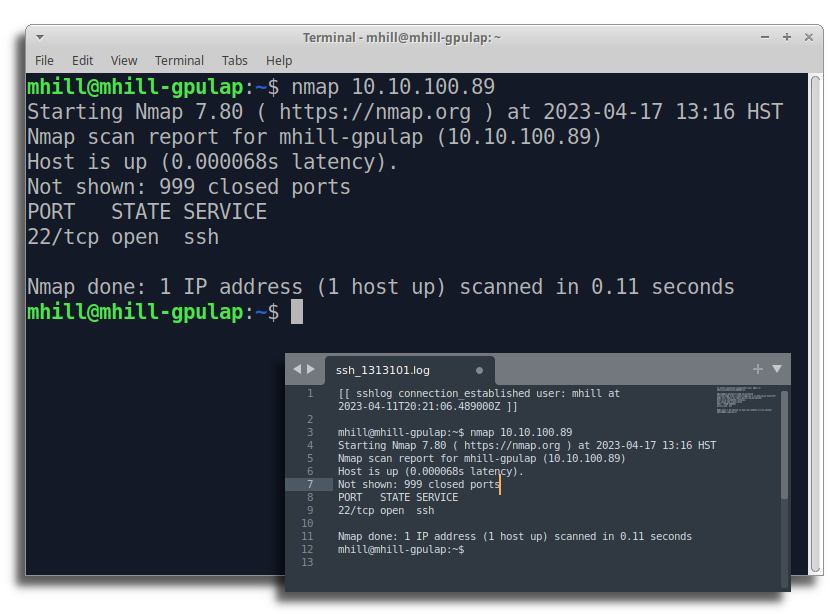
- Record all SSH session activity (commands and output) to log files for any connecting user
- Allow administrators to share an SSH session with any logged in user
- Watch SSH sessions and post Slack messages or run arbitrary commands when specific activity occurs
- Forward all SSH events to a remote syslog server
- Send statsd metrics to track user logins, disconnects, command activity, etc.
- Configurable/Extendable plug-in architecture to execute custom actions triggered by SSH activity
SSHLog is configurable, any combination of features may be enabled, disabled, or customized. It works with your existing OpenSSH server process, no alternative SSH daemon is required. Just install the sshlog package to begin monitoring SSH.
Quick Start (Docker)
SSHLog is designed to run as a privileged Docker container.
1. Try it out (Diagnostic Mode)
To quickly test SSHLog with the web interface and session injection enabled, run:
bashdocker run --privileged \ -e SSHLOG_ENABLE_DIAGNOSTIC_WEB=1 \ -e SSHLOG_ENABLE_SESSION_INJECTION=1 \ -e SSHLOG_WEB_USER=admin \ -e SSHLOG_WEB_PASS=admin \ -v /usr/src:/usr/src:ro \ -v /lib/modules:/lib/modules:ro \ -v /var/log/btmp:/var/log/btmp:ro \ -v /etc/passwd:/etc/passwd:ro \ -v /etc/group:/etc/group:ro \ -v /dev/pts:/dev/pts:rw \ -v /sys/kernel/debug:/sys/kernel/debug:rw \ -v /etc/sshlog:/etc/sshlog \ --net=host --pid=host \ --rm -it ghcr.io/sshlog/agent:1.1.0
Note: This mode enables the diagnostic web server on port 5000 and allows writing to SSH sessions.
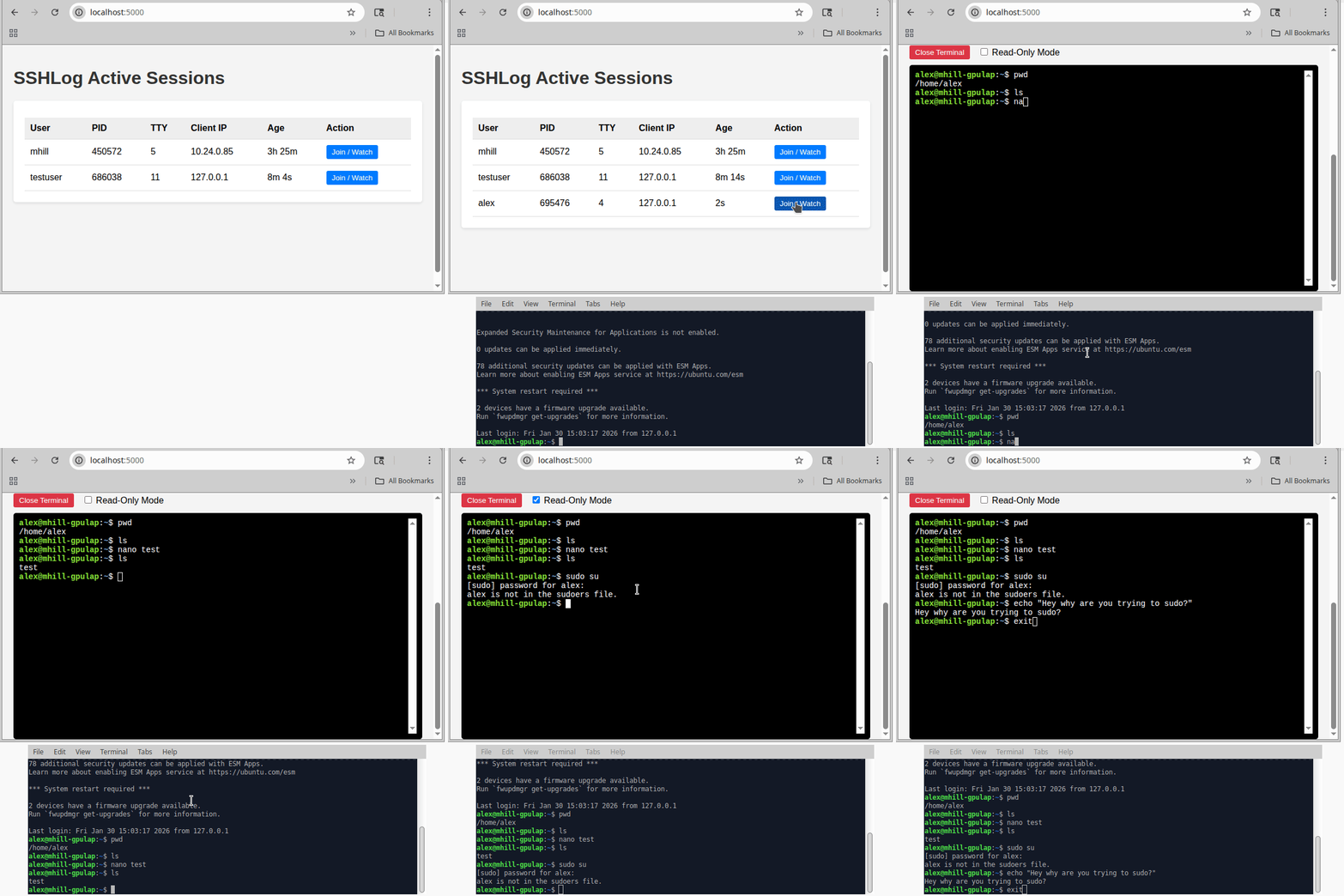
2. Web Interface
Once running, access the dashboard at http://<server-ip>:5000.
3. CLI Usage
You can interact with the daemon via the CLI app inside the container:
Show current logged in sessions:
docker exec -it sshlog sshlog sessions

 User        Last Activity             Last Command               Session Start              Client IP           TTY
mhill           just now              /usr/bin/gcc             2023-04-10 16:16:18        127.0.0.1:58668         17
billy          10 min ago            /usr/sbin/fdisk           2023-04-10 12:11:05        15.12.5.8:58669         32
Monitor real-time SSH activity
docker exec -it sshlog sshlog watch

16:16:45 connection_established (970236) billy from ip 15.12.5.8:59120 tty 33
16:16:45 command_start          (970236) billy executed /bin/bash
...
Attach to another user's shell session (either read-only or interactive)
docker exec -it sshlog sshlog attach [TTY ID]
Production Deployment
For production use, we recommend locking down the container:
- Disable the web server (remove
SSHLOG_ENABLE_DIAGNOSTIC_WEB) - Disable session injection (remove
SSHLOG_ENABLE_SESSION_INJECTION) - Mount
/dev/ptsas read-only
bashdocker run -d --restart=always --name sshlog \ --privileged \ -v /usr/src:/usr/src:ro \ -v /lib/modules:/lib/modules:ro \ -v /var/log/btmp:/var/log/btmp:ro \ -v /etc/passwd:/etc/passwd:ro \ -v /etc/group:/etc/group:ro \ -v /dev/pts:/dev/pts:ro \ -v /sys/kernel/debug:/sys/kernel/debug:rw \ -v /var/log/sshlog:/var/log/sshlog \ -v /etc/sshlog:/etc/sshlog \ --net=host --pid=host \ ghcr.io/sshlog/agent:1.1.0
Security Implications
Warning: This container requires --privileged mode and --pid=host to monitor SSH processes via eBPF. This grants the container significant access to the host system.
When SSHLOG_ENABLE_SESSION_INJECTION is enabled, the container has the ability to inject keystrokes into any active SSH session on the host. Ensure access to this container and the Docker socket is strictly controlled.
Configuration
The configuration files can be customized to trigger any number of actions based on configurable conditions. For example:
- Send a Slack message when an SSH login succeeds or fails
- Trigger a script if anyone runs the "nmap" command.
- Send an e-mail if a particular username uploads a file via scp
Active configurations are located in /etc/sshlog/conf.d/
Sample configurations for reference are located in /etc/sshlog/samples/
Detailed configuration documentation is available in the daemon/config_samples/ folder
Custom Plug-ins
SSHLog plug-in architecture supports running custom Python code to filter and act upon SSH events. These plug-ins have full access to the SSH data and are triggered in real-time. In fact, all of the core functionality available in SSHLog uses this same plug-in architecture.
To create your own plug-ins, follow along with the documentation and tutorial
Requirements
- *Linux Kernel 5.4 or higher (released Nov 2019)
- OpenSSH server 1.8.1 or higher
*SSHLog uses eBPF filters to monitor OpenSSH passively. This technique requires a minimum Linux kernel version in order to function
Older versions of OpenSSH Server may work correctly, however it has not been tested
Contributors
Showing top 1 contributor by commit count.

Related Repositories

apache/skywalking
APM, Application Performance Monitoring System

cilium/cilium
eBPF-based Networking, Security, and Observability

kubesphere/kubesphere
The container platform tailored for Kubernetes multi-cloud, datacenter, and edge management ⎈ 🖥 ☁️

gojue/ecapture
Capturing SSL/TLS plaintext without a CA certificate using eBPF. Supported on Linux/Android kernels for amd64/arm64.

kubeshark/kubeshark
eBPF-powered network observability for Kubernetes. Indexes L4/L7 traffic with full K8s context, decrypts TLS without keys. Queryable by AI agents via MCP and humans via dashboard.

bpftrace/bpftrace
High-level tracing language for Linux