

Firebase authentication dotnet
C# library for Firebase Authentication
FirebaseAuthentication.net is an unofficial C# implementation of [Firebase Authentication](https://firebase.google.com/docs/auth) and [FirebaseUI](https://firebase.google.com/docs/auth). The project is written primarily in C#, distributed under the MIT License license, first published in 2016. Key topics include: firebase, firebase-authentication, firebase-database, firebase-realtime-database.
FirebaseAuthentication.net



FirebaseAuthentication.net is an unofficial C# implementation of Firebase Authentication
and FirebaseUI.
The libraries provide a drop-in auth solution that handles the flows for signing in users with email addresses and passwords, Identity Provider Sign In including Google, Facebook, GitHub, Twitter, Apple, Microsoft and anonymous sign-in.
The solution consists of 5 libraries - a base one and 4 platform specific ones:
- FirebaseAuthentication<strong>.net</strong> targets .NET Standard 2.0
- FirebaseAuthentication<strong>.WPF</strong> targets WPF on .NET 6
- FirebaseAuthentication<strong>.UWP</strong> targets UWP with min version 19041
- FirebaseAuthentication<strong>.WinUI3</strong> targets WinUI3
- FirebaseAuthentication<strong>.Maui</strong> targets Maui (TODO)
Installation
Either via Visual Studio Nuget package manager, or from command line:
powershell# base package dotnet add package FirebaseAuthentication.net # Platform specific FirebaseUI (has dependency on base package) dotnet add package FirebaseAuthentication.WPF dotnet add package FirebaseAuthentication.UWP dotnet add package FirebaseAuthentication.WinUI3 dotnet add package FirebaseAuthentication.Maui
Use the --version option to specify a preview version to install.
Daily preview builds are also available on feedz.io. Just add the following Package Source to your Visual Studio:
https://f.feedz.io/step-up-labs/firebase/nuget/index.json
Usage
In general the terminology and API naming conventions try to follow the official JavaScript implementation, adjusting it to fit the .NET conventions.
E.g. signInWithCredential is called SignInWithCredentialAsync because it is meant to be awaited, but otherwise the terminology should be mostly the same.
Samples
There are currently 3 sample projects in the samples folder:
- .NET Core Console application (uses only the base library, no UI)
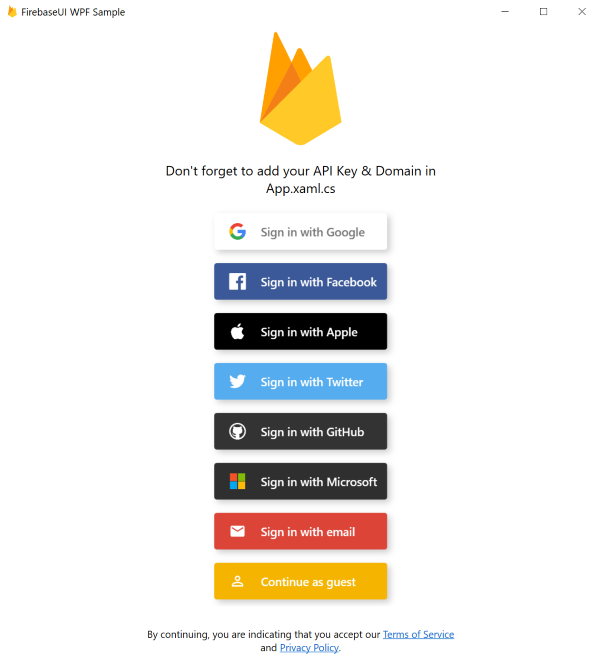
- WPF sample with UI
- UWP sample with UI
- WinUI3 sample with UI
Feel free to clone the repo and check them out, just don't forget to add your custom API keys and other setup (typically in Program.cs or App.xaml.cs).
Setup
For general Firebase setup, refer to the official documentation which discusses the general concepts and individual providers in detail.
You might also want to check out the first two steps in this web documentation.
Notice that Firebase doesn't officially support Windows as a platform so you will have to register your application as a web app in Firebase Console.
FirebaseAuthentication.net
The base library gives you the same features as the official Firebase SDK Authentication, that is without any UI. Your entrypoint is the FirebaseAuthClient.
csharp// main namespaces using Firebase.Auth; using Firebase.Auth.Providers; using Firebase.Auth.Repository; // Configure... var config = new FirebaseAuthConfig { ApiKey = "<API KEY>", AuthDomain = "<DOMAIN>.firebaseapp.com", Providers = new FirebaseAuthProvider[] { // Add and configure individual providers new GoogleProvider().AddScopes("email"), new EmailProvider() // ... }, // WPF: UserRepository = new FileUserRepository("FirebaseSample") // persist data into %AppData%\FirebaseSample // UWP: UserRepository = new StorageRepository() // persist data into ApplicationDataContainer }; // ...and create your FirebaseAuthClient var client = new FirebaseAuthClient(config);
Notice the UserRepository. This tells FirebaseAuthClient where to store the user's credentials.
By default the libraries use in-memory repository; to preserve user's credentials between application runs, use FileUserRepository (or your custom implementation of IUserRepository).
After you have your client, you can sign-in or sign-up the user with any of the configured providers.
csharp// anonymous sign in var user = await client.SignInAnonymouslyAsync(); // sign up or sign in with email and password var userCredential = await client.CreateUserWithEmailAndPasswordAsync("email", "pwd", "Display Name"); var userCredential = await client.SignInWithEmailAndPasswordAsync("email", "pwd"); // sign in via provider specific AuthCredential var credential = TwitterProvider.GetCredential("access_token", "oauth_token_secret"); var userCredential = await client.SignInWithCredentialAsync(credential); // sign in via web browser redirect - navigate to given uri, monitor a redirect to // your authdomain.firebaseapp.com/__/auth/handler // and return the whole redirect uri back to the client; // this method is actually used by FirebaseUI var userCredential = await client.SignInWithRedirectAsync(provider, async uri => { return await OpenBrowserAndWaitForRedirectToAuthDomain(uri); });
As you can see the sign-in methods give you a UserCredential object, which contains an AuthCredential and a User objects.
User holds details about a user as well as some useful methods, e.g. GetIdTokenAsync() to get a valid IdToken you can use as an access token to other Firebase API (e.g. Realtime Database).
csharp// user and auth properties var user = userCredential.User; var uid = user.Uid; var name = user.Info.DisplayName; // more properties are available in user.Info var refreshToken = user.Credential.RefreshToken; // more properties are available in user.Credential // user methods var token = await user.GetIdTokenAsync(); await user.DeleteAsync(); await user.ChangePasswordAsync("new_password"); await user.LinkWithCredentialAsync(authCredential);
To sign out a user simply call
csharpclient.SignOut();
FirebaseUI
The platform specific UI libraries use the FirebaseAuthClient under the hood, but need to be initilized via the static Initialize method of FirebaseUI:
csharp// Initialize FirebaseUI during your application startup (e.g. App.xaml.cs) FirebaseUI.Initialize(new FirebaseUIConfig { ApiKey = "<API KEY>", AuthDomain = "<DOMAIN>.firebaseapp.com", Providers = new FirebaseAuthProvider[] { new GoogleProvider().AddScopes("email"), new EmailProvider() // and others }, PrivacyPolicyUrl = "<PP URL>", TermsOfServiceUrl = "<TOS URL>", IsAnonymousAllowed = true, UserRepository = new FileUserRepository("FirebaseSample") // persist data into %AppData%\FirebaseSample });
Notice the UserRepository. This tells FirebaseUI where to store the user's credentials.
By default the libraries use in-memory repository; to preserve user's credentials between application runs, use FileUserRepository (or your custom implementation of IUserRepository).
FirebaseUI comes with FirebaseUIControl you can use in your xaml as follows:
xml<!--WPF Sample--> <Page x:Class="Firebase.Auth.Wpf.Sample.LoginPage" xmlns="http://schemas.microsoft.com/winfx/2006/xaml/presentation" xmlns:x="http://schemas.microsoft.com/winfx/2006/xaml" xmlns:mc="http://schemas.openxmlformats.org/markup-compatibility/2006" xmlns:d="http://schemas.microsoft.com/expression/blend/2008" xmlns:firebase="clr-namespace:Firebase.Auth.UI;assembly=Firebase.Auth.UI.WPF" mc:Ignorable="d" d:DesignHeight="450" d:DesignWidth="800"> <Grid> <firebase:FirebaseUIControl> <firebase:FirebaseUIControl.Header> <!--Custom content shown above the provider buttons--> <Image Height="150" Source="/Assets/firebase.png" /> </firebase:FirebaseUIControl.Header> </firebase:FirebaseUIControl> </Grid> </Page>
Toggling the visibility of this UI control is up to you, depending on your business logic.
E.g. you could show it as a popup, or a Page inside a Frame etc.
You would typically want to toggle the control's visibility in response to the AuthStateChanged event:
csharp// subscribe to auth state changes FirebaseUI.Instance.Client.AuthStateChanged += this.AuthStateChanged; private void AuthStateChanged(object sender, UserEventArgs e) { // the callback is not guaranteed to be on UI thread Application.Current.Dispatcher.Invoke(() => { if (e.User == null) { // no user is signed in (first run of the app, user signed out..), show login UI this.ShowLoginUI(); } else if (this.loginUIShowing) { // user signed in (or was already signed in), hide the login UI // this event can be raised multiple times (e.g. when access token gets refreshed), you need to be ready for that this.HideLoginUI(); } }); }
Contributors
Showing top 12 contributors by commit count.





Related Repositories

supabase/supabase
The Postgres development platform. Supabase gives you a dedicated Postgres database to build your web, mobile, and AI applications.

appwrite/appwrite
Appwrite® - complete cloud infrastructure for your web, mobile and AI apps. Including Auth, Databases, Storage, Functions, Messaging, Hosting, Realtime and more

pubkey/rxdb
The local-first database that runs on every JS runtime and replicates with your existing backend - no vendor, no lock-in - https://rxdb.info/

microg/GmsCore
Free implementation of Play Services

invertase/react-native-firebase
🔥 A well-tested feature-rich modular Firebase implementation for React Native. Supports both iOS & Android platforms for all Firebase services.

firebase/functions-samples
Collection of sample apps showcasing popular use cases using Cloud Functions for Firebase