

Cost map
Costmaps, directly analogous to ethz-asl's grid_map library.
This is a C++ library directly analogous to ETHZ ASL's [GridMap] library, but designed for use with costs where the data element is an unsigned char (as opposed to grid_map's doubles). The project is written primarily in C++, distributed under the BSD 2-Clause "Simplified" License license, first published in 2016. Key topics include: costmap, cpp, ros.
Cost Map
This is a C++ library directly analogous to ETHZ ASL's GridMap library,
but designed for use with costs where the data element is an unsigned char (as opposed to grid_map's doubles).
Table of Contents
- Packages Overview
- CostMap
- Publishing and Subscribing
- Visualisations
- Saving and Loading
- Costmap2DROS Conversions
- Other Conversions
- Inflation Computers
Packages Overview
- cost_map : meta-package for the grid map library.
- cost_map_core : core interfaces and algorithms of the cost map library, this package has no ROS dependencies.
- cost_map_ros : converters and utilities for cost maps in a ROS ecosystem - Image Bundles, CostMap2DROS, OccupancyGrid, CostMap messsages.
- cost_map_cv : conversions from and to OpenCV image types.
- cost_map_msgs : ROS message definitions related to the cost_map_msgs/CostMap type.
- cost_map_visualisations : helper nodes that bridge cost maps to RViz.
- cost_map_demos : several nodes for demonstration purposes and a test suite.
The source code is released under a BSD 3-Clause license.
CostMap
The core cost_map::CostMap class is designed to maintain as close a compatibility
to grid maps as possible. This compatibility extends to conventions, definitions and API.
For convenience, an illustrative reference of a few of the conventions that hold for both
cost maps and grid maps is provided below.
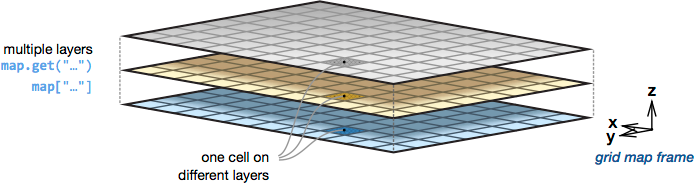
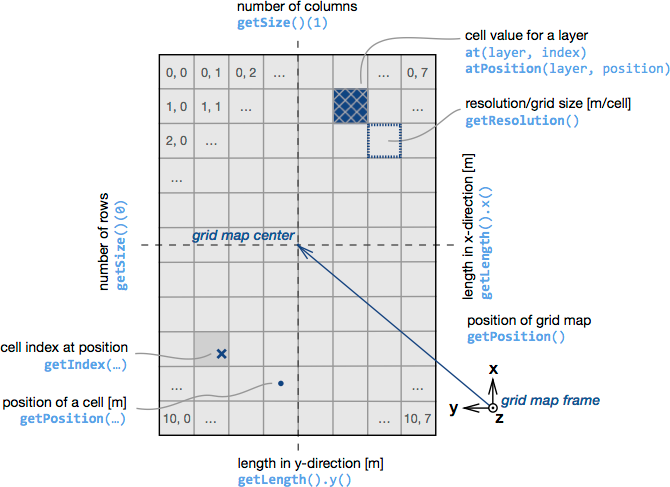
Please refer to the GridMap README for a
more comprehensive outline of what is possible with cost maps and grid maps.
Doxygen documentation for the cost map API's is served via the Code API links on the
ROS wiki for each respective release/package. In addition
the latest doxygen documentation can always be found for each package at:
Publishing and Subscribing
Use the cost_map::toMessage()/fromMessage(...) methods.
cpp// Publishing #include <cost_map_ros/converter.hpp> void publishCostMap(const cost_map::CostMap& cost_map) { cost_map_msgs::CostMap msg; toMessage(cost_map, msg); publisher.publish(msg); }
cpp// Subscribing #include <cost_map_ros/converter.hpp> void costMapCallback(const cost_map_msgs::CostMap::ConstPtr& msg) { cost_map::CostMap cost_map; cost_map::fromMessage(*msg, cost_map); }
Visualisations
As with grid maps, the method employed to visualise is to drop in a relay node between
the cost map publisher and rviz to convert it to the appropriate type for visualisation.
This spares you from having to write any gui-related code in the cost maps or the
planners/controllers that use the cost maps.
cost_map_visualisations has a relay node that converts each layer of a subscribed
cost map topic to a nav_msgs/OccupancyGrid topic for rviz. Simply include and
remap the input cost map topic in your launcher, for example:
xml<launch> <!-- node that publishes cost maps --> <node pkg="cost_map_visualisations" type="node" name="cost_map_visualisation"> <remap from="cost_map_visualisation/cost_map" to="funky_cost_maps/cost_map"/> </node> <!-- rviz, with a pre-loaded configuration that loads the resulting occupancy grid maps --> <node name="rviz" pkg="rviz" type="rviz" args="-d $(find funky_demos)/rviz/funky_cost_maps.rviz" /> </launch>
An example of a relay in action is in the image bundle demo below.
Saving and Loading
Image Bundles
Image bundles provide an easy way to load and save cost maps to and from files on disk.
An image bundle consists of data stored in two parts - 1) meta-information about a costmap in
a yaml file and 2) layer data that is stored alongside in grayscale images.
A typical meta yaml for an image bundle:
yaml# frame in the world that this map is attached to frame_id: map # co-ordinates of the centre of the map relative to the frame_id centre_x: 0 centre_y: 0 # dimensional properties of the map resolution: 0.05 number_of_cells_x: 200 number_of_cells_y: 200 # data layers layers: - layer_name: obstacle_costs layer_data: obstacle_costs.png - layer_name: static_costs layer_data: can_be_some_other_name.png
See cost_map_ros/image_bundles/example.yaml for a real example.
ImageBundle Demo
bash# load an image bundle and visualise the cost map roslaunch cost_map_demos load_image_bundle.launch --screen
ImageBundle Command Line Utilities
There exist two command line utilities for loading and saving to and from a cost map topic:
bash# load and publish to '/foo/cost_map' rosrun cost_map_ros load_image_bundle -t /foo/cost_map example.yaml # subscribe and save from '/foo/cost_map' to foo.yaml mkdir foo cd foo rosrun cost_map_ros save_image_bundle /foo/cost_map foo.yaml
ImageBundle Methods
cost_map::toImageBundle(...): save a cost map to an image bundlecost_map::fromImageBundle(...): load an image bundle into a cost map object
See the LoadImageBundle/SaveImageBundle
classes which illustrate how the command line utilities use these api.
Costmap2DROS Conversions
The ROS Navistack uses costmap_2d::Costmap2DROS objects and it is sometimes necessary
to make conversions from these to provide new style cost maps to other libraries. Methods are
available for both full map conversion as well as subwindows centred on the pose of the robot itself.
Costmap2DROS vs CostMap

Costmap2DROS Demo
Costmap2DROS | Full/Partial Copies
:---: | :---: | :---:
 |
| 
bash# load several ros costmaps and copy full/sub windows to new style costmaps roslaunch cost_map_demos from_ros_costmaps.launch --screen
Costmap2DROS Methods
cost_map::fromCostmap2DROS(...): create a cost map from a Costmap2DROScost_map::fromCostmap2DROSAtRobotPose(...): create a cost map from a subwindow around the robot pose in a Costmap2DROS
See the from_ros_costmaps demo program
which illustrates how to use these api. Additionally you can directly use the grid_map::Costmap2DConverter template class for more atomic operations.
Other Conversions
cost_map::toGridMap(...): convert to a float based grid map by normalising values between 0.0 and 100.0cost_map::addLayerFromROSImage(...): add a layer from ros immage message type (sensor_msgs::Image)
Inflation Computers
Inflation Demo
bash# load an image bundle and visualise the cost map roslaunch cost_map_demos inflations.launch --screen
| Obstacle Layer | Inflated Layer | Deflated Layer |
|---|---|---|
 |  |  |
Inflation Classes
cost_map::Inflate: functor that executes (with the assistance of an inflation computer) the inflation processcost_map::ROSInflationComputer: emulates the ROS inflation algorithmcost_map::Deflate: functor reverses an inflation computation
See the inflation demo program
which illustrates how to use these classes.
Contributors
Showing top 3 contributors by commit count.


