

Invaders
A 1980s-arcade-style game written using HTML5, Canvas, and Web Audio
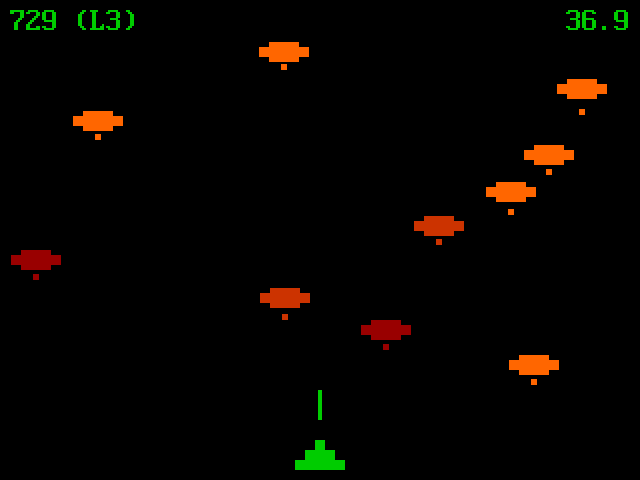
[Andromeda Invaders][PLAY1] is a 1980s-arcade-style game that runs in a modern web browser. This game is inspired by Space Invaders, the 1978 arcade game developed by Tomohiro Nishikado. However, the game characters, gameplay and some technical aspects of this game are very different from those of Space Invaders. The project is written primarily in HTML, distributed under the MIT License license, first published in 2022. Key topics include: audiocontext, canvas-game, game, invaders, javascript.
Andromeda Invaders
Andromeda Invaders is a 1980s-arcade-style game that runs in
a modern web browser. This game is inspired by Space Invaders, the
1978 arcade game developed by Tomohiro Nishikado. However, the game
characters, gameplay and some technical aspects of this game are very
different from those of Space Invaders.
Contents
Play
The current stable version of the game is available at the following
links:
There is rudimentary support for playing this game on small screens
and touchscreens using the buttons provided below the game canvas.
However, this game is best enjoyed on a laptop/desktop device with a
physical keyboard.
Since it is a single-file game, you can also save this game to your
system by right clicking one of the links mentioned above and
selecting the option to save/download the HTML file.
Keys
While playing on a keyboard-enabled device, the following keys are
supported:
<left arrow>orato move player left<right arrow>ordto move player right<space>orpto pause/unpause game<enter>oreto restart gamemto mute/unmute audiofto enter/exit to fullscreen mode
The last key to enter/exit to fullscreen mode may not work on all web
browsers.
Technical Details
All of the graphics is done by drawing rectangles on an HTML5
<canvas> element using the Canvas API. In fact, any text appearing
on the canvas is also displayed by drawing squares on the canvas. The
bitmaps used to draw text are embedded as integer arrays in the code.
All of the audio is done by playing sine waves generated using
OscillatorNode of the Web Audio API. The sine waves used for the
game audio correspond to actual musical notes from the C major scale.
Multiple notes are played together to form chords. The background
music is a chord progression consisting of four chords repeating over
and over again as long as the game is being played. When the game
characters get hit, the hit sounds are made of a single chord that
plays for a very short duration.
Gameplay
You are encouraged to play the game without reading this section. I
believe there is a certain joy in figuring out the game on your own
without referring to any hints or existing documentation. For this
reason, I suggest that you skip this section and go play the
game first. If you really must understand the gameplay right now, the
following subsections contain notes about various details of this
game.
Game Characters
Not so long time ago in a galaxy near, near away ...
Bright orange ships visit the player's planet and begins dropping
boulders from space to hit the player. The player defends itself by
hitting the ships and the falling boulders with laser pulses. When a
boulder is hit successfully, it vanishes instantly. When a ship is
hit successfully, it loses its health. The health is indicated by the
colour of the ship. Bright orange indicates perfect health. When a
bright orange ship is hit, it turns dark orange. When a dark orange
ship is hit, it turns dark red. A dark red ship is in critical
condition. If a dark red ship is hit again, it vanishes.
When a boulder hits the player it loses health. The player is
initially bright green that indicates that it is in perfect health.
When a perfectly healthy player is hit, it turns dark green. If the
player is hit again while it is dark green, it turns dull yellow. If
the player is hit when it is dull yellow, it vanishes and the game
ends.
Further, as each game level progresses, the ships gradually descend.
The fewer the number of ships that are still visible, the faster they
descend. When the lowermost ship reaches the same level as that of
the player, it moves rapidly in the direction of the player and
collides with the player. When a ship collides with the player, the
ship vanishes but so does the player and the game ends.
Health Levels
Each ship has three grades of health and the player too has three
grades of health. After being hit and losing health, the ships and
the player can regain health as the game continues. A ship gains
health by one grade after it drops ten boulders since it was last hit.
The player gains health by one grade after it gains 100 points since
it was last hit.
When a ship collides with the player, the ship loses all its health
and vanishes; so does the player and the game ends immediately.
Game Levels
The game can be played indefinitely long. There are multiple levels
in the game that are numbered 1, 2, 3 and so on. After level 1000,
the level is reset to 1, however, the score remains intact, so one can
keep playing levels 1 to 1000 repeatedly in a loop if one has the
patience and skill to do so.
At level 1, only three ships visit the player's planet. At level 2,
six ships visit the planet. At level 3 and above, ten ships visit the
planet.
The boulders drop at various random speeds. The range of possible
speeds for the boulders is decided by the game level. The speed of
the ships too depends on the level. Further, the tempo of the
background music too depends on the level.
The following table shows the various game parameters for each level.
| Level | Ships | Ship Speed | Boulder Speed | Music Tempo |
|---|---|---|---|---|
| 1 | 3 | 2 | [1, 4] | 2 |
| 2 | 6 | 2 | [2, 4] | 2 |
| 3 | 10 | 3 | [2, 4] | 3 |
| 4 | 10 | 3 | [2, 5] | 4 |
| 5 | 10 | 3 | [3, 5] | 5 |
| 6 | 10 | 4 | [3, 5] | 6 |
| 7 | 10 | 4 | [3, 6] | 7 |
| 8 | 10 | 4 | [4, 6] | 8 |
| 9 | 10 | 5 | [4, 6] | 9 |
| 10 | 10 | 5 | [4, 7] | 10 |
| 11 | 10 | 5 | [5, 7] | 11 |
| 12 | 10 | 6 | [5, 7] | 12 |
| 13 | 10 | 6 | [5, 8] | 12 |
| 14 | 10 | 6 | [6, 8] | 12 |
| 15 | 10 | 7 | [6, 8] | 12 |
| 16 | 10 | 7 | [6, 9] | 12 |
| 17 | 10 | 7 | [7, 9] | 12 |
| 18 | 10 | 8 | [7, 9] | 12 |
| 19 | 10 | 8 | [7, 10] | 12 |
| 20 | 10 | 8 | [8, 10] | 12 |
| ... | " | " | " | " |
| 1000 | " | " | " | " |
In the table above, the unit of speed is pixels per frame (PPF), i.e.
the number of pixels an object appears to move from one game frame to
another. Here, the term game frame refers to a single instance of
rendering the game state to the HTML5 <canvas>. The game state is
rendered to the canvas 50 times per second. The speed of the boulders
is chosen randomly from the closed interval shown in the Boulder
Speed column. The unit of music tempo is beats per second. Each
chord is played in a beat.
To summarise the table above, the game becomes progressively more
difficult to play in each level until level 20. The game parameters
do not change between levels 20 to 1000. After level 1000, the game
resets to level 1 but the player's score remains intact. Thus the
game can be played indefinitely long in theory. However, in practice
you might find that it is quite difficult to reach even level 10 or
so.
Points
The player gets 1 point for hitting a boulder, 10 points for hitting a
bright orange ship, 20 points for hitting a dark orange ship and 30
points for hitting a dark red ship.
Autoplay
This game comes with an autoplay feature. After the game loads on the
web browser or after the game is restarted, when there is no activity
for 5 seconds, the autoplay algorithm starts and begins playing the
game on its own.
To see the autoplay algorithm in action, load or restart the game,
press <kbd>enter</kbd> twice and wait for 5 seconds.
Pressing <kbd>enter</kbd> twice is not strictly necessary for the
autoplay algorithm to begin. The autoplay algorithm starts
automatically 5 seconds after a game is loaded or restarted regardless
of whether you press <kbd>enter</kbd> or not. However, if you don't
perform some kind of user interaction with the web page, such as by
pressing a key or clicking with a mouse or with touch, before the
autoplay begins, then the web browser may refuse to play the game
audio. That is why typing some key that does not start a normal game
or clicking with the mouse or some other user activity is necessary to
ensure that when the autoplay algorithm starts, the game audio plays
as well. Pressing <kbd>enter</kbd> twice happens to restart the game
happens to be one such convenient user interaction.
Why?
I first came across Space Invaders in the 1990s in the computer
laboratory of my lower secondary school. Soon after playing the game
a few times, I wanted to develop a similar game of my own. However,
the little GW-BASIC programming I knew and the very limited access to
computers I had then was insufficient to write anything more
sophisticated than simple text-based input/output programs. I did
write several simple text-based quiz and adventure games back then but
a more sophisticated game with graphics and audio remained elusive.
As years went by, I gradually forgot about it, learnt more mainstream
languages like C, Python, Lisp, etc. and got into programming as a
career.
Although it is 25 years too late, I decided to spend a weekend to
fulfill my childhood desire to write my own Invaders-like game. This
project fulfills a childhood dream of mine!
Licence
This is free and open source software. You can use, copy, modify,
merge, publish, distribute, sublicence and/or sell copies of it, under
the terms of the MIT Licence. See LICENSE.md for details.
This software is provided "AS IS", WITHOUT WARRANTY OF ANY KIND,
express or implied. See LICENSE.md for details.
More
This project uses bitmap arrays to render text by drawing squares on
canvas. The bitmaps of only those characters that are needed in this
game are included in the source code. This includes the bitmap of ten
digits, a few punctuation characters and a very limited subset of
uppercase and lowercase letters.
The glyphs for these characters are taken from a raster font named
Modern DOS 8x16 version 20190101.02. This font was developed
by Jayvee Enaguas and it is available under the terms of CC0 1.0
Universal Public Domain Dedication. This font is based on the
IBM VGA 8x16 and Verite 8x16 OEM fonts.
If you are doing something similar and want the bitmap arrays for a
larger set of characters, see another project of mine named PC
Face which offers bitmap arrays for all 256 characters of the
CP437 character set.
Contributors
Showing top 3 contributors by commit count.


Related Repositories

ErosZy/WXInlinePlayer
🤟 Super fast H.264/H.265 FLV player

surikov/webaudiofont
Use full GM set of musical instruments to play MIDI and single sounds or effects. Support for reverberation and equaliser. No plugins, no Flash. Pure HTML5 implementation compatible with desktop and mobile browser. See live examples.

benji6/virtual-audio-graph
:notes: Library for declaratively manipulating the Web Audio API

zhw2590582/FlvPlayer
:lollipop: FlvPlayer.js is a JavaScript player for decode flv to the canvas

dlepaux/realtime-bpm-analyzer
Library using WebAudioAPI to analyse BPM from files, audionodes. It's also able to compute BPM from streams as well as realtime using a microphone. This tool might be useful for music producers and DJs or anybody that wants to get BPM from any music source.
zhw2590582/WFPlayer
:ocean: WFPlayer.js is an audio waveform generator