

Hyscale
Hytale on Tailscale Server Manager
**The easiest way to host a private Hytale server for you and your friends** The project is written primarily in Go, distributed under the BSD 3-Clause "New" or "Revised" License license, first published in 2026. Key topics include: hytale, hytale-server, hytale-servers, tailscale.
hyscale
<div align="center">The easiest way to host a private Hytale server for you and your friends
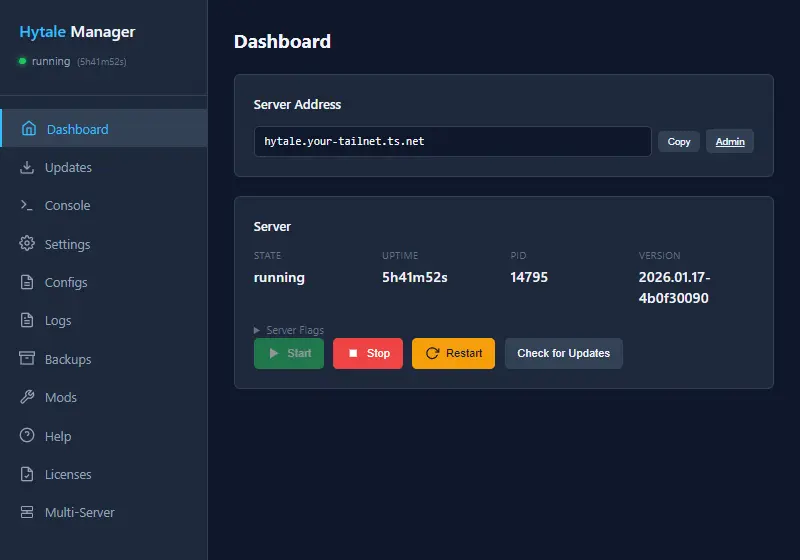
A web-based server manager that runs on your private Tailscale network - no port forwarding, no exposing your IP, no firewall headaches.
Why hyscale?
| Traditional Server Hosting | With hyscale |
|---|---|
| Configure port forwarding on your router | Nothing to configure |
| Share your home IP address with everyone | Only your Tailscale network can see it |
| Dynamic IP? Set up DDNS | Automatic DNS name (e.g., hytale.your-tailnet.ts.net) |
| Manage via command line | Web dashboard in your browser |
| FTP for mods | Map a network drive directly! |
Quick Start
1. Download and Run
Download the latest release for your platform and run it:
./hyscale
2. Authenticate with Tailscale
On first run, you'll see an authentication URL:
====================================================
  AUTHENTICATION REQUIRED
====================================================
  Visit this URL to authenticate:
  https://login.tailscale.com/...
====================================================
Visit the URL and sign in to connect hyscale to your Tailnet.
3. Open Dashboard and Start Your Server
Once authenticated, hyscale prints your dashboard URL (something like https://hytale.your-tailnet.ts.net).
From the dashboard:
- Click Authenticate and sign in with your Hytale account
- Click Download Server to fetch the server files
- Click Start - you're running!
Invite Friends
Getting friends connected is simple:
-
They install Tailscale - free for personal use at tailscale.com
-
You share your node - In the Tailscale admin console, click on your hyscale machine, then Share to email an invite or create an invite link
-
They join and connect - Friends accept your invite and use your server's Tailscale DNS name (shown in your dashboard) to connect in-game
Allow Game Traffic
Add this rule to your Tailscale ACL policy so shared users can connect:
ACLs syntax:
json{ "action": "accept", "src": ["autogroup:member", "autogroup:shared"], "dst": ["tag:hytale:5520"], "proto": "udp" }
Grants syntax:
json{ "src": ["autogroup:member", "autogroup:shared"], "dst": ["tag:hytale"], "ip": ["*:5520"], "proto": "udp" }
Replace tag:hytale with your node's actual tag or IP address.
Features
- Web Dashboard - Manage everything from your browser, no terminal required
- Real-Time Console - Full terminal emulator with xterm.js
- Config Editor - Edit server settings with Monaco (the same editor as VS Code)
- One-Click Backups - Back up your entire universe or individual worlds
- Mod Support - Enable/disable mods through the UI, upload via WebDAV
- Auto Updates - Keep your server up to date automatically
- Developer Mode - JDWP debugging support for mod developers
- Private by Default - Only devices on your Tailscale network can connect
Requirements
- A computer to run the server (Windows, macOS, or Linux)
- A Tailscale account (free for personal use)
- A Hytale account (for downloading server files)
That's it. No Java installation needed - hyscale can download and configure it for you.
Advanced Configuration
<details> <summary><strong>Mod Development (JDWP Debugging)</strong></summary>Enable developer mode in the dashboard settings to start the server with JDWP debugging enabled. Connect your IDE's remote debugger to the displayed port.
</details> <details> <summary><strong>Multi-Server (Federation)</strong></summary>hyscale supports running multiple servers that can transfer players between them. Configure federation settings in your server's config.json.
Image: ghcr.io/tailscale/hyscale:latest
Run hyscale in a container:
bashdocker run -d \ --name hyscale \ -v ./config:/app/config \ -v ./server:/app/server \ -v ./tsstate:/app/tsstate \ ghcr.io/tailscale/hyscale:latest
Volume mounts:
| Mount | Purpose |
|---|---|
/app/config | Configuration files (hyscale.json, credentials) |
/app/server | Server files, worlds, mods, backups |
/app/tsstate | Tailscale state (preserves node identity) |
Docker Compose:
yamlservices: hyscale: image: ghcr.io/tailscale/hyscale:latest volumes: - ./config:/app/config - ./server:/app/server - ./tsstate:/app/tsstate restart: unless-stopped
First-run authentication: Check logs for the Tailscale auth URL:
bashdocker logs hyscale
Headless/automated setup: Set TS_AUTHKEY for unattended setup:
bashdocker run -d \ --name hyscale \ -e TS_AUTHKEY=tskey-auth-xxx \ -v ./config:/app/config \ -v ./server:/app/server \ -v ./tsstate:/app/tsstate \ ghcr.io/tailscale/hyscale:latest
Generate auth keys at https://login.tailscale.com/admin/settings/keys
</details>Troubleshooting
Friends can't connect?
- Verify they've joined your Tailnet via the share link
- Check that your ACL policy allows UDP traffic on port 5520
- Have them verify Tailscale is running (
tailscale status)
Server won't start?
- Check the console output in the dashboard for error messages
- Ensure you have enough disk space for server files
- Verify the server files downloaded completely
Download fails?
- Re-authenticate with your Hytale account in the dashboard
- Check your internet connection
- Try the download again
License
BSD-3-Clause License. See LICENSE for details.
Contributors
Showing top 2 contributors by commit count.


Related Repositories

JannisX11/blockbench
Blockbench - A low poly 3D model editor

Azuriom/Azuriom
Azuriom is a complete open-source web solution for game servers. Enjoy dozens of extensions for endless possibilities. Already trusted by over 1,800 servers totaling more than two million users.

hyprismteam/HyPrism
Hytale launcher with mod management, and more!

vectrix-space/ignite
A Mixin loader for Paper/Velocity/Spigot/Hytale

aternosorg/mclogs
Paste, share and analyse your logs - Built for Minecraft & Hytale

HytaleModding/site
Hytale Modding Website - your one stop shop for all guides & docs related to Hytale.