

Steampipe mod aws thrifty
Are you a Thrifty AWS dev? This mod checks your AWS accounts for unused and under-utilized resources using Powerpipe and Steampipe.
- **[Benchmarks and controls →](https://hub.powerpipe.io/mods/turbot/aws_thrifty/controls)** - **[Named queries →](https://hub.powerpipe.io/mods/turbot/aws_thrifty/queries)** The project is written primarily in Pascal, distributed under the Apache License 2.0 license, first published in 2021. Key topics include: aws, cost, cost-control, cost-optimization, hacktoberfest.
AWS Thrifty Mod for Powerpipe
An AWS cost savings and waste checking tool.
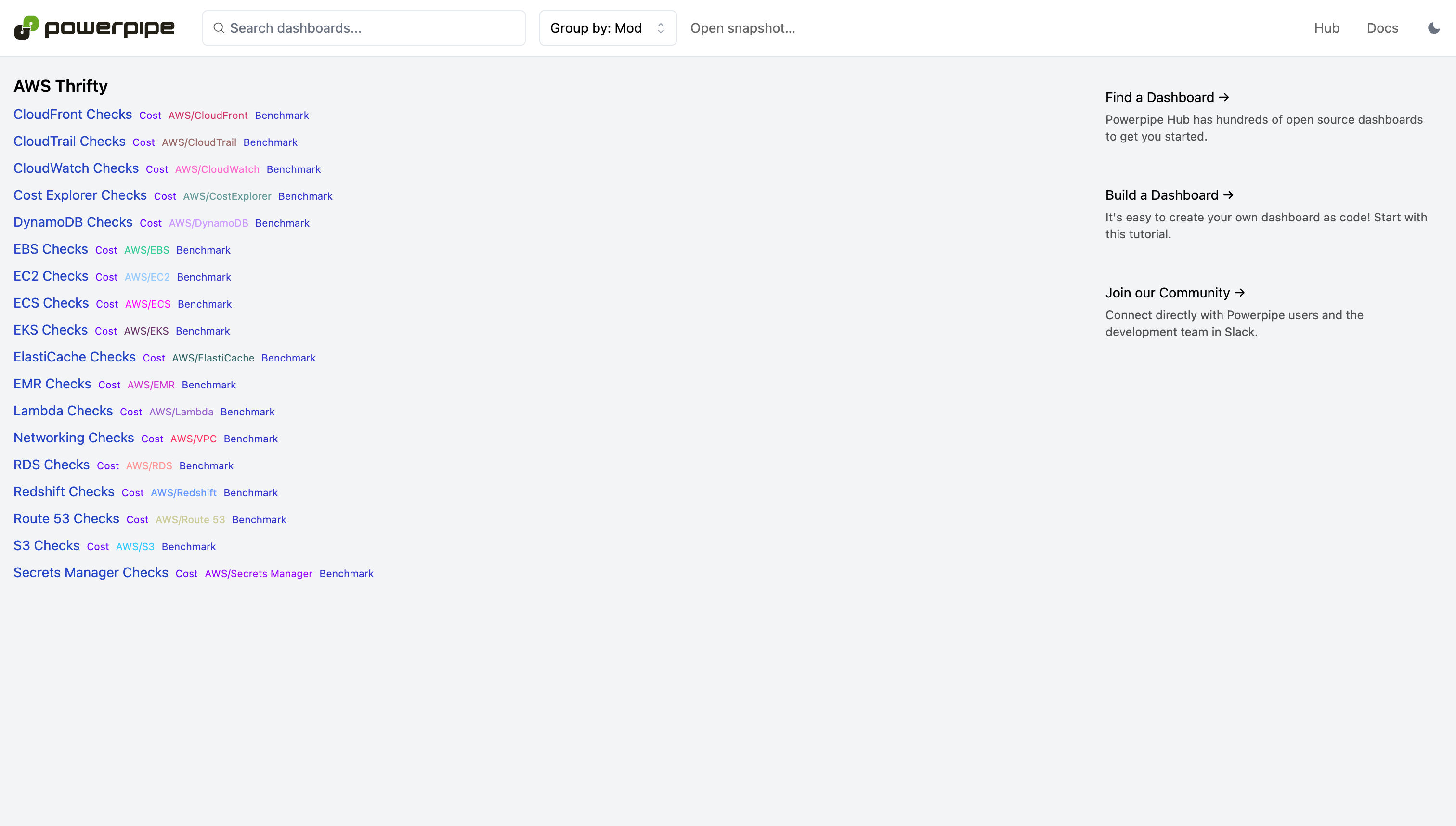
Run checks in a dashboard:
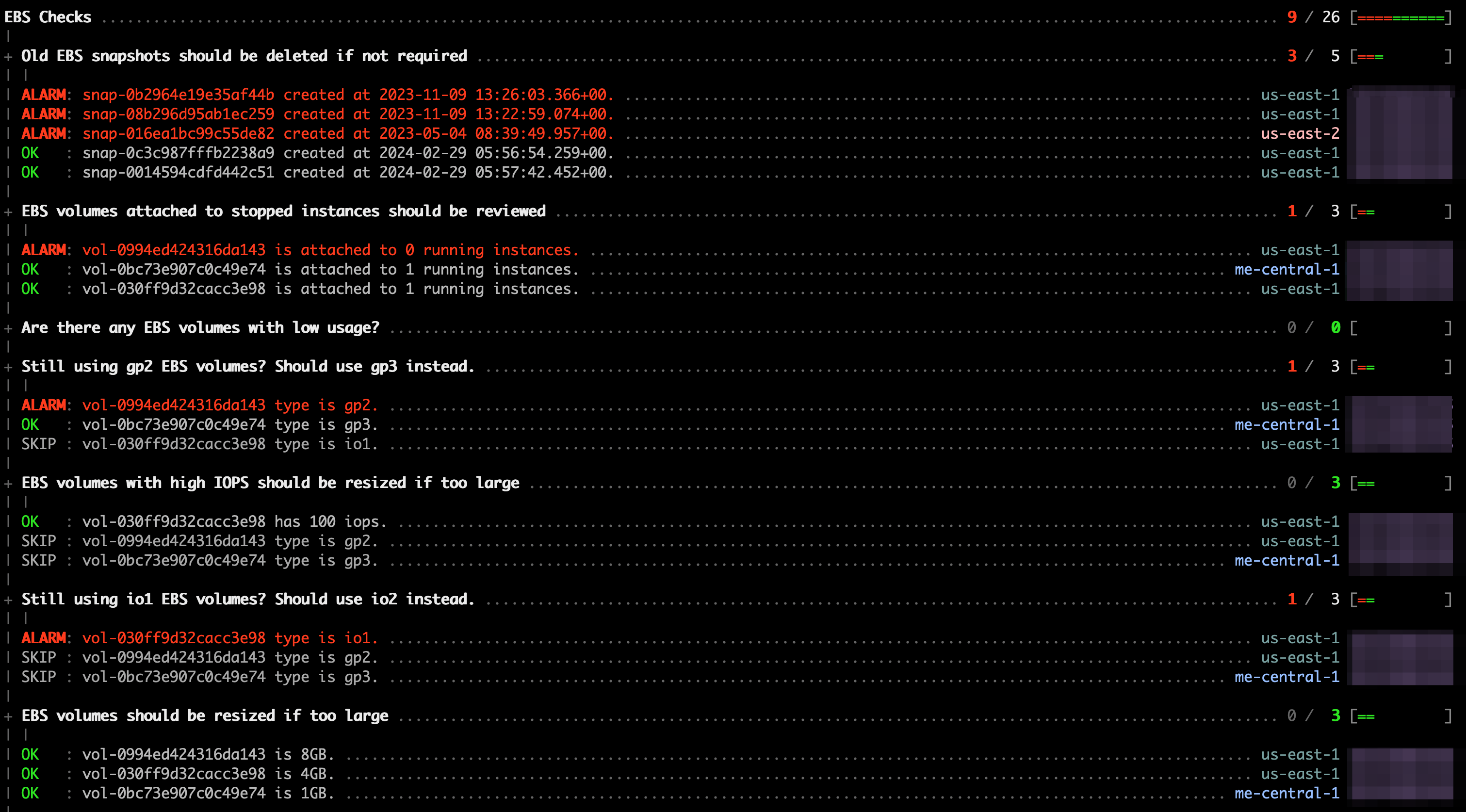
Or in a terminal:
Documentation
Getting Started
Installation
Install Powerpipe (https://powerpipe.io/downloads), or use Brew:
shbrew install turbot/tap/powerpipe
This mod also requires Steampipe with the AWS plugin as the data source. Install Steampipe (https://steampipe.io/downloads), or use Brew:
shbrew install turbot/tap/steampipe steampipe plugin install aws
Steampipe will automatically use your default AWS credentials. Optionally, you can setup multiple accounts or customize AWS credentials.
Finally, install the mod:
shmkdir dashboards cd dashboards powerpipe mod init powerpipe mod install github.com/turbot/steampipe-mod-aws-thrifty
Browsing Dashboards
Start Steampipe as the data source:
shsteampipe service start
Start the dashboard server:
shpowerpipe server
Browse and view your dashboards at http://localhost:9033.
Running Checks in Your Terminal
Instead of running benchmarks in a dashboard, you can also run them within your
terminal with the powerpipe benchmark command:
List available benchmarks:
shpowerpipe benchmark list
Run a benchmark:
shpowerpipe benchmark run ec2
Different output formats are also available, for more information please see
Output Formats.
Configure Variables
Several benchmarks have input variables that can be configured to better match your environment and requirements. Each variable has a default defined in its source file, e.g., controls/rds.sp, but these can be overwritten in several ways:
It's easiest to setup your vars file, starting with the sample:
shcp powerpipe.ppvars.example powerpipe.ppvars vi powerpipe.ppvars
Alternatively you can pass variables on the command line:
shpowerpipe benchmark run ec2 --var=ec2_running_instance_age_max_days=90
Or through environment variables:
shexport PP_VAR_ec2_running_instance_age_max_days=90 powerpipe control run long_running_ec2_instances
These are only some of the ways you can set variables. For a full list, please see Passing Input Variables.
Common and Tag Dimensions
The benchmark queries use common properties (like account_id, connection_name and region) and tags that are defined in the form of a default list of strings in the variables.sp file. These properties can be overwritten in several ways:
It's easiest to setup your vars file, starting with the sample:
shcp powerpipe.ppvars.example powerpipe.ppvars vi powerpipe.ppvars
Alternatively you can pass variables on the command line:
shpowerpipe benchmark run cloudfront --var 'tag_dimensions=["Environment", "Owner"]'
Or through environment variables:
shexport PP_VAR_common_dimensions='["account_id", "connection_name", "region"]' export PP_VAR_tag_dimensions='["Environment", "Owner"]' powerpipe benchmark run cloudfront
Open Source & Contributing
This repository is published under the Apache 2.0 license. Please see our code of conduct. We look forward to collaborating with you!
Steampipe and Powerpipe are products produced from this open source software, exclusively by Turbot HQ, Inc. They are distributed under our commercial terms. Others are allowed to make their own distribution of the software, but cannot use any of the Turbot trademarks, cloud services, etc. You can learn more in our Open Source FAQ.
Get Involved
Want to help but don't know where to start? Pick up one of the help wanted issues:
Contributors
Showing top 12 contributors by commit count.


Related Repositories

ByteByteGoHq/system-design-101
Explain complex systems using visuals and simple terms. Help you prepare for system design interviews.

bregman-arie/devops-exercises
Linux, Jenkins, AWS, SRE, Prometheus, Docker, Python, Ansible, Git, Kubernetes, Terraform, OpenStack, SQL, NoSQL, Azure, GCP, DNS, Elastic, Network, Virtualization. DevOps Interview Questions

localstack/localstack
💻 A fully functional local AWS cloud stack. Develop and test your cloud & Serverless apps offline

serverless/serverless
⚡ Serverless Framework – Effortlessly build apps that auto-scale, incur zero costs when idle, and require minimal maintenance using AWS Lambda and other managed cloud services.

danny-avila/LibreChat
Enhanced ChatGPT Clone: Features Agents, MCP, Skills, DeepSeek, Anthropic, AWS, OpenAI, Responses API, Azure, Groq, o1, GPT-5, Mistral, OpenRouter, Vertex AI, Gemini, Artifacts, AI model switching, message search, Code Interpreter, langchain, DALL-E-3, OpenAPI Actions, Functions, Secure Multi-User Auth, Presets, open-source for self-hosting. Active

donnemartin/data-science-ipython-notebooks
Data science Python notebooks: Deep learning (TensorFlow, Theano, Caffe, Keras), scikit-learn, Kaggle, big data (Spark, Hadoop MapReduce, HDFS), matplotlib, pandas, NumPy, SciPy, Python essentials, AWS, and various command lines.