

School Management System
This is a School Management System website built using MERN stack.
This is a MERN stack website which can be used for managing the school. It has almost all features and few are in development phase. The project is written primarily in JavaScript, first published in 2021. Key topics include: mongodb, nodejs, react, school-management-system, school-project.
School Management System
This is a MERN stack website which can be used for managing the school. It has almost all features and few are in development phase.
Please give this repo a star if this project helped you in any way. This will mean a lot to me and motivate me more to bring this type of project. (Live url does not work as of now due to heroku removing free services)
LIVE SITE
bashhttps://manageschool1.herokuapp.com/
LOGIN AS ADMIN AND SEE EVERYTHING
bashLogin email="admin1@example.com" Login password="adminpassword1"
Usage
Clone the repo
bashgit clone https://github.com/upendradhamala/School-Management-System.git
Getting Started
Go to the root folder and install the backend dependencies by using the command-
bashnpm install
Go to the frontend folder by command cd frontend and then install frontend dependecies using the command-
bashnpm install
ENV Variables
Create a .env file in the root and add the following. You can see .env.example for format.
bashNODE_ENV=development PORT=5000 MONGO_URI="Your mongo uri" JWT_SECRET="Anything you like" CLOUDINARY_URL ="your cloudinary url" CLOUDINARY_UPLOAD_PRESET = "your cloudinary preset "
Create a .env file in the frontend folder and add the following. You can see .env.example for format.
bashREACT_APP_CLOUD_NAME="Your value" REACT_APP_CLOUD_PRESET="Your value"
Running
Go to the root folder and at first seed the database through command
bashnpm run data:import
After seed is successful run following command to run both backend and frontend concurrently
bashnpm run dev
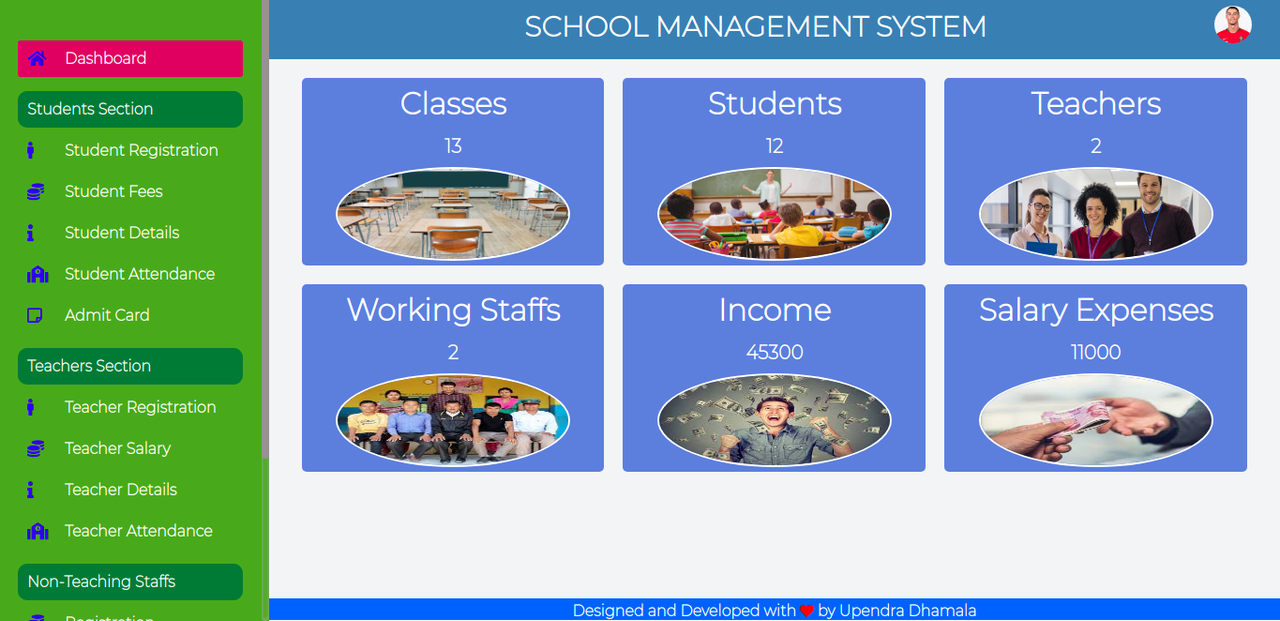
Homepage
Contributors
Showing top 2 contributors by commit count.


Related Repositories

macrozheng/mall
mall项目是一套电商系统,包括前台商城系统及后台管理系统,基于Spring Boot+MyBatis实现,采用Docker容器化部署。 前台商城系统包含首页门户、商品推荐、商品搜索、商品展示、购物车、订单流程、会员中心、客户服务、帮助中心等模块。 后台管理系统包含商品管理、订单管理、会员管理、促销管理、运营管理、内容管理、统计报表、财务管理、权限管理、设置等模块。

netdata/netdata
The fastest path to AI-powered full stack observability, even for lean teams.

Asabeneh/30-Days-Of-Python
The 30 Days of Python programming challenge is a step-by-step guide to learn the Python programming language in 30 days. This challenge may take more than 100 days. Follow your own pace. These videos may help too: https://www.youtube.com/channel/UC7PNRuno1rzYPb1xLa4yktw

prisma/prisma
Next-generation ORM for Node.js & TypeScript | PostgreSQL, MySQL, MariaDB, SQL Server, SQLite, MongoDB and CockroachDB

meteor/meteor
Meteor, the JavaScript App Platform

payloadcms/payload
Payload is the open-source, fullstack Next.js framework, giving you instant backend superpowers. Get a full TypeScript backend and admin panel instantly. Use Payload as a headless CMS or for building powerful applications.