

Leaker
Passive leak enumeration tool.
Created by Maksim Radaev/[@vflame6](https://github.com/vflame6) The project is written primarily in Go, distributed under the MIT License license, first published in 2025. Key topics include: bugbounty, hacking, leak-detection, leaks, osint.
Created by Maksim Radaev/@vflame6
leaker is a leak discovery tool that returns valid credential leaks using passive online sources. It supports searching by email, username, domain, keyword, and phone number.
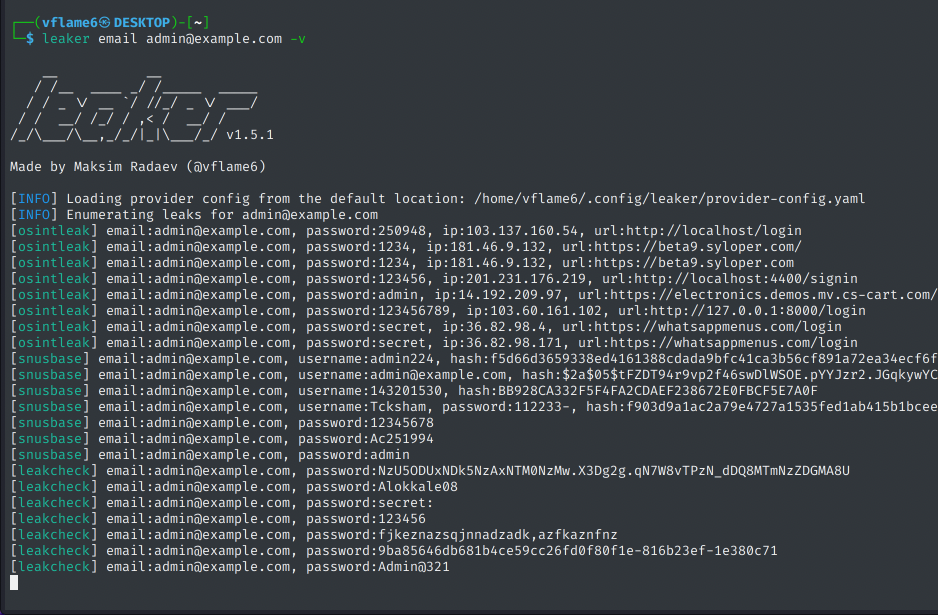
Features
- 13 sources - aggregates results from multiple leak databases
- 5 search types - email, username, domain, keyword, phone
- Deduplication - removes duplicate results across sources
- JSONL output - structured output for pipelines (
-j) - Rate limiting - built-in per-source rate limits (disable with
-N) - Proxy support - route traffic through HTTP proxy (
--proxy) - Multiple API keys - load balancing across keys per source
Available sources
| Source | API Key | Search Types | Pricing |
|---|---|---|---|
| BreachDirectory | Yes | all (auto-detect) | Free via RapidAPI |
| DeHashed | Yes | email, username, domain, keyword, phone | Paid |
| Hudson Rock | No* | email, username, domain | Free / Paid |
| Intelligence X | Yes | all | Free tier available |
| LeakCheck | Yes | email, username, domain, keyword, phone | Paid |
| LeakRadar | Yes | email, username, domain | Paid |
| Leak-Lookup | Yes | email, username, domain, keyword, phone | Paid |
| LeakSight | Yes | email, username, domain, keyword, phone | Paid |
| OSINTLeak | Yes | email, username, domain, keyword, phone | Paid |
| ProxyNova | No | all | Free |
| Snusbase | Yes | email, username, domain, keyword, phone | Paid |
| WeLeakInfo | Yes | email, username, domain, keyword, phone | Paid |
| WhiteIntel | Yes | email, username, domain | Paid |
Usage
shellleaker -h
This will display help for the tool. Here are all the switches it supports.
yamlUsage: leaker <command> [flags] leaker is a leak discovery tool that returns valid credential leaks for emails, using passive online sources. Flags: -h, --help Show context-sensitive help. -s, --sources=online,... Sources to use for enumeration. online (default), all, local, or explicit source names. --timeout=30s Seconds to wait on each request before timing out -N, --no-rate-limit Disable rate limiting (DANGER) -j, --json Output results as JSONL (one JSON object per line) --no-deduplication Disable deduplication of results across sources --no-filter Disable results filtering, include every result -o, --output=STRING File to write output to --overwrite Force overwrite of existing output file -V, --verify Verify credentials using HIBP password check and hash identification -p, --provider-config=STRING Provider config file --proxy=STRING HTTP proxy to use with leaker -A, --user-agent=STRING Custom user agent --insecure Disable TLS certificate verification (use with caution) --db=STRING Path to the local SQLite cache DB --no-write-db Disable writing results to the local SQLite cache --version Print version of leaker -q, --quiet Suppress output, print results only -v, --verbose Show sources in results output -M, --metadata Include metadata fields (database) in output -D, --debug Enable debug mode --no-color Disable colored output -L, --list-sources List all available sources Commands: domain Search by domain name. email Search by email address. keyword Search by keyword. phone Search by phone number. username Search by username. Run "leaker <command> --help" for more information on a command.
Learn more about Leaker's options here: https://github.com/vflame6/leaker/wiki/Usage
Installation
leaker requires go1.24 to install successfully. Run the following command to install the latest version:
shellgo install -v github.com/vflame6/leaker@latest
Learn about more ways to install leaker here: https://github.com/vflame6/leaker/wiki/Install
Configuration
leaker can be used right after the installation, however many sources require API keys to work. Learn more here: https://github.com/vflame6/leaker/wiki/Configuration
Running Leaker
Learn about how to run Leaker here: https://github.com/vflame6/leaker/wiki/Running
Contributing
Feel free to open an issue if something does not work, or if you have any ideas to improve the tool.
Disclaimer
Read the usage disclaimer at DISCLAIMER.md.
Star History
Contributors
Showing top 4 contributors by commit count.


![dependabot[bot]](https://avatars.githubusercontent.com/in/29110?v=4)

Related Repositories

swisskyrepo/PayloadsAllTheThings
A list of useful payloads and bypass for Web Application Security and Pentest/CTF

maurosoria/dirsearch
Web path scanner

projectdiscovery/subfinder
Fast passive subdomain enumeration tool.
projectdiscovery/nuclei-templates
Community curated list of templates for the nuclei engine to find security vulnerabilities.

nahamsec/Resources-for-Beginner-Bug-Bounty-Hunters
A list of resources for those interested in getting started in bug bounties

dstotijn/hetty
An HTTP toolkit for security research.