

MagicTrackpad2ForWindows
Magic Trackpad 2 Precision Touchpad driver for Windows 11, based on the imbushuo driver, signed by Microsoft
This is a fork of the excellent [imbushuo](https://github.com/imbushuo/mac-precision-touchpad) driver for the Magic Trackpad 2. **It supports Bluetooth**. Compared to imbushuo or to the official 2021 Apple driver, this project adds: The project is written primarily in C, distributed under the GNU General Public License v2.0 license, first published in 2024. Key topics include: driver, hid, trackpad, usb-hid, windows-driver.
Magic Trackpad 2 Precision Touchpad driver for Windows 11, signed by Microsoft, no more hacks required 🎉
This is a fork of the excellent imbushuo driver for the Magic Trackpad 2. It supports Bluetooth. Compared to imbushuo or to the official 2021 Apple driver, this project adds:
- support for USB-C Magic Trackpad 2
- battery level reading
- haptic feedback control
- various options for controlling pointer precision
- a control panel:
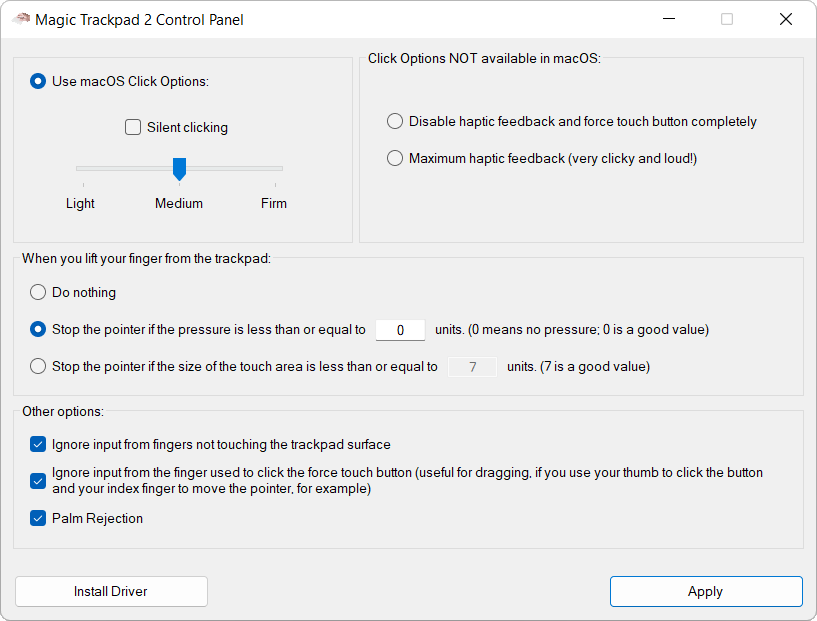
The previous version of this project used a hack to install itself in the DriverStore and couldn't support Bluetooth. At the beginning of this year, I decided to purchase an EV certificate to properly sign the driver: I paid 485 euros for it, including taxes that I have no way of recovering as an individual (btw, only organizations can request an EV certificate). I was tired of seeing people resorting to the wildest hacks to get the MT2 to work via Bluetooth 😀 (you can get a glimpse of this in the issues of this repo). Windows drivers signing requirements and costs are unfair to open-source developers.
Installation on Windows 11
-
Uninstall any previous versions of this driver, imbushuo or
official 2021 Apple driver. Personally I use DriverStore Explorer for that, alternatively you can use Windows Device Manager. Also, it's especially important to uninstallMagic UtilitiesandTrackpad++before continuing with the installation! -
Download the zip file of this project from the Releases of this repo and unzip it.
-
Select your architecture: AMD64 or ARM64. Right-click on the INF file and click "Install".
Note about Windows 10
Windows 10 AMD64 is supported through this workaround.
Windows 10 ARM64 is not supported.
Credits
- This excellent PR of 1Revenger1 to the imbushuo repo, which fixes the "near field fingers" problem, cleans up the code, and removes the QueryPerformanceCounter call in the interrupt function.
- The haptic feedback control messages sent by the driver to the MT2 in this project are based on the excellent reverse engineering work of dos1 (here).
- My long-time friends at Landlogic IT, who took care of the grueling process of gaining access to Microsoft's Hardware Dashboard and who take care of signing the driver packages for me.
- @ordens, Taylor Sharp, @Wikiwix, @nagromc, @danspel, 乔泽昱, Purasu Oy for their contribution to the purchase of the EV certificate (more info here).
Contributors
Showing top 2 contributors by commit count.


Related Repositories

ExistentialAudio/BlackHole
BlackHole is a modern macOS audio loopback driver that allows applications to pass audio to other applications with zero additional latency.

lostindark/DriverStoreExplorer
Driver Store Explorer
imbushuo/mac-precision-touchpad
Windows Precision Touchpad Driver Implementation for Apple MacBook / Magic Trackpad

winfsp/winfsp
Windows File System Proxy - FUSE for Windows

porsager/postgres
Postgres.js - The Fastest full featured PostgreSQL client for Node.js, Deno, Bun and CloudFlare

mongodb/mongo-go-driver
The Official Golang driver for MongoDB