

Dispatch
Dispatch is a framework for deploying and managing serverless style applications.
> **IMPORTANT:** VMware has ended active development of this project, this repository will no longer be updated. The project is written primarily in Go, distributed under the Apache License 2.0 license, first published in 2017. Key topics include: dispatch, faas, functions, kubernetes, serverless.
IMPORTANT: VMware has ended active development of this project, this repository will no longer be updated.

NOTE: This is the knative branch of Dispatch. Full Dispatch functionality is still a ways off. The code here
represents a work in progress. For information about Dispatch Solo, the version of Dispatch distributed as an OVA,
see thesolobranch or documentation.
Dispatch is a framework for deploying and managing serverless style applications. The intent is a framework
which enables developers to build applications which are defined by functions which handle business logic and services
which provide all other functionality:
- State (Databases)
- Messaging/Eventing (Queues)
- Ingress (Api-Gateways)
- Etc.
Our goal is to provide a substrate which can be built upon and extended to serve as a framework for serverless
applications. Additionally, the framework must provide tools and features which aid the developer in building,
debugging and maintaining their serverless application.
Documentation
Checkout the detailed documentation including a quickstart guide.
Architecture
NOTE: The information in this section is specific to the knative branch of Dispatch. Equivalent documentation for Dispatch Solo can be found on the
solobranch.
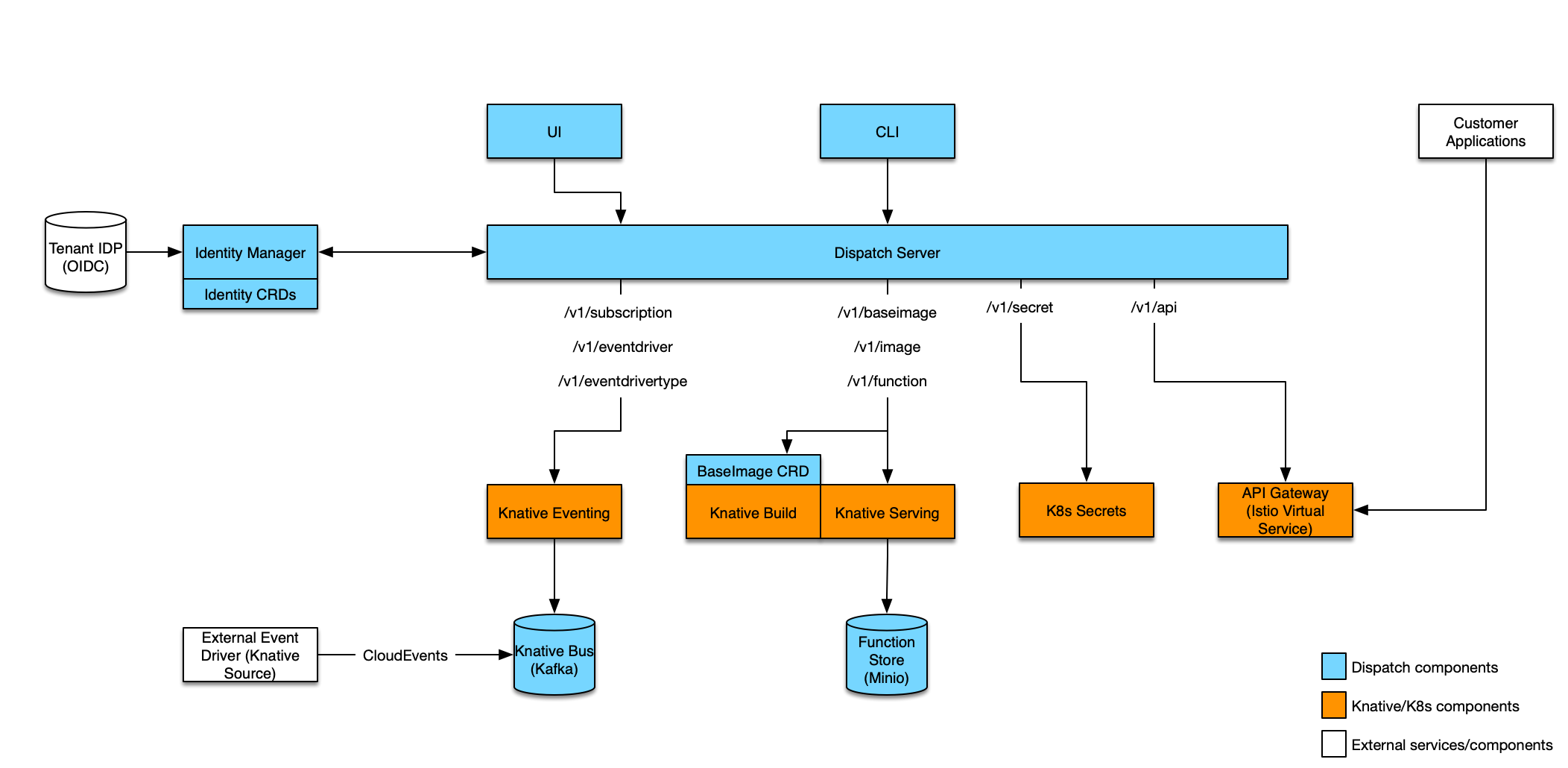
The diagram below illustrates the different components which make up the Dispatch project:
Installation
NOTE: The information in this section is specific to the knative branch of Dispatch. Equivalent documentation for Dispatch Solo can be found on the
solobranch.
Prerequisites
GKE
-
bash
export GCLOUD_KEY=<path to key.json> -
Create GKE cluster:
bashK8S_VERSION=1.10.7-gke.6 export CLUSTER_NAME=dispatch-knative gcloud container clusters create -m n1-standard-4 --cluster-version ${K8S_VERSION} ${CLUSTER_NAME} gcloud container clusters get-credentials ${CLUSTER_NAME} -
Install Knative:
bash# Get the current knative verision used with dispatch KNATIVE_VERSION=$(cat Gopkg.toml | grep -A 2 'name = "github.com/knative/serving"' | grep revision | cut -d '"' -f2) ./scripts/install-knative.py ${CLUSTER_NAME} --gcloud-key=${GCLOUD_KEY} --revision=${KNATIVE_VERSION}
VMware Cloud PKS
-
Create a Cloud PKS cluster with privileged mode enabled.
bashexport VKE_CLUSTER=dispatch-knative vke cluster create --privilegedMode --name $VKE_CLUSTER --cluster-type PRODUCTION --region us-west-2 -
Get kubectl credentials:
bashvke cluster auth setup $VKE_CLUSTER -
Install Knative:
- Install Istio:
bash
kubectl apply -f third-party/vmware-cloud-pks/istio-1.0.2/istio.yaml - Wait for Istio pods to become READY (will take a little while to scale up smart cluster):
bash
kubectl get pods -n istio-system NAME READY STATUS RESTARTS AGE istio-citadel-746c765786-2cm5p 1/1 Running 0 6m istio-cleanup-secrets-vbqk7 0/1 Completed 0 6m istio-egressgateway-57df84cfcf-hpkx4 1/1 Running 0 6m istio-galley-5b4f774c-9gcqm 1/1 Running 0 6m istio-ingressgateway-76dbd65c-7qf2w 1/1 Running 0 6m istio-pilot-7ddfbdf465-cj5jl 2/2 Running 0 6m istio-policy-56789fbb8c-flxkz 2/2 Running 0 6m istio-statsd-prom-bridge-7c77ddc9b9-s2zwl 1/1 Running 0 6m istio-telemetry-855bb88878-kbhsj - Install Knative serving (includes build):
bash
kubectl apply -f third-party/vmware-cloud-pks/serving-0.2.2/release.yaml
- Install Istio:
Other
In order to install Knative, follow the development instructions
Dispatch
Installing Dispatch depends on having a Kubernetes cluster with the Knative components installed (Build, Serving and soon Eventing). From here build and install dispatch as follows:
-
Set the following environment variables:
bashexport DISPATCH_NAMESPACE="default" export DISPATCH_DEBUG="true" export RELEASE_NAME="dispatch" export MINIO_USERNAME="dispatch" export MINIO_PASSWORD="dispatch" export INGRESS_IP=$(kubectl get service -n istio-system knative-ingressgateway -o wide | tail -n1 | awk '{print $4}') -
Build and publish a dispatch image (Substitute in your docker repository):
Note: if you just want to use a pre-created image use the script to create your
values.yamland continue to step 4.bashTAG="v0.1.22-knative" ./scripts/values.shbashDISPATCH_SERVER_DOCKER_REPOSITORY=<docker repository username> PUSH_IMAGES=1 make images -
The previous command will output a configuration file
values.yaml:yamlimage: host: username tag: v0.1.xx registry: url: http://dispatch-docker-registry:5000/ repository: dispatch-docker-registry:5000 storage: minio: address: dispatch-minio:9000 username: ******** password: ******** -
Deploy via helm chart (if helm is not installed and initialized, do that first):
bashhelm init --wait # helm won't overwrite the existing config-maps (at least not the first/install time), so explicitly delete them. kubectl delete configmap -n knative-serving config-domain config-network helm dependency build ./charts/dispatch/ helm upgrade -i --debug ${RELEASE_NAME} ./charts/dispatch --namespace ${DISPATCH_NAMESPACE} -f values.yamlNOTE: Use following to create cluster role binding for tiller:
bashkubectl create clusterrolebinding tiller-cluster-admin --clusterrole=cluster-admin --serviceaccount=kube-system:default -
Reconfigure Knative serving (need to whitelist our internal repository):
bash./scripts/configure-knative.sh -
Build the CLI (substitute darwin for linux if needed):
bashmake cli-darwin # Create symlink to binary ln -s `pwd`/bin/dispatch-darwin /usr/local/bin/dispatch -
Create the Dispatch config:
bashcat << EOF > config.json { "current": "${RELEASE_NAME}", "contexts": { "${RELEASE_NAME}": { "host": "$(kubectl -n ${DISPATCH_NAMESPACE} get service ${RELEASE_NAME}-nginx-ingress-controller -o wide | tail -n1 | awk '{print $4}')", "port": 443, "scheme": "https", "insecure": true } } } EOF # point to the config file (could also move to ~/.dispatch/config) export DISPATCH_CONFIG=`pwd`/config.json -
Test out your install:
First, create an baseimage:bashdispatch create base-image python3-base dispatchframework/python3-base:0.0.13-knative Created baseimage: python3-baseThen, create an image:
bashdispatch create image python3 python3-base Created image: python3Wait for status READY:
bashdispatch get images NAME | DESTINATION | BASEIMAGE | STATUS | CREATED DATE -------------------------------------------------------------------------- python3 | *********** | ********* | READY | Tue Sep 25 16:51:35 PDT 2018Create a function:
bashdispatch create function --image python3 hello ./examples/python3/hello.py Created function: helloOnce status is READY:
bashdispatch get function NAME | FUNCTIONIMAGE | STATUS | CREATED DATE ---------------------------------------------------------------- hello | ************* | READY | Thu Sep 13 12:41:07 PDT 2018Exec the function:
bashdispatch exec hello <<< '{"name": "user"}' | jq . { "context": { "logs": { "stdout": [ "messages to stdout show up in logs" ], "stderr": null } }, "payload": { "myField": "Hello, user from Nowhere" } }Create an endpoint:
bashdispatch create endpoint get-hello hello --method GET --method POST --path /helloHit the endpoint with curl:
bashcurl -v http://${INGRESS_IP}/hello?name=Jon -H 'Host: default.${DISPATCH_NAMESPACE}.dispatch.local'
For a more complete quickstart see the developer documentation
Contributors
Showing top 12 contributors by commit count.






Related Repositories

skywind3000/asyncrun.vim
:rocket: Run Async Shell Commands in Vim 8.0 / NeoVim and Output to the Quickfix Window !!

FabrizioBrancati/Queuer
Queuer is a queue manager, built on top of OperationQueue and Dispatch (aka GCD).

AnswerDotAI/fastcore
Python supercharged for the fastai library

belozierov/SwiftCoroutine
Swift coroutines for iOS, macOS and Linux.

TimoKoerber/laravel-one-time-operations
Run operations once after deployment - just like you do it with migrations!

khlieng/dispatch
Web-based IRC client in Go.