

Civet
一款类似Eagle的,基于electron-vue及C++开发的本地图片素材管理软件。An Image management software.
> :kissing_heart: 支持多平台(Windows/Mac/Ubuntu)的资源管理软件。 目标是希望像VSCode那样,以扩展的形式为用户提供一个数字资产(图片、文档、视频、文献、网页等)的管理软件。 The project is written primarily in TypeScript, distributed under the MIT License license, first published in 2020. Key topics include: billfish, civet, eagle, electron, image.
Latest release: v0.3.1— Release v0.3.1
July 26, 2022View Changelog →
<div align="center">
<h1><img src="src/main/asset/icon.png" alt="" height="35" width="35"/>Civet</h1>
<blockquote>资源管理新体验</blockquote>
<a href="https://github.com/webbery/civet/actions">
<img src="https://github.com/webbery/civet/workflows/win-build/badge.svg" alt="">
</a>
<a href="https://github.com/webbery/civet/actions">
<img src="https://github.com/webbery/civet/workflows/mac-build/badge.svg" alt="">
</a>
<a href="https://github.com/webbery/civet/actions">
<img src="https://github.com/webbery/civet/workflows/linux-build/badge.svg" alt="">
</a>
<a href="https://github.com/webbery/civet/releases/latest">
<img src="https://img.shields.io/github/v/tag/webbery/civet.svg?style=flat-square" alt="">
</a>
<a href="https://gitter.im/webbery/civet?utm_source=badge&utm_medium=badge&utm_campaign=pr-badge&utm_content=badge">
<img src="https://badges.gitter.im/webbery/civet.svg" alt="">
</a>
</div>
简体中文 | English
应用概述
:kissing_heart: 支持多平台(Windows/Mac/Ubuntu)的资源管理软件。
目标是希望像VSCode那样,以扩展的形式为用户提供一个数字资产(图片、文档、视频、文献、网页等)的管理软件。
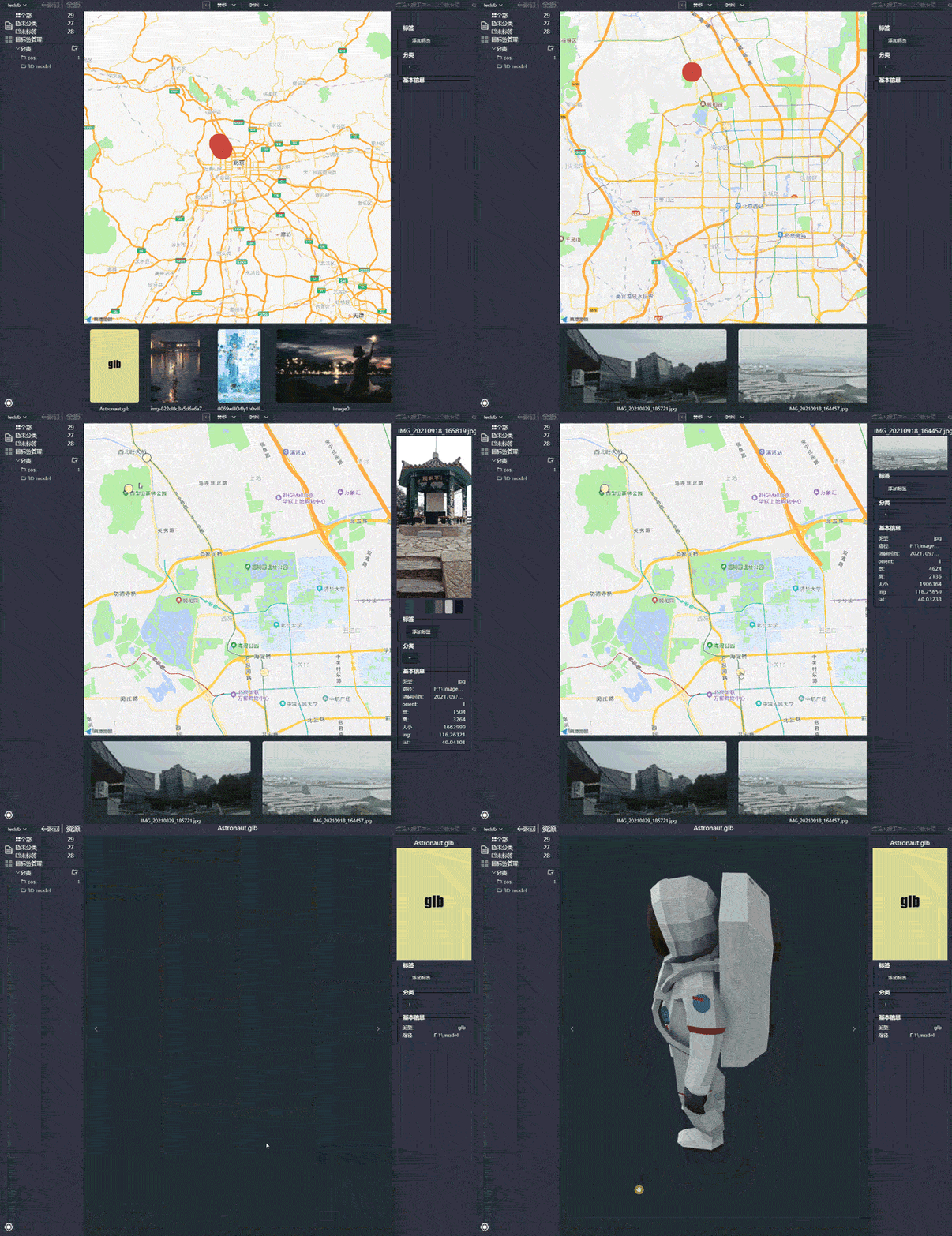
目录
<!-- vscode-markdown-toc --> <!-- vscode-markdown-toc-config numbering=true autoSave=true /vscode-markdown-toc-config --> <!-- /vscode-markdown-toc -->1. <a name='BuildInstall'></a>Build/Install
开发版本下载链接: Development Version
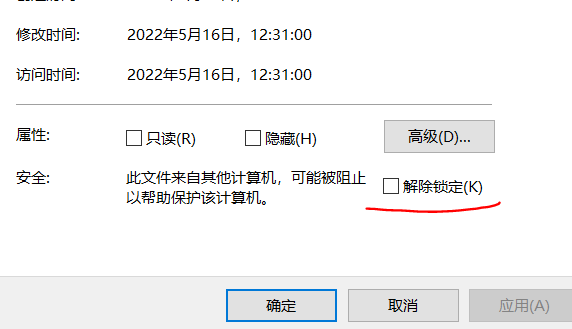
当前windows环境下因为没有签名的原因,所以需要在安装文件的右键“属性”->“常规”中关闭掉安全选项
由于版本更新比较慢,所以也可以自行编译。
编译安装方式:
- 确保自己平台的node版本是node 14,C++编译器支持C++17。如果使用的是Ubuntu16,可以使用
update-alternatives命令安装并切换高版本的gcc - 在下载的源代码目录下,运行
npm install安装相关的依赖包 - 执行
npm run build打包安装包;执行该命令会安装插件的依赖项 - 如果是在Mac环境下,请确保自己的环境能够进行签名打包
2. <a name='Design'></a>wiki
插件开发
浏览器扩展接口
浏览器图片下载扩展(支持firefox/chrome/opera)
讨论区
Wiki
道阻且长,行则将至。
3. <a name='RoadMap'></a>Feature/RoadMap
- 自定义界面扩展,增加数据源插件功能,以支持多种格式(本地及网页等)的数据读取和展示
:white_square_button: 增加存储插件功能,以支持多种数据存储方式(如本地复制、云存储等) - 支持信息提取的插件开发,利用插件可以为不同类型的文件抽取信息,并进行存储与检索
- 引入HTML5批注规范,为各种类型的文件增加批注功能
- 升级数据库,增强搜索(经典筛选+向量搜索)功能
4. <a name='SoftComp'></a>类似软件对比
| 软件 | 界面 | 开发语言 | 本地存储 | 协议 | 平台 |
|---|---|---|---|---|---|
| Civet | Electron | Typescript/C++ | lmdb | 开源MIT | Windows/Mac/Ubuntu |
| Eagle | Electron | Js | Json/图片拷贝 | 私有 | Windows/Mac |
| Billfish | Qt | C++ | SQLite + 图片拷贝/索引 | 私有 | Windows/Mac |
| PicSee | ObjectC | ObjectC | Realm | 私有 | Mac |
| Pixcall | Electron | Clojure/Rust | SQLite + 图片拷贝/索引 | 私有 | Windows/Mac |
内置插件支持的文件格式:
- 图片: jpg png bmp tif
- 3D模型: glt
<a name='Contributors'></a>Contributors
<!-- readme: contributors -start --> <table> <tr> <td align="center"> <a href="https://github.com/webbery"> <img src="https://avatars.githubusercontent.com/u/5257853?v=4" width="100;" alt="webbery"/> <br /> <sub><b>Webberg</b></sub> </a> </td> <td align="center"> <a href="https://github.com/PixcallLabs"> <img src="https://avatars.githubusercontent.com/u/91412844?v=4" width="100;" alt="PixcallLabs"/> <br /> <sub><b>PixcallLabs</b></sub> </a> </td></tr> </table> <!-- readme: contributors -end -->Contributors
Showing top 4 contributors by commit count.

![dependabot[bot]](https://avatars.githubusercontent.com/in/29110?v=4)
![github-actions[bot]](https://avatars.githubusercontent.com/in/15368?v=4)

Related Repositories

This article is auto-generated from webbery/civet via the GitHub API.Last fetched: 6/14/2026