

V webui
Use any web browser as GUI, with V in the backend and modern web technologies in the frontend.
[build-status]: https://img.shields.io/github/actions/workflow/status/webui-dev/v-webui/ci.yml?branch=main&style=for-the-badge&logo=V&labelColor=414868&logoColor=C0CAF5 [last-commit]: https://img.shields.io/github/last-commit/webui-dev/v-webui?style=for-the-badge&logo=github&logoColor=C0CAF5&labelColor=414868 [release-version]: https://img.shields.io/github/v/release/webui-dev/v-webui?style=for-the-badge&logo=webtrees&logoColor=C0CAF5&labelColor=414868&color=7664C6 [license]: https://img.shields... The project is written primarily in V, distributed under the MIT License license, first published in 2022. Key topics include: brave-browser, browser, chrome, chromium, cross-platform.

V-WebUI
Features · Installation · Usage · Documentation · WebUI


Use any web browser or WebView as GUI.
With V in the backend and modern web technologies in the frontend.
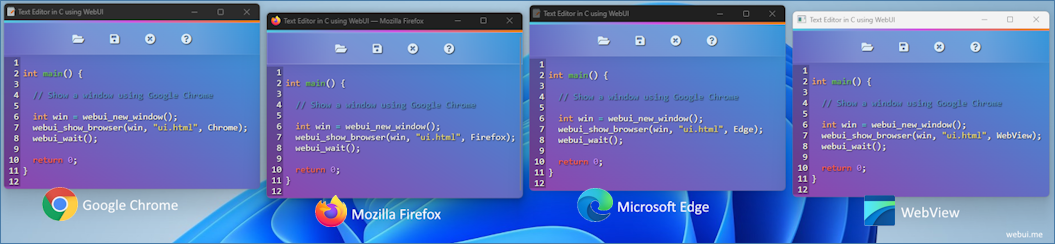
Features
- Parent library written in pure C
- Fully Independent (No need for any third-party runtimes)
- Lightweight ~200 Kb & Small memory footprint
- Fast binary communication protocol between WebUI and the browser (Instead of JSON)
- Multi-platform & Multi-Browser
- Using private profile for safety
Installation
shv install https://github.com/webui-dev/v-webui
Usage
[!NOTE]
It is recommended to use GCC or Clang to compile a WebUI V program.
TCC is currently not working due to missing header files. E.g.:v -cc gcc run .
Example
vimport vwebui as ui const html = '<!DOCTYPE html> <html> <head> <script src="webui.js"></script> <style> body { background: linear-gradient(to left, #36265a, #654da9); color: AliceBlue; font: 16px sans-serif; text-align: center; margin-top: 30px; } </style> </head> <body> <h1>Welcome to WebUI!</h1> <br> <input type="text" id="name" value="Neo"> <button onclick="handleVResponse();">Call V</button> <br> <br> <div><samp id="greeting"></samp></div> <script> async function handleVResponse() { const inputName = document.getElementById("name"); const result = await webui.greet(inputName.value); document.getElementById("greeting").innerHTML = result; } </script> </body> </html>' fn greet(e &ui.Event) string { name := e.get_arg[string]() or { panic('expected an argument') } println('${name} has reached the backend!') return 'Hello ${name} 🐇' } fn main() { mut w := ui.new_window() w.bind('greet', greet) w.show(html)! ui.wait() }
Find more examples in the examples/ directory.
Documentation
- Online Documentation (WIP)
[!TIP]
Until our online documentation is finished, you can refer tosrc/lib.vor use V's built-inv doc -comments vwebuiin the terminal for the latest overview of exported functions.
-
To use WebUI's debug build in your V-WebUI application, add the
-d debugflag. E.g.:shv -d webui_log run examples/call_v_from_js.v -
Run tests locally:
shVJOBS=1 v -stats test tests/
Supported Web Browsers
| Browser | Windows | macOS | Linux |
|---|---|---|---|
| Mozilla Firefox | ✔️ | ✔️ | ✔️ |
| Google Chrome | ✔️ | ✔️ | ✔️ |
| Microsoft Edge | ✔️ | ✔️ | ✔️ |
| Chromium | ✔️ | ✔️ | ✔️ |
| Yandex | ✔️ | ✔️ | ✔️ |
| Brave | ✔️ | ✔️ | ✔️ |
| Vivaldi | ✔️ | ✔️ | ✔️ |
| Epic | ✔️ | ✔️ | not available |
| Apple Safari | not available | coming soon | not available |
| Opera | coming soon | coming soon | coming soon |
License
Licensed under the MIT License.
Contributors
Showing top 5 contributors by commit count.


Related Repositories

DandelionSprout/adfilt
The place where I, DandelionSprout, store my web filter lists for countless topics, including my Nordic adblock list. As simple as that, really.

JingMatrix/ChromeXt
UserScript and DevTools supports for Chromium based and WebView based browsers

Tobi823/ffupdater
FFUpdater: Updater for privacy friendly browser

LimerBoy/Adamantium-Thief
:key: (THIS CODE IS OUTDATED FOR NEW CHROME VERSIONS) Decrypt chromium based browsers passwords, cookies, credit cards, history, bookmarks, autofill. Version > 80 is supported.

ltx0101/SlimBrave
Debloat Brave for faster performance and smoother browsing.

ChaoticSi1ence/SlimBrave-Neo
SlimBrave Neo — Debloat and harden Brave Browser on Linux and Windows. Python curses TUI + CLI. Zero dependencies.