

Perspective
Powerful scrolling and motion parallax for iOS
***Perspective*** is a powerful and lightweight library to create scrolling and motion parallax. The project is written primarily in Swift, distributed under the MIT License license, first published in 2019. Key topics include: ios, motion, parallax, parallax-scrolling, scrolling.
Perspective is a powerful and lightweight library to create scrolling and motion parallax.
<p align="center"> <img src="https://user-images.githubusercontent.com/798235/51496460-24cf4300-1dc0-11e9-9d6c-97d753498f5b.gif" alt="Scrolling and motion parallax" /> </p>(Credits: the assets used in the example project come from Free Game Assets)
<p align="center"> <a href="#requirements">Requirements</a> • <a href="#usage">Usage</a> • <a href="#installation">Installation</a> • <a href="#contribution">Contribution</a> • <a href="#contact">Contact</a> • <a href="#license-mit">License</a> </p>Requirements
- iOS 11.0+
- Xcode 10.0+
- Swift 5+
Usage
Basics
Create a PerspectiveView:
swiftimport Perspective let perspectiveView = PerspectiveView(frame: CGRect(x: 0, y: 0, width: 100, height: 100)) view.addSubview(perspectiveView)
Configure its contentSize:
swiftperspectiveView.contentSize = CGSize(width: 1599, height: 900)
Add the images as arranged subviews:
swiftfor i in stride(from: 7, to: 0, by: -1) { let imgView = UIImageView(image: UIImage(named: "castle-layer0\(i)")) imgView.frame.size = CGSize(width: 1599, height: 900) perspectiveView.addArrangedSubview(imgView) }
Behaviours
A behaviour is an object that allows you to interact with the perspective view. If you want to let your users to scroll the persective you can add a PerspectiveScrollBehaviour, and if you want to use the accelerometer just add a PerspectiveMotionBehaviour. To add a new behaviour to your perspective view you must call the addBehaviour method.
Scroll
swiftperspectiveView.addBehaviour(PerspectiveScrollBehaviour())
Motion
swiftperspectiveView.addBehaviour(PerspectiveMotionBehaviour())
How it works
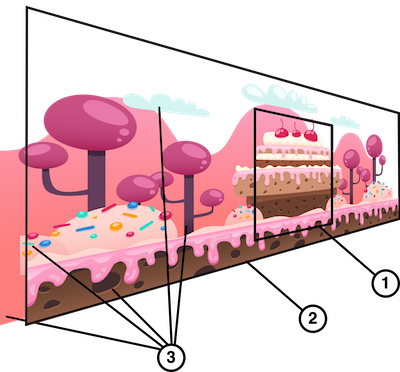
- the
PerspectiveView'sframerectangle: describes the view’s location and size in its superview’s coordinate system like any anotherUIView. - the
PerspectiveView'scontentSize: defines the extent of the content (usuallyUIImageView). - the
arrangedSubviews: list the views arranged by the perspective view. The order of the views work like in anyUIView. The foreground view is at the end of the array (as opposite to the background which is the first element of the array).
Configuration
If you use the motion behaviour, configure the UIRequiredDeviceCapabilities key of its Info.plist file with the accelerometer and gyroscope values:

To go further, take a look at the example project.
Installation
The recommended approach to use Perspective in your project is using the CocoaPods package manager, as it provides flexible dependency management and dead simple installation.
CocoaPods
Install CocoaPods if not already available:
bash$ [sudo] gem install cocoapods $ pod setup
Go to the directory of your Xcode project, and Create and Edit your Podfile and add Perspective:
bash$ cd /path/to/MyProject $ touch Podfile $ edit Podfile source 'https://github.com/CocoaPods/Specs.git' platform :ios, '11.0' use_frameworks! pod 'Perspective', '~> 0.9.1'
Install into your project:
bash$ pod install
Open your project in Xcode from the .xcworkspace file (not the usual project file):
bash$ open MyProject.xcworkspace
You can now import Perspective framework into your files.
Carthage
Carthage is a decentralized dependency manager that automates the process of adding frameworks to your Cocoa application.
You can install Carthage with Homebrew using the following command:
bash$ brew update $ brew install carthage
To integrate Perspective into your Xcode project using Carthage, specify it in your Cartfile file:
ogdlgithub "yannickl/Perspective" >= 0.9.1
Manually
Download the project and copy the Perspective folder into your project to use it in.
Contribution
Contributions are welcomed and encouraged ♡.
Contact
Yannick Loriot
License (MIT)
Copyright (c) 2018-present - Yannick Loriot
Permission is hereby granted, free of charge, to any person obtaining a copy
of this software and associated documentation files (the "Software"), to deal
in the Software without restriction, including without limitation the rights
to use, copy, modify, merge, publish, distribute, sublicense, and/or sell
copies of the Software, and to permit persons to whom the Software is
furnished to do so, subject to the following conditions:
The above copyright notice and this permission notice shall be included in
all copies or substantial portions of the Software.
THE SOFTWARE IS PROVIDED "AS IS", WITHOUT WARRANTY OF ANY KIND, EXPRESS OR
IMPLIED, INCLUDING BUT NOT LIMITED TO THE WARRANTIES OF MERCHANTABILITY,
FITNESS FOR A PARTICULAR PURPOSE AND NONINFRINGEMENT. IN NO EVENT SHALL THE
AUTHORS OR COPYRIGHT HOLDERS BE LIABLE FOR ANY CLAIM, DAMAGES OR OTHER
LIABILITY, WHETHER IN AN ACTION OF CONTRACT, TORT OR OTHERWISE, ARISING FROM,
OUT OF OR IN CONNECTION WITH THE SOFTWARE OR THE USE OR OTHER DEALINGS IN
THE SOFTWARE.
Contributors
Showing top 1 contributor by commit count.

Related Repositories

flutter/flutter
Flutter makes it easy and fast to build beautiful apps for mobile and beyond

react/react-native
A framework for building native applications using React

rustdesk/rustdesk
An open-source remote desktop application designed for self-hosting, as an alternative to TeamViewer.

justjavac/free-programming-books-zh_CN
:books: 免费的计算机编程类中文书籍,欢迎投稿

Solido/awesome-flutter
An awesome list that curates the best Flutter libraries, tools, tutorials, articles and more.

FiloSottile/mkcert
A simple zero-config tool to make locally trusted development certificates with any names you'd like.