

VectorDBBench
Benchmark for vector databases.
VDBBench is not just an offering of benchmark results for mainstream vector databases and cloud services, it's your go-to tool for the ultimate performance and cost-effectiveness comparison. Designed with ease-of-use in mind, VDBBench is devised to help users, even non-professionals, reproduce results or test new systems, making the hunt for the optimal choice amongst a plethora of cloud services and open-source vector databases a breeze. The project is written primarily in Python, distributed under the MIT License license, first published in 2023. It has gained significant community traction with 1,128 stars and 398 forks on GitHub. Key topics include: benchmark, cost-effectiveness, performance, vector-database, vector-search.
VectorDBBench(VDBBench): A Benchmark Tool for VectorDB

What is VDBBench
VDBBench is not just an offering of benchmark results for mainstream vector databases and cloud services, it's your go-to tool for the ultimate performance and cost-effectiveness comparison. Designed with ease-of-use in mind, VDBBench is devised to help users, even non-professionals, reproduce results or test new systems, making the hunt for the optimal choice amongst a plethora of cloud services and open-source vector databases a breeze.
Understanding the importance of user experience, we provide an intuitive visual interface. This not only empowers users to initiate benchmarks at ease, but also to view comparative result reports, thereby reproducing benchmark results effortlessly.
To add more relevance and practicality, we provide cost-effectiveness reports particularly for cloud services. This allows for a more realistic and applicable benchmarking process.
Closely mimicking real-world production environments, we've set up diverse testing scenarios including insertion, searching, and filtered searching. To provide you with credible and reliable data, we've included public datasets from actual production scenarios, such as SIFT, GIST, Cohere, and a dataset generated by OpenAI from an opensource raw dataset. It's fascinating to discover how a relatively unknown open-source database might excel in certain circumstances!
Prepare to delve into the world of VDBBench, and let it guide you in uncovering your perfect vector database match.
VDBBench is sponsored by Zilliz,the leading opensource vectorDB company behind Milvus. Choose smarter with VDBBench - start your free test on zilliz cloud today!
Leaderboard: https://zilliz.com/benchmark
Quick Start
Prerequirement
shellpython >= 3.11
Install
Install vectordb-bench with only PyMilvus
shellpip install vectordb-bench
Install the specific database client
shellpip install 'vectordb-bench[pinecone]'
All the database client supported
| Optional database client | install command |
|---|---|
| pymilvus, zilliz_cloud (default) | pip install vectordb-bench |
| qdrant | pip install vectordb-bench[qdrant] |
| pinecone | pip install vectordb-bench[pinecone] |
| weaviate | pip install vectordb-bench[weaviate] |
| elastic, aliyun_elasticsearch | pip install vectordb-bench[elastic] |
| pgvector, pgvectorscale, pgdiskann, alloydb, vectorchord | pip install vectordb-bench[pgvector] |
| pgvecto.rs | pip install vectordb-bench[pgvecto_rs] |
| redis | pip install vectordb-bench[redis] |
| memorydb | pip install vectordb-bench[memorydb] |
| chromadb | pip install vectordb-bench[chromadb] |
| cockroachdb | pip install vectordb-bench[cockroachdb] |
| awsopensearch | pip install vectordb-bench[opensearch] |
| aliyun_opensearch | pip install vectordb-bench[aliyun_opensearch] |
| mongodb | pip install vectordb-bench[mongodb] |
| tidb | pip install vectordb-bench[tidb] |
| vespa | pip install vectordb-bench[vespa] |
| oceanbase | pip install vectordb-bench[oceanbase] |
| hologres | pip install vectordb-bench[hologres] |
| tencent_es | pip install vectordb-bench[tencent_es] |
| alisql | pip install 'vectordb-bench[alisql]' |
| polardb | pip install vectordb-bench[polardb] |
| doris | pip install vectordb-bench[doris] |
| zvec | pip install vectordb-bench[zvec] |
| endee | pip install vectordb-bench[endee] |
| lindorm | pip install vectordb-bench[lindorm] |
Run
shellinit_bench
OR:
Run from the command line.
shellvectordbbench [OPTIONS] COMMAND [ARGS]...
To list the clients that are runnable via the commandline option, execute: vectordbbench --help
text$ vectordbbench --help Usage: vectordbbench [OPTIONS] COMMAND [ARGS]... Options: --help Show this message and exit. Commands: pgvectorhnsw pgvectorivfflat vectorchordrq test weaviate
To list the options for each command, execute vectordbbench [command] --help
text$ vectordbbench pgvectorhnsw --help Usage: vectordbbench pgvectorhnsw [OPTIONS] Options: --config-file PATH Read configuration from yaml file --drop-old / --skip-drop-old Drop old or skip [default: drop-old] --load / --skip-load Load or skip [default: load] --search-serial / --skip-search-serial Search serial or skip [default: search- serial] --search-concurrent / --skip-search-concurrent Search concurrent or skip [default: search- concurrent] --case-type [CapacityDim128|CapacityDim960|Performance768D100M|Performance768D10M|Performance768D1M|Performance768D10M1P|Performance768D1M1P|Performance768D10M99P|Performance768D1M99P|Performance1536D500K|Performance1536D5M|Performance1536D500K1P|Performance1536D5M1P|Performance1536D500K99P|Performance1536D5M99P|Performance1536D50K] Case type --db-label TEXT Db label, default: date in ISO format [default: 2024-05-20T20:26:31.113290] --dry-run Print just the configuration and exit without running the tasks --k INTEGER K value for number of nearest neighbors to search [default: 100] --concurrency-duration INTEGER Adjusts the duration in seconds of each concurrency search [default: 30] --num-concurrency TEXT Comma-separated list of concurrency values to test during concurrent search [default: 1,10,20] --concurrency-timeout INTEGER Timeout (in seconds) to wait for a concurrency slot before failing. Set to a negative value to wait indefinitely. [default: 3600] --user-name TEXT Db username [required] --password TEXT Db password [required] --host TEXT Db host [required] --db-name TEXT Db name [required] --maintenance-work-mem TEXT Sets the maximum memory to be used for maintenance operations (index creation). Can be entered as string with unit like '64GB' or as an integer number of KB.This will set the parameters: max_parallel_maintenance_workers, max_parallel_workers & table(parallel_workers) --max-parallel-workers INTEGER Sets the maximum number of parallel processes per maintenance operation (index creation) --m INTEGER hnsw m --ef-construction INTEGER hnsw ef-construction --ef-search INTEGER hnsw ef-search --quantization-type [none|bit|halfvec] quantization type for vectors (in index) --table-quantization-type [none|bit|halfvec] quantization type for vectors (in table). If equal to bit, the parameter quantization_type will be set to bit too. --reranking / --skip-reranking Enable reranking for HNSW search for binary quantization --reranking-metric [L2|COSINE|IP|DP] Distance metric for reranking [default: COSINE] --quantized-fetch-limit INTEGER Limit of fetching quantized vector ranked by distance for reranking -- bound by ef_search --custom-case-name TEXT Custom case name i.e. PerformanceCase1536D50K --custom-case-description TEXT Custom name description --custom-case-load-timeout INTEGER Custom case load timeout [default: 36000] --custom-case-optimize-timeout INTEGER Custom case optimize timeout [default: 36000] --custom-dataset-name TEXT Dataset name i.e OpenAI --custom-dataset-dir TEXT Dataset directory i.e. openai_medium_500k --custom-dataset-size INTEGER Dataset size i.e. 500000 --custom-dataset-dim INTEGER Dataset dimension --custom-dataset-metric-type TEXT Dataset distance metric [default: COSINE] --custom-dataset-file-count INTEGER Dataset file count --custom-dataset-use-shuffled / --skip-custom-dataset-use-shuffled Use shuffled custom dataset or skip [default: custom-dataset- use-shuffled] --custom-dataset-with-gt / --skip-custom-dataset-with-gt Custom dataset with ground truth or skip [default: custom-dataset- with-gt] --help Show this message and exit.
Run VectorChord (vchordrq) from command line
VectorChord is a PostgreSQL extension for scalable vector similarity search using IVF + RaBitQ indexing.
It is fully compatible with pgvector data types and provides faster queries and index builds.
shellvectordbbench vectorchordrq \ --user-name postgres --password '<password>' \ --host localhost --port 5432 --db-name vectordb \ --case-type Performance1536D50K \ --lists 1000 --probes 10 --epsilon 1.9 \ --spherical-centroids --build-threads 8 \ --max-parallel-workers 15
Key VectorChord-specific options:
| Option | Description |
|---|---|
--lists | Number of IVF lists for vchordrq index |
--probes | Number of probes during search (default: 10) |
--epsilon | Reranking precision factor, 0.0-4.0 (default: 1.9) |
--residual-quantization | Enable residual quantization |
--spherical-centroids | L2-normalize centroids (recommended for cosine/IP) |
--build-threads | Number of threads for index building (1-255) |
--degree-of-parallelism | Degree of parallelism for index build (1-256) |
--max-parallel-workers | Sets max_parallel_workers & max_parallel_maintenance_workers |
--max-scan-tuples | Max tuples to scan before stopping (-1 for unlimited) |
Run awsopensearch from command line
shellvectordbbench awsopensearch --db-label awsopensearch \ --m 16 --ef-construction 256 \ --host search-vector-db-prod-h4f6m4of6x7yp2rz7gdmots7w4.us-west-2.es.amazonaws.com --port 443 \ --user vector --password '<password>' \ --case-type Performance1536D5M --number-of-indexing-clients 10 \ --skip-load --num-concurrency 75
To list the options for awsopensearch, execute vectordbbench awsopensearch --help
text$ vectordbbench awsopensearch --help Usage: vectordbbench awsopensearch [OPTIONS] Options: # Sharding and Replication --number-of-shards INTEGER Number of primary shards for the index --number-of-replicas INTEGER Number of replica copies for each primary shard # Indexing Performance --index-thread-qty INTEGER Thread count for native engine indexing --index-thread-qty-during-force-merge INTEGER Thread count during force merge operations --number-of-indexing-clients INTEGER Number of concurrent indexing clients # Index Management --number-of-segments INTEGER Target number of segments after merging --refresh-interval TEXT How often to make new data available for search --force-merge-enabled BOOLEAN Whether to perform force merge operation --flush-threshold-size TEXT Size threshold for flushing the transaction log --engine TEXT type of engine to use valid values [faiss, lucene, s3vector] # Memory Management --cb-threshold TEXT k-NN Memory circuit breaker threshold --ondisk Ondisk mode with binary quantization(32x compression) --oversample-factor Controls the degree of oversampling applied to minority classes in imbalanced datasets to improve model performance by balancing class distributions.(default 1.0) # Quantization Type --quantization-type TEXT which type of quantization to use valid values [fp32, fp16, bq] --help Show this message and exit.
Run Elastic Cloud from command line
Elastic Cloud supports multiple index types: HNSW, HNSW_INT8, HNSW_INT4, and HNSW_BBQ.
Example: Run HNSW index test
shellvectordbbench elasticcloudhnsw --db-label elastic-cloud-test \ --cloud-id <your-cloud-id> --password '<your-password>' \ --m 16 --ef-construction 100 --num-candidates 100 \ --case-type Performance768D1M --number-of-shards 1 \ --number-of-replicas 0 --refresh-interval 30s
Example: Run HNSW_INT8 index test
shellvectordbbench elasticcloudhnswint8 --db-label elastic-cloud-int8 \ --cloud-id <your-cloud-id> --password '<your-password>' \ --m 16 --ef-construction 200 --num-candidates 200 \ --case-type Performance1536D50K --element-type float
Example: Run HNSW_INT4 index test
shellvectordbbench elasticcloudhnswint4 --db-label elastic-cloud-int4 \ --cloud-id <your-cloud-id> --password '<your-password>' \ --m 16 --ef-construction 200 --num-candidates 200 \ --case-type Performance768D10M --use-rescore --oversample-ratio 2.0
Example: Run HNSW_BBQ index test
shellvectordbbench elasticcloudhnswbbq --db-label elastic-cloud-bbq \ --cloud-id <your-cloud-id> --password '<your-password>' \ --m 16 --ef-construction 200 --num-candidates 200 \ --case-type Performance1536D5M --use-routing --use-force-merge
Example: Run Label Filter Performance test
shellvectordbbench elasticcloudhnsw --db-label elastic-cloud-label-filter \ --cloud-id <your-cloud-id> --password '<your-password>' \ --case-type LabelFilterPerformanceCase \ --dataset-with-size-type "Medium OpenAI (1536dim, 500K)" \ --label-percentage 0.001 \ --m 16 --ef-construction 128 --num-candidates 100 \ --num-concurrency 1,5 --number-of-shards 1
To list all options for Elastic Cloud, execute vectordbbench elasticcloudhnsw --help. The following are Elastic Cloud-specific command-line options:
text$ vectordbbench elasticcloudhnsw --help Usage: vectordbbench elasticcloudhnsw [OPTIONS] Options: # Connection --cloud-id TEXT Elastic Cloud ID [required] --password TEXT Elastic Cloud password [required] # HNSW Index Parameters --m INTEGER HNSW M parameter [default: 16] --ef-construction INTEGER HNSW efConstruction parameter [default: 100] --num-candidates INTEGER Number of candidates for search [default: 100] --element-type [float|byte] Element type for vectors (float: 4 bytes, byte: 1 byte) [default: float] # Index Configuration --number-of-shards INTEGER Number of shards [default: 1] --number-of-replicas INTEGER Number of replicas [default: 0] --refresh-interval TEXT Index refresh interval [default: 30s] --merge-max-thread-count INTEGER Maximum thread count for merge [default: 8] --use-force-merge BOOLEAN Whether to use force merge [default: True] --use-routing BOOLEAN Whether to use routing [default: False] --use-rescore BOOLEAN Whether to use rescore [default: False] --oversample-ratio FLOAT Oversample ratio for rescore [default: 2.0] # Common Options --case-type [CapacityDim128|CapacityDim960|Performance768D100M|...] Case type --db-label TEXT Db label, default: date in ISO format --k INTEGER K value for number of nearest neighbors to search [default: 100] --num-concurrency TEXT Comma-separated list of concurrency values [default: 1,5,10,20,30,40,60,80] --help Show this message and exit.
Run OceanBase from command line
Execute tests for the index types: HNSW, HNSW_SQ, or HNSW_BQ.
shellvectordbbench oceanbasehnsw --host xxx --port xxx --user root@mysql_tenant --database test \ --m 16 --ef-construction 200 --case-type Performance1536D50K \ --index-type HNSW --ef-search 100
To list the options for oceanbase, execute vectordbbench oceanbasehnsw --help, The following are some OceanBase-specific command-line options.
text$ vectordbbench oceanbasehnsw --help Usage: vectordbbench oceanbasehnsw [OPTIONS] Options: [...] --host TEXT OceanBase host --user TEXT OceanBase username [required] --password TEXT OceanBase database password --database TEXT DataBase name [required] --port INTEGER OceanBase port [required] --m INTEGER hnsw m [required] --ef-construction INTEGER hnsw ef-construction [required] --ef-search INTEGER hnsw ef-search [required] --index-type [HNSW|HNSW_SQ|HNSW_BQ] Type of index to use. Supported values: HNSW, HNSW_SQ, HNSW_BQ [required] --help Show this message and exit.
Execute tests for the index types: IVF_FLAT, IVF_SQ8, or IVF_PQ.
shellvectordbbench oceanbaseivf --host xxx --port xxx --user root@mysql_tenant --database test \ --nlist 1000 --sample_per_nlist 256 --case-type Performance768D1M \ --index-type IVF_FLAT --ivf_nprobes 100
To list the options for oceanbase, execute vectordbbench oceanbaseivf --help, The following are some OceanBase-specific command-line options.
text$ vectordbbench oceanbaseivf --help Usage: vectordbbench oceanbaseivf [OPTIONS] Options: [...] --host TEXT OceanBase host --user TEXT OceanBase username [required] --password TEXT OceanBase database password --database TEXT DataBase name [required] --port INTEGER OceanBase port [required] --index-type [IVF_FLAT|IVF_SQ8|IVF_PQ] Type of index to use. Supported values: IVF_FLAT, IVF_SQ8, IVF_PQ [required] --nlist INTEGER Number of cluster centers [required] --sample_per_nlist INTEGER The cluster centers are calculated by total sampling sample_per_nlist * nlist vectors [required] --ivf_nprobes TEXT How many clustering centers to search during the query [required] --m INTEGER The number of sub-vectors that each data vector is divided into during IVF-PQ --help Show this message and exit. Show this message and exit.
Run Hologres from command line
It is recommended to use the following code for installation.
shellpip install 'vectordb-bench[hologres]' 'psycopg[binary]' pgvector
Execute tests for the index types: HGraph.
shellNUM_PER_BATCH=10000 vectordbbench hologreshgraph --host Hologres_Endpoint --port 80 \ --user ACCESS_ID --password ACCESS_KEY --database DATABASE_NAME \ --m 64 --ef-construction 400 --case-type Performance768D10M \ --index-type HGraph --ef-search 400 --k 10 --num-concurrency 1,60,70,75,80,90,95,100,110,120
To list the options for Hologres, execute vectordbbench hologreshgraph --help, The following are some Hologres-specific command-line options.
text$ vectordbbench hologreshgraph --help Usage: vectordbbench hologreshgraph [OPTIONS] Options: [...] --host TEXT Hologres host --user TEXT Hologres username [required] --password TEXT Hologres database password --database TEXT Hologres database name [required] --port INTEGER Hologres port [required] --m INTEGER hnsw m [required] --ef-construction INTEGER hnsw ef-construction [required] --ef-search INTEGER hnsw ef-search [required] --index-type [HGraph] Type of index to use. Supported values: HGraph [required] --help Show this message and exit.
Run Zvec from command line
bashvectordbbench zvec --path Performance768D10M --db-label 16c64g-v0.1 \ --case-type Performance768D10M --num-concurrency 12,14,16,18,20 \ --quantize-type int8 --ef-search 118 --is-using-refiner
To list the options for zvec, execute vectordbbench zvec --help
  --path TEXT                     collection path  [required]
  --m INTEGER                     HNSW index parameter m.
  --ef-construction INTEGER       HNSW index parameter ef_construction
  --ef-search INTEGER             HNSW index parameter ef for search
  --quantize-type TEXT            HNSW index quantize type, fp16/int8
                                  supported
  --is-using-refiner              is using refiner, suitable for quantized
                                  index, recall `ef-search` results then
                                  refine with unquantized vector to `topk`
                                  results
Run Doris from command line
Doris supports ann index with type hnsw from version 4.0.x
shellNUM_PER_BATCH=1000000 vectordbbench doris --http-port=8030 --port=9030 --db-name=vector_test --case-type=Performance768D1M --stream-load-rows-per-batch=500000
Using flag --session-var, if you want to test doris with some customized session variables. For example:
shellNUM_PER_BATCH=1000000 vectordbbench doris --http-port=8030 --port=9030 --db-name=vector_test --case-type=Performance768D1M --stream-load-rows-per-batch=500000 --session-var enable_profile=True
Mote options:
text--m INTEGER hnsw m --ef-construction INTEGER hnsw ef-construction --username TEXT Username [default: root; required] --password TEXT Password [default: ""] --host TEXT Db host [default: 127.0.0.1; required] --port INTEGER Query Port [default: 9030; required] --http-port INTEGER Http Port [default: 8030; required] --db-name TEXT Db name [default: test; required] --ssl / --no-ssl Enable or disable SSL, for Doris Serverless SSL must be enabled [default: no-ssl] --index-prop TEXT Extra index PROPERTY as key=value (repeatable) --session-var TEXT Session variable key=value applied to each SQL session (repeatable) --stream-load-rows-per-batch INTEGER Rows per single stream load request; default uses NUM_PER_BATCH --no-index Create table without ANN index
Run Lindorm from command line
Lindorm supports index types: hnsw, ivfpq, or ivfbq.
Example: Run hnsw index test
shellvectordbbench lindormhnsw --case-type Performance768D10M --index-name <index_name> --k 10 \ --host <lindorm_host> --port <lindorm_port> --user <username> --password <password> --m 32 \ --ef-construction 400 --ef-search 150
Example: Run ivfpq index test
shellvectordbbench lindormivfpq --case-type Performance768D10M \ --index-name <index_name> --k 10 --host <lindorm_host> --port <lindorm_port> \ --user <username> --password <password> --lists <nlist> --probes <nprobe> \ --m 32 --ef-construction 500 --ef-search 200 --reorder-factor 2
Example: Run ivfbq index test
shellvectordbbench lindormivfbq --case-type Performance768D10M --index-name <index_name> \ --k 10 --host <index_name> --port <lindorm_port> \ --user <username> --password <password> --lists <nlist> --probes <nprobe> \ --exbits 2 --m 32 --ef-construction 500 --ef-search 200 --reorder-factor 2
To list the options for Lindorm, execute vectordbbench lindormhnsw --help, The following are some Lindorm-specific command-line options.
text--host TEXT host connection string [required] --port INTEGER Db Port [required] --user TEXT Db username [required] --password TEXT Db password [required] --index-name TEXT Db index name [required] --filter-type TEXT post_filter|pre_filter|efficient_filter --number-of-regions INTEGER Vector number of regions --m INTEGER hnsw m [required] --ef-construction INTEGER hnsw ef-construction [required] --ef-search INTEGER hnsw ef-search [required]
Run PolarDB from command line
PolarDB supports index types: faiss_hnsw_flat, faiss_hnsw_pq, and faiss_hnsw_sq.
Example: Run faiss_hnsw_flat benchmark
shellvectordbbench polardbhnswflat \ --case-type Performance768D1M \ --username <db_user> \ --password '<db_password>' \ --host <db_host> \ --port 3306 \ --m 16 \ --ef-construction 256 \ --ef-search 256 \ --insert-workers 64 \ --num-concurrency '10,20,40,60,80' \ --concurrency-duration 60 \ --task-label <task_label> \ --db-label <db_label> \ --skip-search-serial \ --post-load-index
To list the options for PolarDB, execute vectordbbench polardbhnswflat --help. The following are some PolarDB-specific command-line options.
text--username TEXT Username [required] --password TEXT Password --host TEXT Db host [default: 127.0.0.1] --port INTEGER Db Port [default: 3306] --database TEXT Database name [default: vectordbbench] --m INTEGER M parameter (max_degree) in HNSW --ef-construction INTEGER ef_construction parameter in HNSW --ef-search INTEGER polar_vector_index_hnsw_ef_search session variable --insert-workers INTEGER Number of concurrent threads for data insertion --post-load-index / --inline-index Create index after load or inline at table creation
Using a configuration file.
The vectordbbench command can optionally read some or all the options from a yaml formatted configuration file.
By default, configuration files are expected to be in vectordb_bench/config-files/, this can be overridden by setting
the environment variable CONFIG_LOCAL_DIR or by passing the full path to the file.
The required format is:
yamlcommandname: parameter_name: parameter_value parameter_name: parameter_value
Example:
yamlpgvectorhnsw: db_label: pgConfigTest user_name: vectordbbench password: vectordbbench db_name: vectordbbench host: localhost m: 16 ef_construction: 128 ef_search: 128 milvushnsw: skip_search_serial: True case_type: Performance1536D50K uri: http://localhost:19530 m: 16 ef_construction: 128 ef_search: 128 drop_old: False load: False elasticcloudhnsw: db_label: elastic-cloud-hnsw cloud_id: <your-cloud-id> password: <your-password> case_type: Performance768D1M m: 16 ef_construction: 100 num_candidates: 100 number_of_shards: 1 number_of_replicas: 0 refresh_interval: 30s element_type: float
Notes:
- Options passed on the command line will override the configuration file*
- Parameter names use an _ not -
- For
LabelFilterPerformanceCaseandNewIntFilterPerformanceCase, you must specifydataset_with_size_typein addition tocase_type
Using a batch configuration file.
The vectordbbench command can read a batch configuration file to run all the test cases in the yaml formatted configuration file.
By default, configuration files are expected to be in vectordb_bench/config-files/, this can be overridden by setting
the environment variable CONFIG_LOCAL_DIR or by passing the full path to the file.
The required format is:
yamlcommandname: - parameter_name: parameter_value another_parameter_name: parameter_value
Example:
yamlpgvectorhnsw: - db_label: pgConfigTest user_name: vectordbbench password: vectordbbench db_name: vectordbbench host: localhost m: 16 ef_construction: 128 ef_search: 128 milvushnsw: - skip_search_serial: True case_type: Performance1536D50K uri: http://localhost:19530 m: 16 ef_construction: 128 ef_search: 128 drop_old: False load: False elasticcloudhnsw: - db_label: elastic-cloud-hnsw-test-1 cloud_id: <your-cloud-id> password: <your-password> case_type: Performance768D1M m: 16 ef_construction: 100 num_candidates: 100 - db_label: elastic-cloud-label-filter-0.1 cloud_id: <your-cloud-id> password: <your-password> case_type: LabelFilterPerformanceCase dataset_with_size_type: "Medium OpenAI (1536dim, 500K)" label_percentage: 0.001 m: 16 ef_construction: 128 num_candidates: 100 num_concurrency: "1,5"
Notes:
- Options can only be passed through configuration files
- Parameter names use an _ not -
- For
LabelFilterPerformanceCaseandNewIntFilterPerformanceCase, you must specifydataset_with_size_typein addition tocase_type
How to use?
shellvectordbbench batchcli --batch-config-file <your-yaml-configuration-file>
Leaderboard
Introduction
To facilitate the presentation of test results and provide a comprehensive performance analysis report, we offer a leaderboard page. It allows us to choose from QPS, QP$, and latency metrics, and provides a comprehensive assessment of a system's performance based on the test results of various cases and a set of scoring mechanisms (to be introduced later). On this leaderboard, we can select the systems and models to be compared, and filter out cases we do not want to consider. Comprehensive scores are always ranked from best to worst, and the specific test results of each query will be presented in the list below.
Cloud Leaderboard
VectorDBBench now includes Cloud Leaderboard cases for production-oriented cloud vector database evaluation. These cases complement the original raw-performance leaderboard by measuring behaviors that matter for managed services:
CloudInsertCase: insert throughput plus searchable and indexed readiness delays.CloudPayloadSearchCase: search performance when responses return IDs only, scalar metadata, or vectors.CloudMultiTenantSearchCase: tenant-routed search for SaaS-shaped workloads.CloudColdLatencyCase: cold and warm serial latency for first-query and cache-sensitive serving paths.
The May 2026 release note explains why the Cloud Leaderboard was added, what changed, which systems were tested this round, and how to run each new case: docs/release/2026-05-cloud-leaderboard.md.
Scoring Rules
-
For each case, select a base value and score each system based on relative values.
- For QPS and QP$, we use the highest value as the reference, denoted as
base_QPSorbase_QP$, and the score of each system is(QPS/base_QPS) * 100or(QP$/base_QP$) * 100. - For Latency, we use the lowest value as the reference, that is,
base_Latency, and the score of each system is(base_Latency + 10ms)/(Latency + 10ms) * 100.
We want to give equal weight to different cases, and not let a case with high absolute result values become the sole reason for the overall scoring. Therefore, when scoring different systems in each case, we need to use relative values.
Also, for Latency, we add 10ms to the numerator and denominator to ensure that if every system performs particularly well in a case, its advantage will not be infinitely magnified when latency tends to 0.
- For QPS and QP$, we use the highest value as the reference, denoted as
-
For systems that fail or timeout in a particular case, we will give them a score based on a value worse than the worst result by a factor of two. For example, in QPS or QP$, it would be half the lowest value. For Latency, it would be twice the maximum value.
-
For each system, we will take the geometric mean of its scores in all cases as its comprehensive score for a particular metric.
Build on your own
Install requirements
shellpip install -e '.[test]' pip install -e '.[pinecone]'
Run test server
python -m vectordb_bench
OR:
shellinit_bench
OR:
If you are using dev container, create
the following dataset directory first:
shell# Mount local ~/vectordb_bench/dataset to contain's /tmp/vectordb_bench/dataset. # If you are not comfortable with the path name, feel free to change it in devcontainer.json mkdir -p ~/vectordb_bench/dataset
After reopen the repository in container, run python -m vectordb_bench in the container's bash.
Check coding styles
shellmake lint
To fix the coding styles automatically
shellmake format
How does it work?
Result Page
This is the main page of VDBBench, which displays the standard benchmark results we provide. Additionally, results of all tests performed by users themselves will also be shown here. We also offer the ability to select and compare results from multiple tests simultaneously.
The standard benchmark results displayed here include all 15 cases that we currently support for 6 of our clients (Milvus, Zilliz Cloud, Elastic Search, Qdrant Cloud, Weaviate Cloud and PgVector). However, as some systems may not be able to complete all the tests successfully due to issues like Out of Memory (OOM) or timeouts, not all clients are included in every case.
All standard benchmark results are generated by a client running on an 8 core, 32 GB host, which is located in the same region as the server being tested. The client host is equipped with an Intel(R) Xeon(R) Platinum 8375C CPU @ 2.90GHz processor. Also all the servers for the open-source systems tested in our benchmarks run on hosts with the same type of processor.
Run Test Page
- Initially, you select the systems to be tested - multiple selections are allowed. Once selected, corresponding forms will pop up to gather necessary information for using the chosen databases. The db_label is used to differentiate different instances of the same system. We recommend filling in the host size or instance type here (as we do in our standard results).
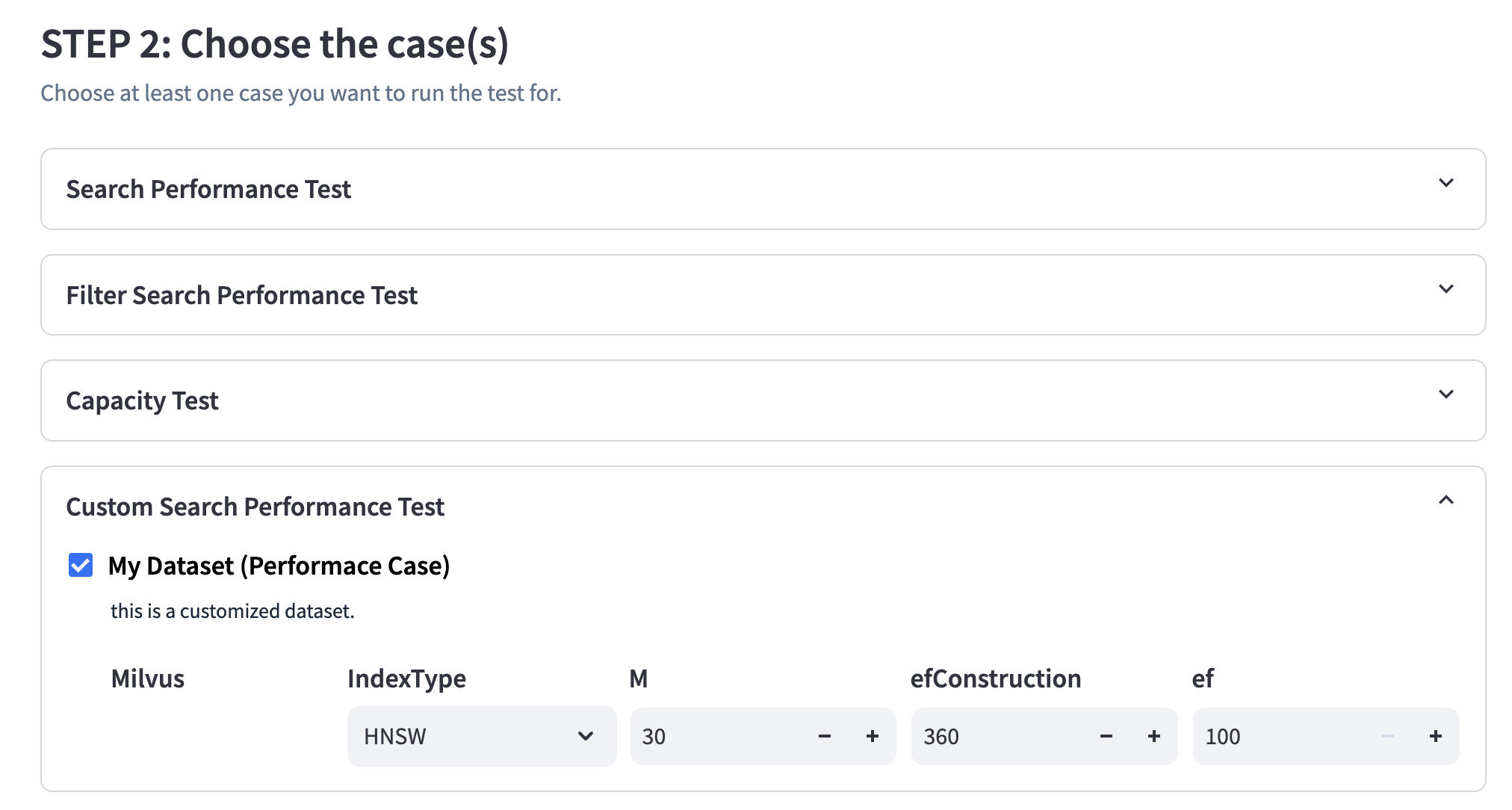
- The next step is to select the test cases you want to perform. You can select multiple cases at once, and a form to collect corresponding parameters will appear.
- Finally, you'll need to provide a task label to distinguish different test results. Using the same label for different tests will result in the previous results being overwritten.
Now we can only run one task at the same time.
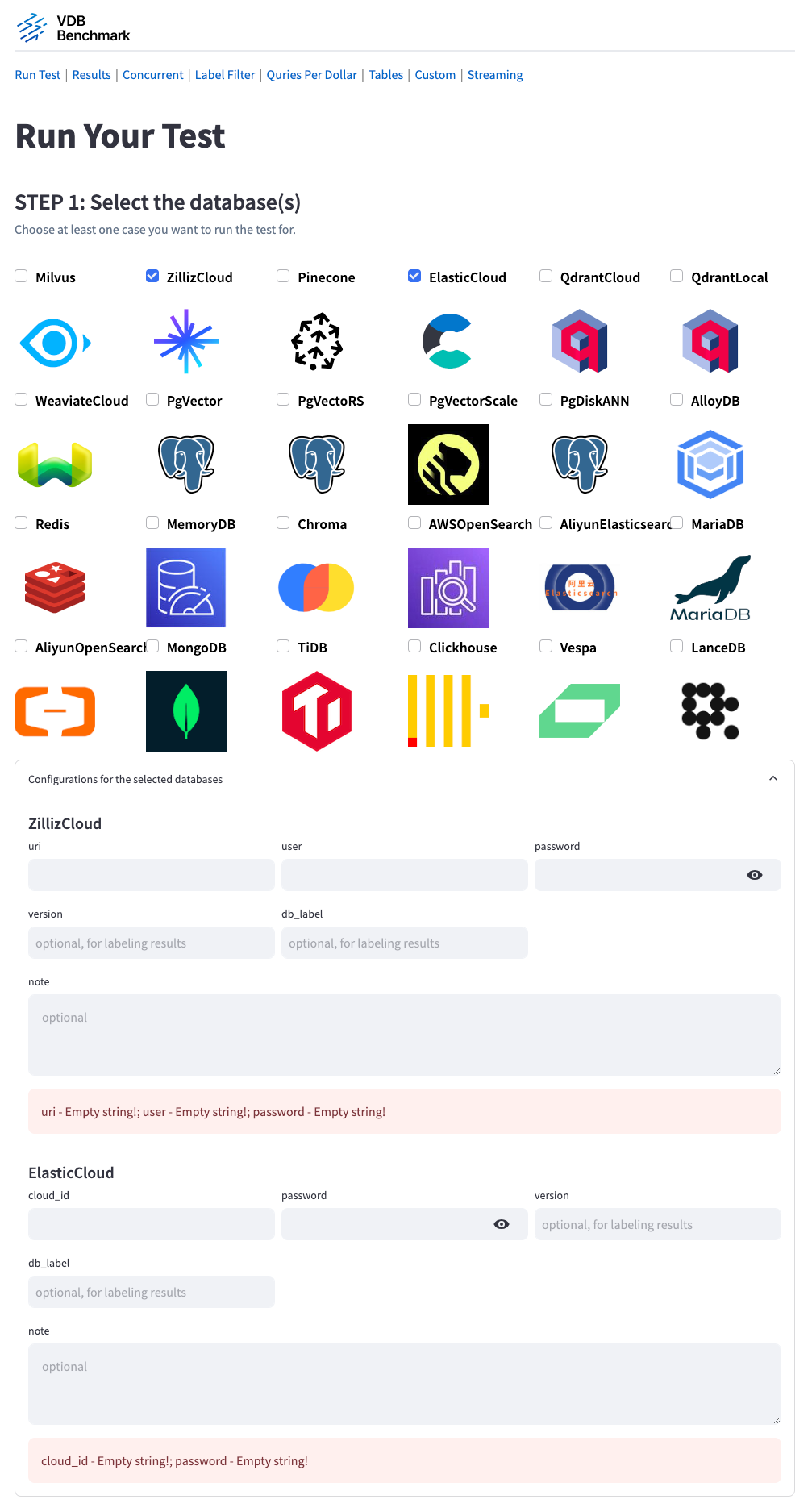
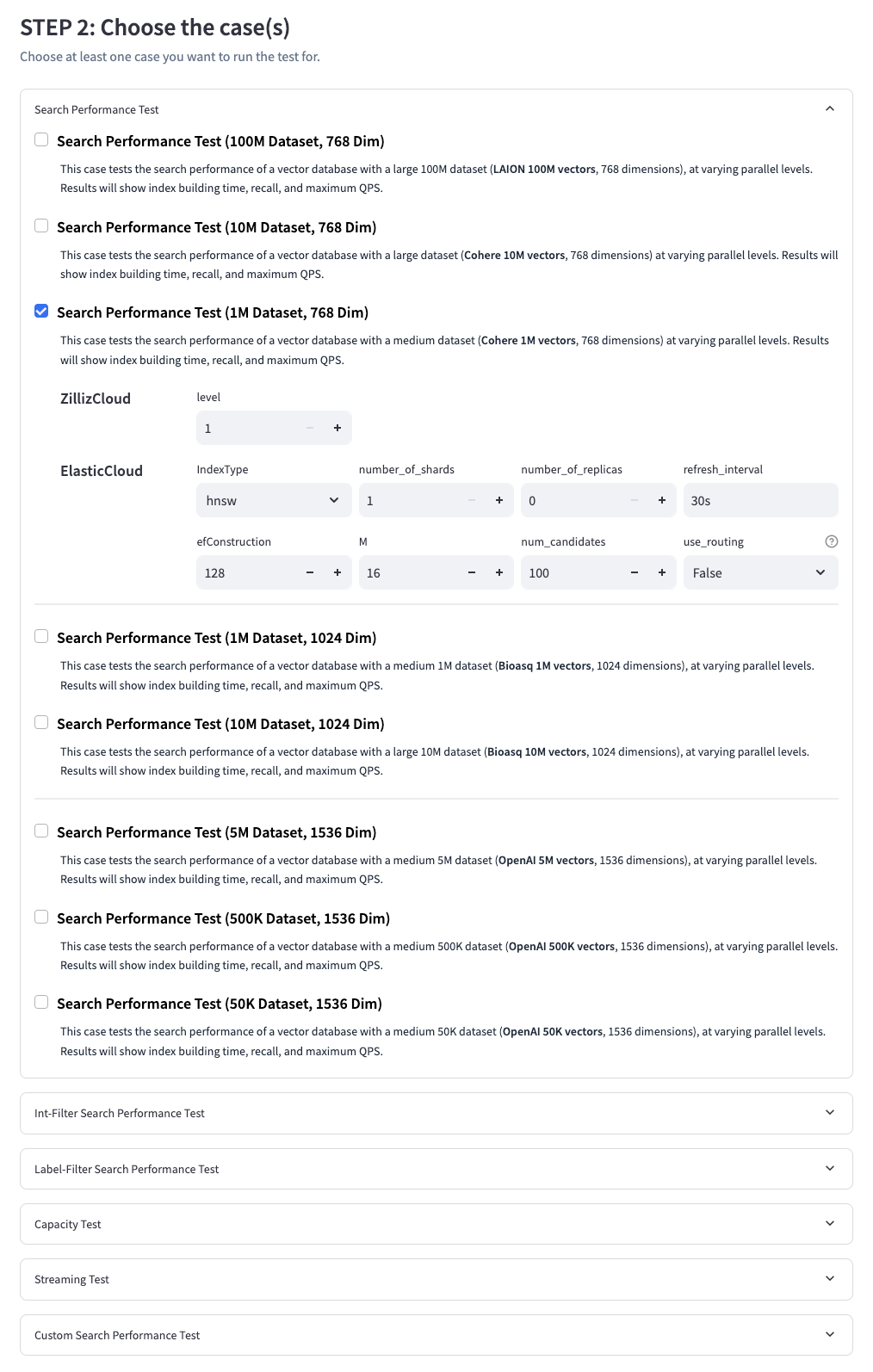
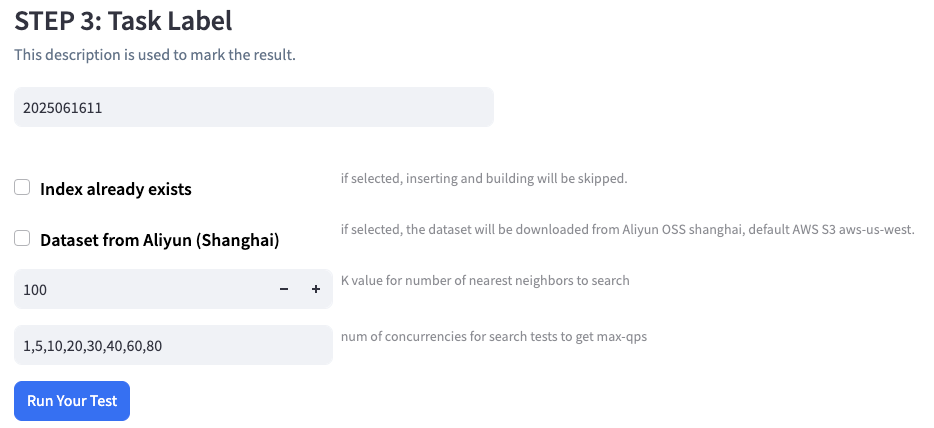
Module
Code Structure
Client
Our client module is designed with flexibility and extensibility in mind, aiming to integrate APIs from different systems seamlessly. As of now, it supports Milvus, Zilliz Cloud, Elastic Search, Pinecone, Qdrant Cloud, Weaviate Cloud, PgVector, VectorChord, Redis, Chroma, CockroachDB, etc. Stay tuned for more options, as we are consistently working on extending our reach to other systems.
Benchmark Cases
We've developed lots of comprehensive benchmark cases to test vector databases' various capabilities, each designed to give you a different piece of the puzzle. These cases are categorized into four main types:
Capacity Case
- Large Dim: Tests the database's loading capacity by inserting large-dimension vectors (GIST 100K vectors, 960 dimensions) until fully loaded. The final number of inserted vectors is reported.
- Small Dim: Similar to the Large Dim case but uses small-dimension vectors (SIFT 500K vectors, 128 dimensions).
Search Performance Case
- XLarge Dataset: Measures search performance with a massive dataset (LAION 100M vectors, 768 dimensions) at varying parallel levels. The results include index building time, recall, latency, and maximum QPS.
- Large Dataset: Similar to the XLarge Dataset case, but uses a slightly smaller dataset (10M-1024dim, 10M-768dim, 5M-1536dim).
- Medium Dataset: A case using a medium dataset (1M-1024dim, 1M-768dim, 500K-1536dim).
- Small Dataset: For development (100K-768dim, 50K-1536dim).
Filtering Search Performance Case
- Int-Filter Cases: Evaluates search performance with int-based filter expression (e.g. "id >= 2,000").
- Label-Filter Cases: Evaluates search performance with label-based filter expressions (e.g., "color == 'red'"). The test includes randomly generated labels to simulate real-world filtering scenarios.
Streaming Cases
- Insertion-Under-Load Case: Evaluates search performance while maintaining a constant insertion workload. VDBBench applies a steady stream of insert requests at a fixed rate to simulate real-world scenarios where search operations must perform reliably under continuous data ingestion.
Each case provides an in-depth examination of a vector database's abilities, providing you a comprehensive view of the database's performance.
Custom Dataset for Performance case
Through the /custom page, users can customize their own performance case using local datasets. After saving, the corresponding case can be selected from the /run_test page to perform the test.
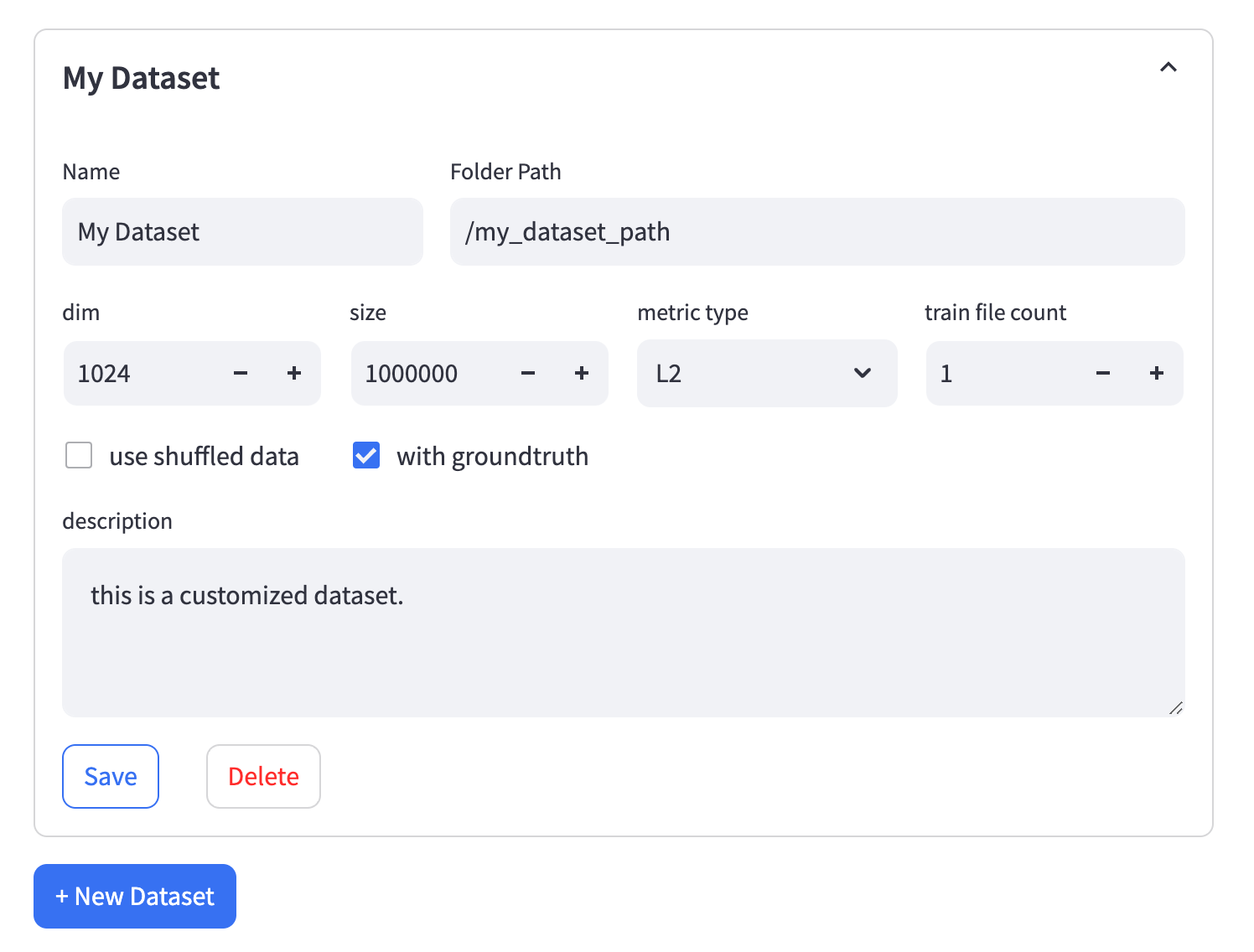
We have strict requirements for the data set format, please follow them.
-
Folder Path- The path to the folder containing all the files. Please ensure that all files in the folder are in theParquetformat.- Vectors data files: The file must be named
train.parquetand should have two columns:idas an incrementingintandembas an array offloat32. - Query test vectors: The file must be named
test.parquetand should have two columns:idas an incrementingintandembas an array offloat32.- We recommend limiting the number of test query vectors, like 1,000.
When conducting concurrent query tests, Vdbbench creates a large number of processes.
To minimize additional communication overhead during testing,
we prepare a complete set of test queries for each process, allowing them to run independently.
However, this means that as the number of concurrent processes increases,
the number of copied query vectors also increases significantly,
which can place substantial pressure on memory resources.
- We recommend limiting the number of test query vectors, like 1,000.
- Ground truth file: The file must be named
neighbors.parquetand should have two columns:idcorresponding to query vectors andneighbors_idas an array ofint.
- Vectors data files: The file must be named
-
Train File Count- If the vector file is too large, you can consider splitting it into multiple files. The naming format for the split files should betrain-[index]-of-[file_count].parquet. For example,train-01-of-10.parquetrepresents the second file (0-indexed) among 10 split files. -
Use Shuffled Data- If you check this option, the vector data files need to be modified. VDBBench will load the data labeled withshuffle. For example, useshuffle_train.parquetinstead oftrain.parquetandshuffle_train-04-of-10.parquetinstead oftrain-04-of-10.parquet. Theidcolumn in the shuffled data can be in any order.
Goals
Our goals of this benchmark are:
Reproducibility & Usability
One of the primary goals of VDBBench is to enable users to reproduce benchmark results swiftly and easily, or to test their customized scenarios. We believe that lowering the barriers to entry for conducting these tests will enhance the community's understanding and improvement of vector databases. We aim to create an environment where any user, regardless of their technical expertise, can quickly set up and run benchmarks, and view and analyze results in an intuitive manner.
Representability & Realism
VDBBench aims to provide a more comprehensive, multi-faceted testing environment that accurately represents the complexity of vector databases. By moving beyond a simple speed test for algorithms, we hope to contribute to a better understanding of vector databases in real-world scenarios. By incorporating as many complex scenarios as possible, including a variety of test cases and datasets, we aim to reflect realistic conditions and offer tangible significance to our community. Our goal is to deliver benchmarking results that can drive tangible improvements in the development and usage of vector databases.
Contribution
General Guidelines
- Fork the repository and create a new branch for your changes.
- Adhere to coding conventions and formatting guidelines.
- Use clear commit messages to document the purpose of your changes.
Adding New Clients
Step 1: Creating New Client Files
- Navigate to the vectordb_bench/backend/clients directory.
- Create a new folder for your client, for example, "new_client".
- Inside the "new_client" folder, create two files: new_client.py and config.py.
Step 2: Implement new_client.py and config.py
- Open new_client.py and define the NewClient class, which should inherit from the clients/api.py file's VectorDB abstract class. The VectorDB class serves as the API for benchmarking, and all DB clients must implement this abstract class.
Example implementation in new_client.py:
new_client.py
pythonfrom ..api import VectorDB class NewClient(VectorDB): # Implement the abstract methods defined in the VectorDB class # ...
- Open config.py and implement the DBConfig and optional DBCaseConfig classes.
- The DBConfig class should be an abstract class that provides information necessary to establish connections with the database. It is recommended to use the pydantic.SecretStr data type to handle sensitive data such as tokens, URIs, or passwords.
- The DBCaseConfig class is optional and allows for providing case-specific configurations for the database. If not provided, it defaults to EmptyDBCaseConfig.
Example implementation in config.py:
pythonfrom pydantic import SecretStr from clients.api import DBConfig, DBCaseConfig class NewDBConfig(DBConfig): # Implement the required configuration fields for the database connection # ... token: SecretStr uri: str class NewDBCaseConfig(DBCaseConfig): # Implement optional case-specific configuration fields # ...
Step 3: Importing the DB Client and Updating Initialization
In this final step, you will import your DB client into clients/init.py and update the initialization process.
- Open clients/init.py and import your NewClient from new_client.py.
- Add your NewClient to the DB enum.
- Update the db2client dictionary by adding an entry for your NewClient.
Example implementation in clients/init.py:
python#clients/__init__.py # Add NewClient to the DB enum class DB(Enum): ... DB.NewClient = "NewClient" @property def init_cls(self) -> Type[VectorDB]: ... if self == DB.NewClient: from .new_client.new_client import NewClient return NewClient ... @property def config_cls(self) -> Type[DBConfig]: ... if self == DB.NewClient: from .new_client.config import NewClientConfig return NewClientConfig ... def case_config_cls(self, ...) if self == DB.NewClient: from .new_client.config import NewClientCaseConfig return NewClientCaseConfig
Step 4: Implement new_client/cli.py and vectordb_bench/cli/vectordbbench.py
In this (optional, but encouraged) step you will enable the test to be run from the command line.
- Navigate to the vectordb_bench/backend/clients/"client" directory.
- Inside the "client" folder, create a cli.py file.
Using zilliz as an example cli.py:
pythonfrom typing import Annotated, Unpack import click import os from pydantic import SecretStr from vectordb_bench.cli.cli import ( CommonTypedDict, cli, click_parameter_decorators_from_typed_dict, run, ) from vectordb_bench.backend.clients import DB class ZillizTypedDict(CommonTypedDict): uri: Annotated[ str, click.option("--uri", type=str, help="uri connection string", required=True) ] user_name: Annotated[ str, click.option("--user-name", type=str, help="Db username", required=True) ] password: Annotated[ str, click.option("--password", type=str, help="Zilliz password", default=lambda: os.environ.get("ZILLIZ_PASSWORD", ""), show_default="$ZILLIZ_PASSWORD", ), ] level: Annotated[ str, click.option("--level", type=str, help="Zilliz index level", required=False), ] @cli.command() @click_parameter_decorators_from_typed_dict(ZillizTypedDict) def ZillizAutoIndex(**parameters: Unpack[ZillizTypedDict]): from .config import ZillizCloudConfig, AutoIndexConfig run( db=DB.ZillizCloud, db_config=ZillizCloudConfig( db_label=parameters["db_label"], uri=SecretStr(parameters["uri"]), user=parameters["user_name"], password=SecretStr(parameters["password"]), ), db_case_config=AutoIndexConfig( params={parameters["level"]}, ), **parameters, )
- Update cli by adding:
- Add database specific options as an Annotated TypedDict, see ZillizTypedDict above.
- Add index configuration specific options as an Annotated TypedDict. (example: vectordb_bench/backend/clients/pgvector/cli.py)
- May not be needed if there is only one index config.
- Repeat for each index configuration, nesting them if possible.
- Add a index config specific function for each index type, see Zilliz above. The function name, in lowercase, will be the command name passed to the vectordbbench command.
- Update db_config and db_case_config to match client requirements
- Continue to add new functions for each index config.
- Import the client cli module and command to vectordb_bench/cli/vectordbbench.py (for databases with multiple commands (index configs), this only needs to be done for one command)
- Import the
get_custom_case_configfunction fromvectordb_bench/cli/cli.pyand use it to add a new keycustom_caseto theparametersvariable within the command.
cli modules with multiple index configs:
- pgvector: vectordb_bench/backend/clients/pgvector/cli.py
- milvus: vectordb_bench/backend/clients/milvus/cli.py
That's it! You have successfully added a new DB client to the vectordb_bench project.
Rules
Installation
The system under test can be installed in any form to achieve optimal performance. This includes but is not limited to binary deployment, Docker, and cloud services.
Fine-Tuning
For the system under test, we use the default server-side configuration to maintain the authenticity and representativeness of our results.
For the Client, we welcome any parameter tuning to obtain better results.
Incomplete Results
Many databases may not be able to complete all test cases due to issues such as Out of Memory (OOM), crashes, or timeouts. In these scenarios, we will clearly state these occurrences in the test results.
Mistake Or Misrepresentation
We strive for accuracy in learning and supporting various vector databases, yet there might be oversights or misapplications. For any such occurrences, feel free to raise an issue or make amendments on our GitHub page.
Timeout
In our pursuit to ensure that our benchmark reflects the reality of a production environment while guaranteeing the practicality of the system, we have implemented a timeout plan based on our experiences for various tests.
1. Capacity Case:
- For Capacity Case, we have assigned an overall timeout.
2. Other Cases:
For other cases, we have set two timeouts:
-
Data Loading Timeout: This timeout is designed to filter out systems that are too slow in inserting data, thus ensuring that we are only considering systems that is able to cope with the demands of a real-world production environment within a reasonable time frame.
-
Optimization Preparation Timeout: This timeout is established to avoid excessive optimization strategies that might work for benchmarks but fail to deliver in real production environments. By doing this, we ensure that the systems we consider are not only suitable for testing environments but also applicable and efficient in production scenarios.
This multi-tiered timeout approach allows our benchmark to be more representative of actual production environments and assists us in identifying systems that can truly perform in real-world scenarios.
<table> <tr> <th>Case</th> <th>Data Size</th> <th>Timeout Type</th> <th>Value</th> </tr> <tr> <td>Capacity Case</td> <td>N/A</td> <td>Loading timeout</td> <td>24 hours</td> </tr> <tr> <td rowspan="2">Other Cases</td> <td rowspan="2">1M vectors, 768 dimensions</br>500K vectors, 1536 dimensions</td> <td>Loading timeout</td> <td>2.5 hours</td> </tr> <tr> <td>Optimization timeout</td> <td>15 mins</td> </tr> <tr> <td rowspan="2">Other Cases</td> <td rowspan="2">10M vectors, 768 dimensions</br>5M vectors, 1536 dimensions</td> <td>Loading timeout</td> <td>25 hours</td> </tr> <tr> <td>Optimization timeout</td> <td>2.5 hours</td> </tr> <tr> <td rowspan="2">Other Cases</td> <td rowspan="2">100M vectors, 768 dimensions</td> <td>Loading timeout</td> <td>250 hours</td> </tr> <tr> <td>Optimization timeout</td> <td>25 hours</td> </tr> </table>Note: Some datapoints in the standard benchmark results that violate this timeout will be kept for now for reference. We will remove them in the future.
Contributors
Showing top 12 contributors by commit count.


