

ERASOR
Official page of ERASOR (Egocentric Ratio of pSeudo Occupancy-based Dynamic Object Removal), which is accepted @ RA-L'21 with ICRA'21
Official page of [*"ERASOR: Egocentric Ratio of Pseudo Occupancy-based Dynamic Object Removal for Static 3D Point Cloud Map Building"*](https://ieeexplore.ieee.org/stamp/stamp.jsp?tp=&arnumber=9361109), which is accepted by RA-L with ICRA'21 option [[Video](https://www.youtube.com/watch?v=Nx27ZO8afm0)] [[Preprint Paper](https://arxiv.org/abs/2103.04316)] The project is written primarily in Python, distributed under the GNU General Public License v3.0 license, first published in 2021. Key topics include: lidar, lidar-point-cloud, lidar-slam, static-map-building.
:rainbow: ERASOR (RA-L'21 with ICRA Option)
Official page of "ERASOR: Egocentric Ratio of Pseudo Occupancy-based Dynamic Object Removal for Static 3D Point Cloud Map Building", which is accepted by RA-L with ICRA'21 option
[Video] [Preprint Paper]
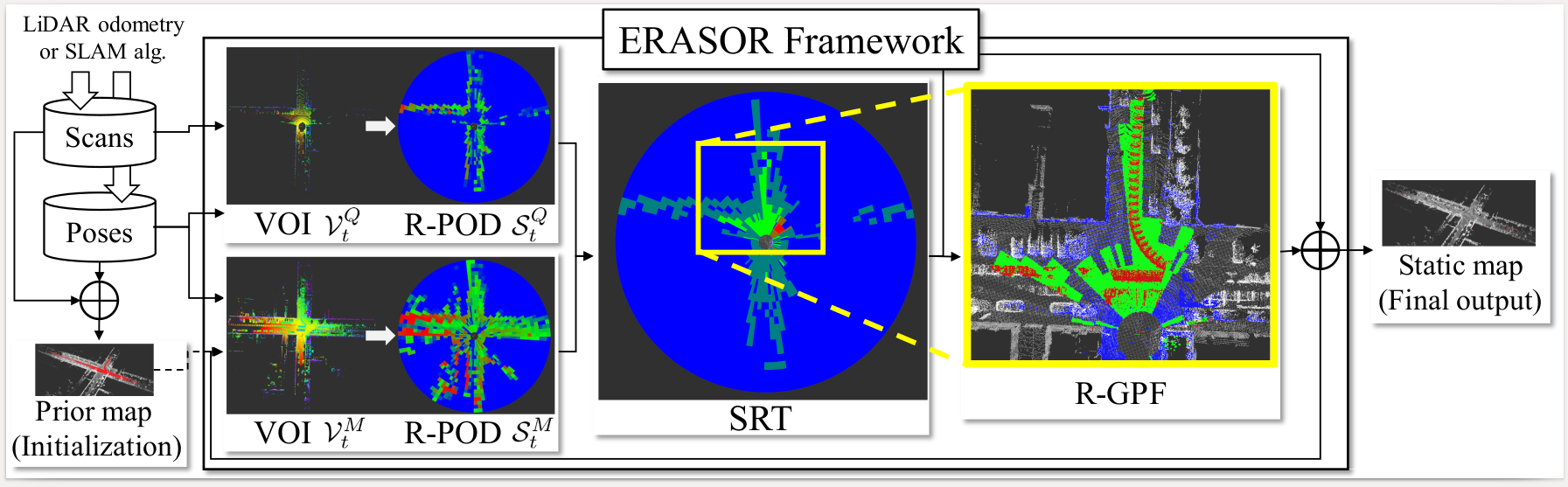
We provide all contents including
- Source code of ERASOR
- All outputs of the State-of-the-arts
- Visualization
- Calculation code of Preservation Rate/Rejection Rate
So enjoy our codes! :)
Contact: Hyungtae Lim (shapelimatkaistdotacdotkr)
Advisor: Hyun Myung (hmyungatkaistdotacdotkr)
NEWS
- 🎉 ERASOR2 is now available! Check out the successor at url-kaist/ERASOR2 — a ROS-free, pure-CMake C++ rewrite with a Python evaluator and improved benchmarks. If you're starting a new project, we recommend ERASOR2.
- 2026-05: Per-seq KITTI configs re-tuned against paper Table II; main-README and
scripts/semantickitti2bag/README.mdrewrites; expanded "ERASOR in the Wild" section with coordinate-frame cautions and a non-KITTI pitfall checklist. - 2021-10: An example of running ERASOR in your own env is provided — see
src/offline_map_updater/main_in_your_env.cppandlaunch/run_erasor_in_your_env_vel16.launch. Details under ERASOR in the Wild.
Contents
- Test Env.
- Requirements
- How to Run ERASOR
- Calculate PR/RR
- Benchmark
- Visualization of All the State-of-the-arts
- ERASOR in the Wild
- Citation
Test Env.
The code is tested successfully at
- Linux 18.04 LTS
- ROS Melodic
Requirements
ROS Setting
- Install ROS on a machine.
- Also, jsk-visualization is required to visualize Scan Ratio Test (SRT) status.
bashsudo apt-get install ros-melodic-jsk-recognition sudo apt-get install ros-melodic-jsk-common-msgs sudo apt-get install ros-melodic-jsk-rviz-plugins
Build Our Package
- Thereafter, compile this package. We use catkin tools,
bashmkdir -p ~/catkin_ws/src cd ~/catkin_ws/src git clone https://github.com/LimHyungTae/ERASOR.git cd .. && catkin build erasor
Python Setting
- Our metric calculation for PR/RR code is implemented by python2.7
- To run the python code, following pakages are necessary: pypcd, tqdm, scikit-learn, and tabulate
bashpip install pypcd pip install tqdm pip install scikit-learn pip install tabulate
Prepared dataset
- Download the preprocessed KITTI data encoded into rosbag.
- The downloading process might take five minutes or so. All rosbags requires total 2.3G of storage space
bashwget https://urserver.kaist.ac.kr/publicdata/erasor/rosbag/00_4390_to_4530_w_interval_2_node.bag wget https://urserver.kaist.ac.kr/publicdata/erasor/rosbag/01_150_to_250_w_interval_1_node.bag wget https://urserver.kaist.ac.kr/publicdata/erasor/rosbag/02_860_to_950_w_interval_2_node.bag wget https://urserver.kaist.ac.kr/publicdata/erasor/rosbag/05_2350_to_2670_w_interval_2_node.bag wget https://urserver.kaist.ac.kr/publicdata/erasor/rosbag/07_630_to_820_w_interval_2_node.bag
NOTE! The rosbags above assume that the per-frame poses are estimated by SuMa (Behley & Stachniss, RSS 2018). As stated in §III.A of the paper, "Maps are constructed at the regular intervals with the poses provided by SuMa, which contains inherent uncertainty." If you regenerate any bag from raw SemanticKITTI data via
scripts/semantickitti2bag/, copysequences/<seq>/poses_suma_optim.txttosequences/<seq>/poses.txtfirst so thatpykitti.odometry.load_poses()picks up the SuMa poses; otherwise the resulting map will not align with the shipped ground-truth PCDs.
Description of Preprocessed Rosbag Files
- Please note that the rosbag consists of
node. Refer tomsg/node.msg. - Note that each label of the point is assigned in
intensityfor the sake of convenience. - And we set the following classes are dynamic classes:
# 252: "moving-car"
# 253: "moving-bicyclist"
# 254: "moving-person"
# 255: "moving-motorcyclist"
# 256: "moving-on-rails"
# 257: "moving-bus"
# 258: "moving-truck"
# 259: "moving-other-vehicle"
- Please refer to
std::vector<int> DYNAMIC_CLASSESin our code :).
How to Run ERASOR
We will explain how to run our code on seq 05 of the KITTI dataset as an example.
Step 1. Build naive map
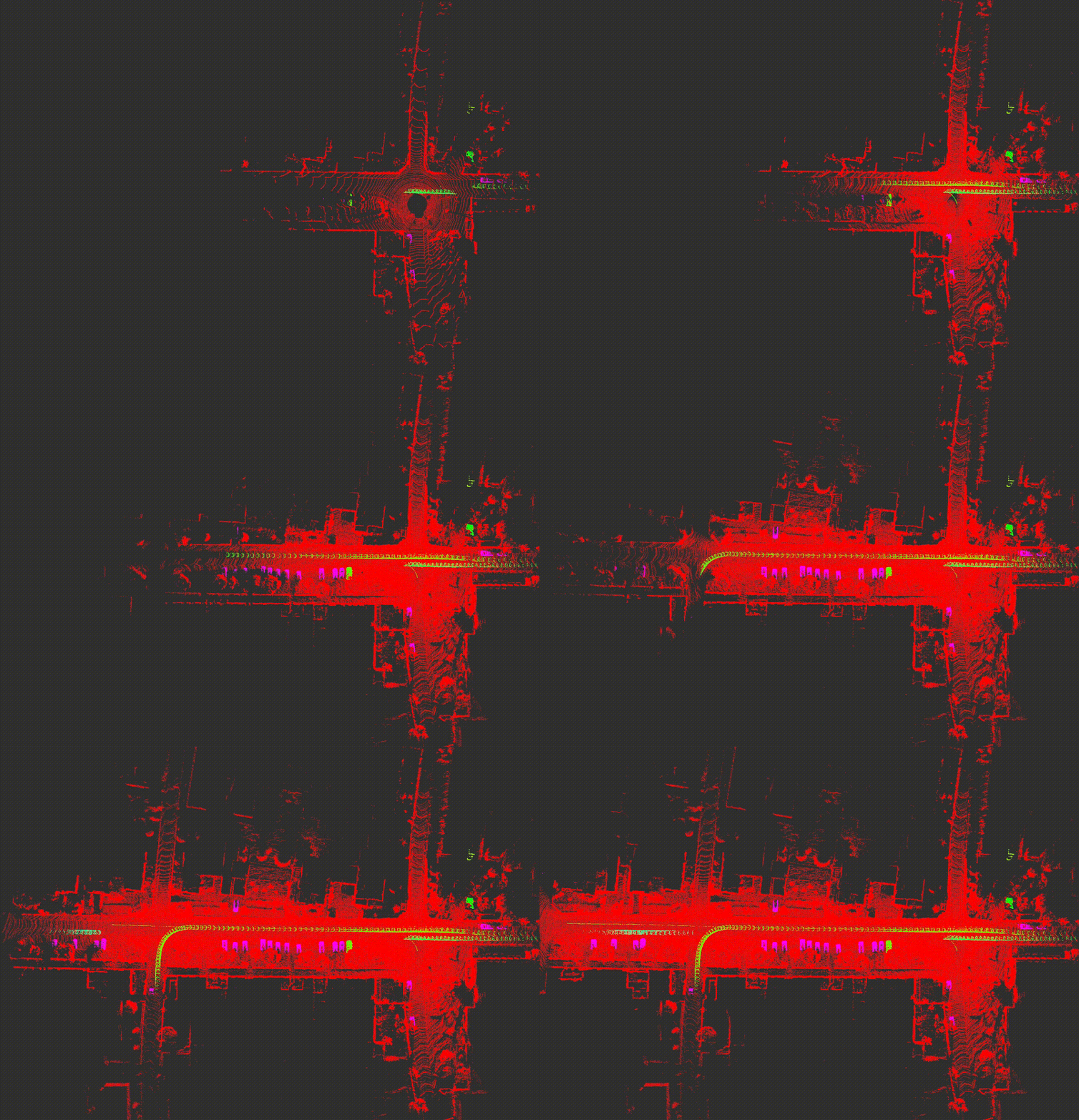
- Set the following parameters in
launch/mapgen.launch.target_rosbag: The name of target rosbag, e.g.05_2350_to_2670_w_interval_2_node.bagsave_path: The path where the naively accumulated map is saved.
- Launch mapgen.launch and play corresponding rosbag on the other bash as follows:
bashroscore # (Optional) roslaunch erasor mapgen.launch rosbag play 05_2350_to_2670_w_interval_2_node.bag
- Then, dense map and voxelized map are auto-saved at the
save path. Note that the dense map is used for evaluation to fill corresponding labels. The voxelized map will be an input of step 2 as a naively accumulated map.
Step 2. Run ERASOR
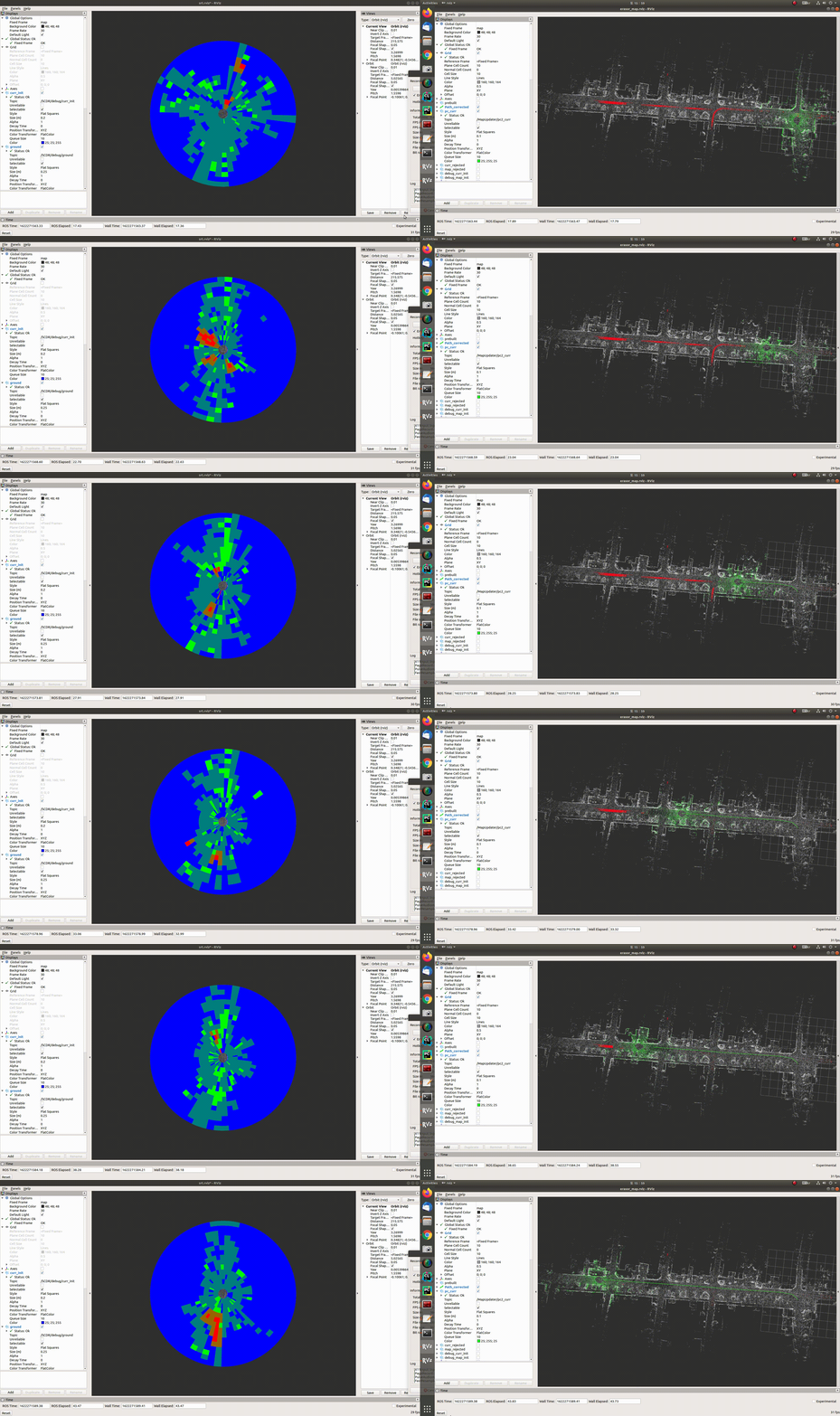
-
Set the following parameters in
config/seq_05.yaml.initial_map_path: The path of naively accumulated mapsave_path: The path where the filtered static map is saved.
-
Run the following command for each bash.
bashroscore # (Optional) roslaunch erasor run_erasor.launch target_seq:="05" rosbag play 05_2350_to_2670_w_interval_2_node.bag
News (22.03.01): The submap module is employed to speed up when extracing map VOI.
Plase check the below rosparams in run_erasor.launch:
<rosparam param="/large_scale/is_large_scale">true</rosparam>
<rosparam param="/large_scale/submap_size">160.0</rosparam>
Note that appropriate submap_size is > 2 * max_range.
- IMPORTANT: After finishing running ERASOR, run the following command to save the static map as a pcd file on another bash.
- "0.2" denotes voxelization size.
bashrostopic pub /saveflag std_msgs/Float32 "data: 0.2"
- Then, you can see the printed command as follows:

- The results will be saved under the
save_pathfolder, i.e.$save_path$/05_result.pcd.
Calculate PR/RR
You can check our results directly.
- First, download all pcd materials.
bashwget https://urserver.kaist.ac.kr/publicdata/erasor/erasor_paper_pcds.zip unzip erasor_paper_pcds.zip
Then, run the analysis code as follows:
bashpython analysis.py --gt $GT_PCD_PATH$ --est $EST_PCD_PATH$
E.g,
bashpython analysis.py --gt /home/shapelim/erasor_paper_pcds/gt/05_voxel_0_2.pcd --est /home/shapelim/erasor_paper_pcds/estimate/05_ERASOR.pcd
NOTE: For estimating PR/RR, more dense pcd file, which is generated in the mapgen.launch procedure, is better to estimate PR/RR precisely.
Benchmark
We re-ran the current master branch on the five SemanticKITTI snippets shipped with this repo (after re-tuning config/seq_{00,02}.yaml) and compared the resulting Preservation Rate (PR), Rejection Rate (RR), and F1 against the original Table II of the paper. Bold marks the higher value per cell.
| Seq | Frames | PR [%] ( $\color{#c026d3}\textsf{paper}$ / $\color{#0969da}\textsf{ours}$ ) | RR [%] ( $\color{#c026d3}\textsf{paper}$ / $\color{#0969da}\textsf{ours}$ ) | F1 ( $\color{#c026d3}\textsf{paper}$ / $\color{#0969da}\textsf{ours}$ ) |
|---|---|---|---|---|
| 00 | 4390 – 4530 | $\color{#c026d3}93.980$ / $\color{#0969da}\mathbf{95.790}$ | $\color{#c026d3}\mathbf{97.081}$ / $\color{#0969da}95.642$ | $\color{#c026d3}0.955$ / $\color{#0969da}\mathbf{0.957}$ |
| 01 | 150 – 250 | $\color{#c026d3}91.487$ / $\color{#0969da}\mathbf{91.890}$ | $\color{#c026d3}\mathbf{95.383}$ / $\color{#0969da}94.777$ | $\color{#c026d3}\mathbf{0.934}$ / $\color{#0969da}0.933$ |
| 02 | 860 – 950 | $\color{#c026d3}\mathbf{87.731}$ / $\color{#0969da}87.136$ | $\color{#c026d3}97.008$ / $\color{#0969da}\mathbf{99.337}$ | $\color{#c026d3}0.921$ / $\color{#0969da}\mathbf{0.928}$ |
| 05 | 2350 – 2670 | $\color{#c026d3}\mathbf{88.730}$ / $\color{#0969da}88.589$ | $\color{#c026d3}98.262$ / $\color{#0969da}\mathbf{98.328}$ | $\color{#c026d3}\mathbf{0.933}$ / $\color{#0969da}0.932$ |
| 07 | 630 – 820 | $\color{#c026d3}90.624$ / $\color{#0969da}\mathbf{93.876}$ | $\color{#c026d3}\mathbf{99.271}$ / $\color{#0969da}98.875$ | $\color{#c026d3}0.948$ / $\color{#0969da}\mathbf{0.963}$ |
<sub>$\color{#c026d3}\textsf{Magenta}$ = paper (Table II), $\color{#0969da}\textsf{blue}$ = our re-run on the current master commit. Both columns are evaluated against the dense semantic ground-truth map shipped in erasor_paper_pcds/gt/<seq>_voxel_0_2.pcd at a 0.2 m voxel size using scripts/analysis_runner.py. Each "ours" run uses a freshly mapgen-built accumulated map as initial_map_path so that the initial map sits in the same coordinate frame as the paper GT.</sub>
- We also provide all pcd files. See Visualization of All the State-of-the-arts below.
Visualization of All the State-of-the-arts
- First, download all pcd materials.
bashwget https://urserver.kaist.ac.kr/publicdata/erasor/erasor_paper_pcds.zip unzip erasor_paper_pcds.zip
-
Set parameters in
config/viz_params.yamlcorrectlyabs_dir: The absolute directory of pcd directoryseq: Target sequence (00, 01, 02, 05, or 07)
-
After setting the parameters, launch following command:
bashroslaunch erasor compare_results.launch
- Then you can inspect all pcd results that are already parsed into static points and dynamic points.
- All examples are here:
ERASOR in the Wild
In your own dataset
To check generalization of ERASOR, we tested ERASOR in more crowded environments. In that experiment, Velodyne Puck 16 was employed, and poses are estimated by LIO-SAM.
| Satellite map | Pcd map by LIO-SAM |
|---|---|
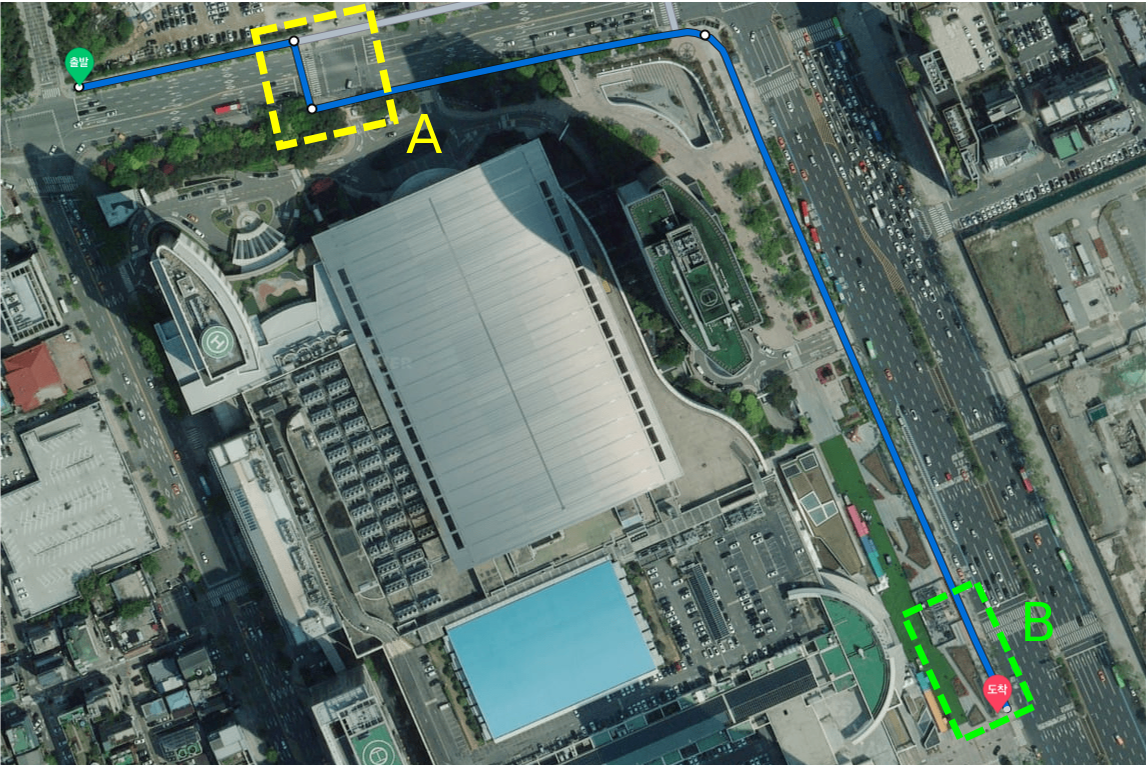 | 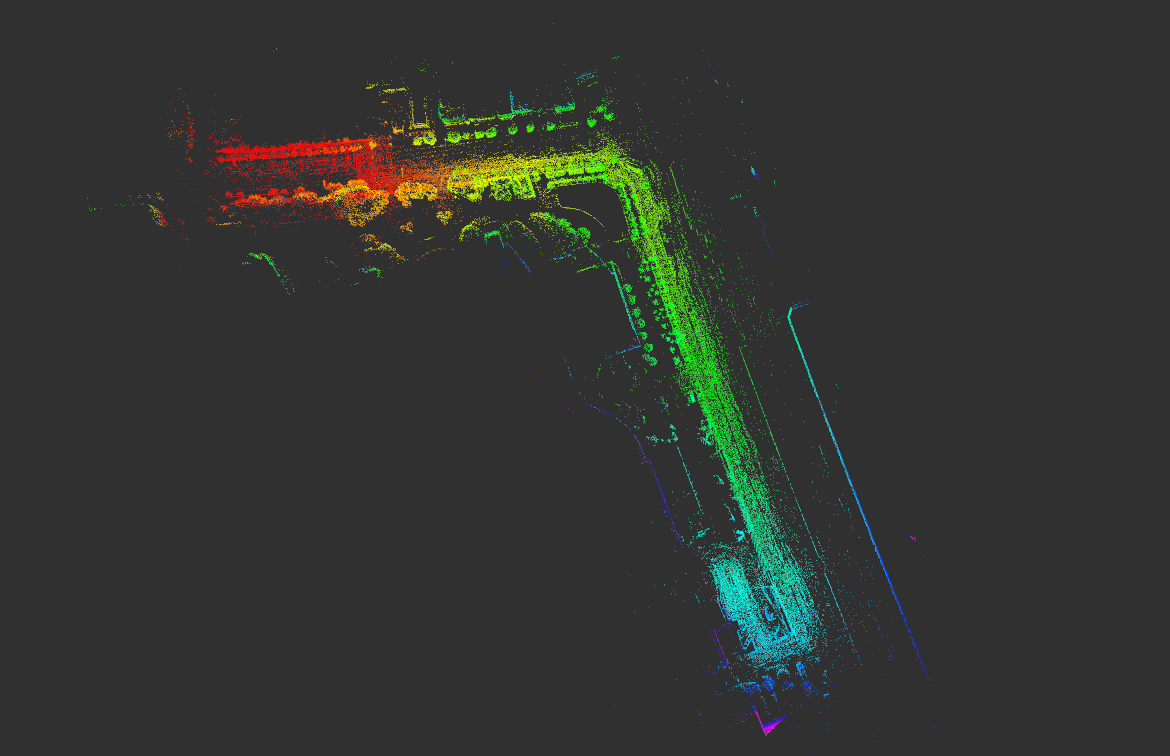 |
When running ERASOR in your own environments, refer to src/offline_map_updater/main_in_your_env.cpp and launch/run_erasor_in_your_env_vel16.launch. The non-KITTI driver reads per-frame point clouds + a CSV of poses (instead of a rosbag of node messages) and feeds them to the same OfflineMapUpdater.
You can learn how to set things up by reproducing our pre-set configuration first:
bashwget https://urserver.kaist.ac.kr/publicdata/erasor/bongeunsa_dataset.zip unzip bongeunsa_dataset.zip
1. Input layout
Modify data_dir, MapUpdater/initial_map_path, and MapUpdater/save_path in config/your_own_env_vel16.yaml to point at your dataset. data_dir must contain:
<data_dir>/
├── pcds/
│   ├── 000000.pcd          # per-frame LiDAR scan (in the LiDAR's own frame)
│   ├── 000001.pcd
│   └── ...
├── dense_global_map.pcd    # naively-accumulated map you want ERASOR to clean
└── poses_lidar2body.csv    # one pose per frame (see format below)
poses_lidar2body.csv has one header line and one comma-separated row per frame. Each row has at least 9 columns; only columns 3–9 are used (0-indexed: pose[2..8]):
<ignored>, <ignored>, x, y, z, qx, qy, qz, qw
Indices 0–1 are reserved (we use them for timestamp / frame index but they aren't read). The CSV is parsed in main_in_your_env.cpp at load_all_poses().
❗ NOTE — what the poses must represent. The CSV name is historical and misleading. Each row is
T_map_from_lidar— i.e. the transformation that takes a point in the LiDAR frame of that specific scan and places it directly into the map frame. Concretely,pose_i · pcds/00000<i>.pcdmust overlay correctly ondense_global_map.pcd. Verify this before tuning anything else (an easy sanity check is to load the dense map and one transformed scan in CloudCompare or RViz — the static structures should overlay to within a few centimetres).
2. tf/lidar2body and the body frame
OfflineMapUpdater exposes a separate tf/lidar2body extrinsic in the yaml (7 floats: [x, y, z, qx, qy, qz, qw]). It is applied to every query scan before the egocentric VoI is extracted:
body_cloud = tf_lidar2body · lidar_cloud
map_cloud  = pose_i · body_cloud           # implicit: pose_i must be T_map_from_body in this convention
Two valid conventions:
| Convention | poses_lidar2body.csv contains | tf/lidar2body should be |
|---|---|---|
| (A) "bake the offset into the poses" (what the bongeunsa example uses) | T_map_from_lidar (already includes the LiDAR-to-body offset, since body == lidar for ERASOR's purposes) | identity = [0, 0, 0, 0, 0, 0, 1] |
| (B) "keep poses in body frame" | T_map_from_body | the actual LiDAR-to-body extrinsic of your robot |
❗ NOTE — body frame defines
min_h/max_h. ERASOR's vertical thresholds (min_h,max_h,th_bin_max_h) are measured in the body frame aftertf/lidar2bodyis applied. If your body frame's Z axis points up and Z = 0 sits at the LiDAR mount, then for a robot whose LiDAR is 1.6 m above the ground, you wantmin_h ≈ -1.6(ground level) andmax_h ≈ 1.5(head clearance). If the resulting static map is tilted, shifted, or you see no ground retrieval, the most likely cause is a mismatch in convention (A vs B) — pick one and stick to it.
3. Launch
bashroslaunch erasor run_erasor_in_your_env_vel16.launch
The launch file loads config/your_own_env_vel16.yaml, starts main_in_your_env_ros, and opens two RViz views. After the last frame is processed the static map is saved to ~/staticmap_via_erasor.pcd.
Results
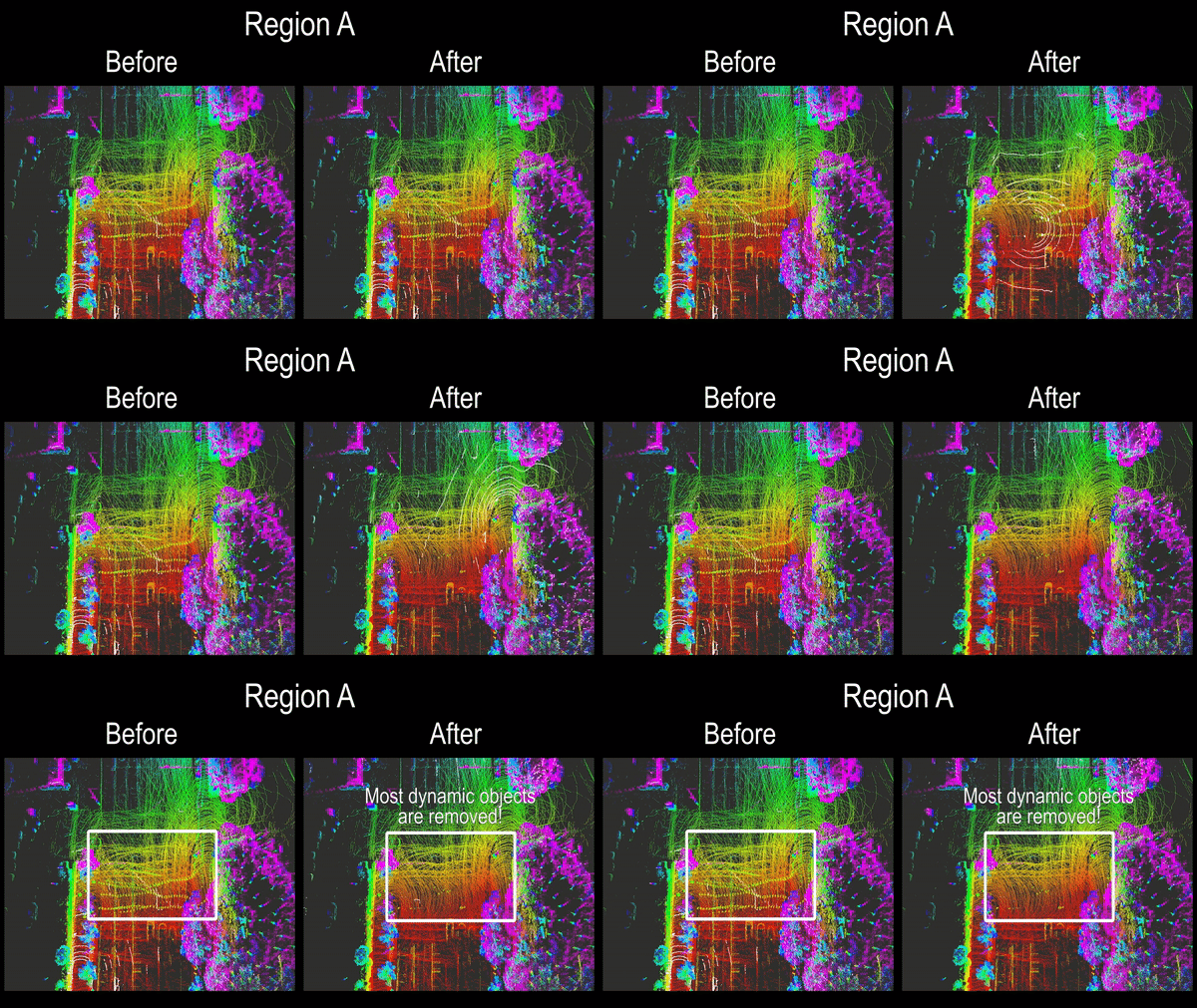
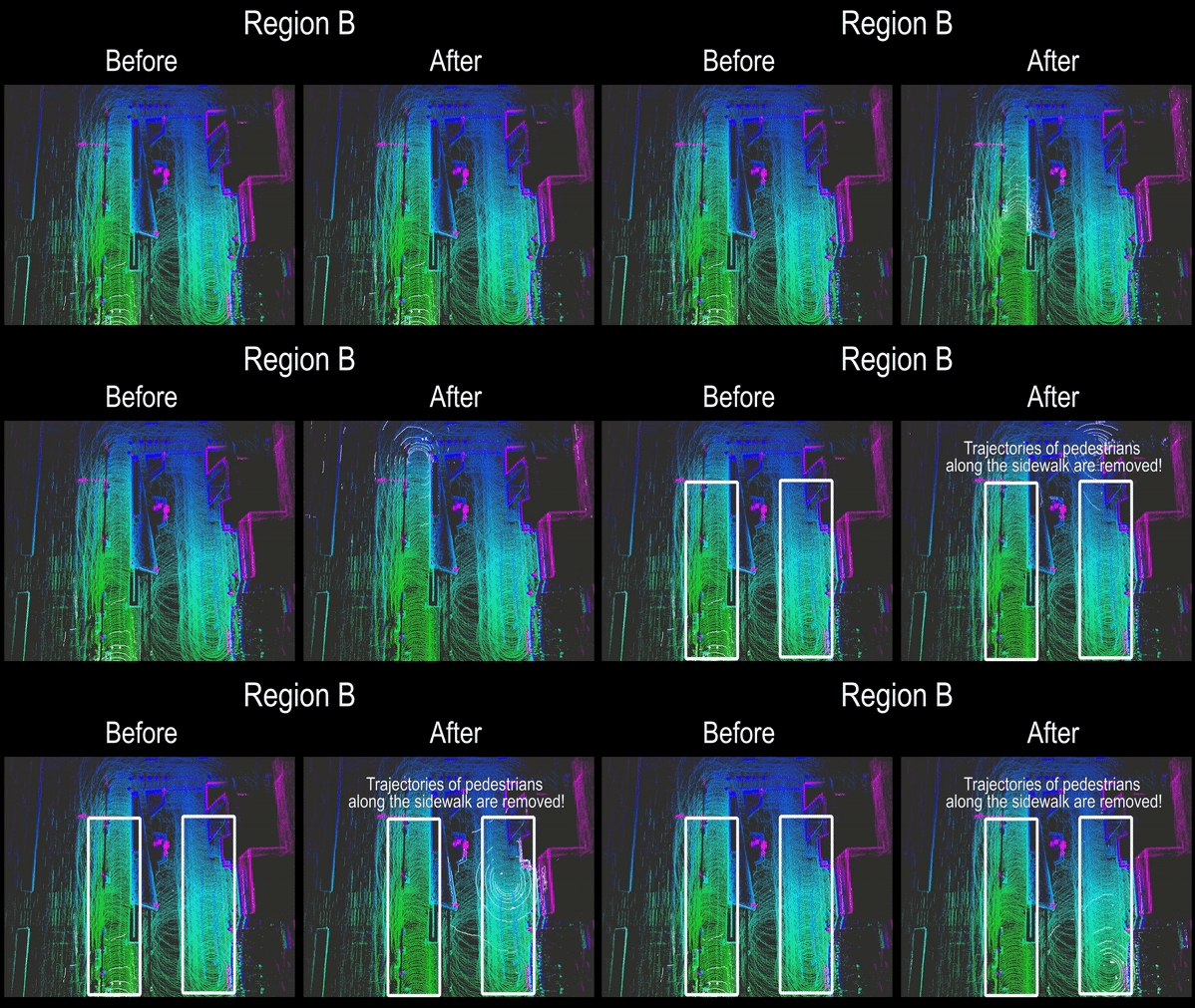
- Per-sensor geometry — depending on the LiDAR you use,
max_range,num_rings, andnum_sectorsneed to be changed so that each angular bin still contains enough points to fit a ground plane. For a low-channel LiDAR (e.g. Velodyne Puck-16), use small values similar toconfig/your_own_env_vel16.yaml(max_range: 9.5,num_rings: 8,num_sectors: 60); for 64-channel SemanticKITTI we use 60–80 m, 15–20 rings, 60–108 sectors. - Vertical thresholds — set
min_h/max_hto your body-frame VoI extents (see §2 above) and tuneth_bin_max_h(a height delta above the per-bin ground) to whatever stops dynamic-but-tall obstacles from being reverted as ground. Typical values are 0.05 – 0.20 m. - Ground filter — if too many points are classified as ground, reduce
gf_dist_thr(the plane-fit inlier distance). If the ground filter misses obvious flat ground, raise it. - Aggressiveness —
scan_ratio_thresholdis the single most impactful knob (higher = more aggressive removal). Sweep it over{0.10, 0.15, 0.20, 0.25, 0.30}and pick the F1 maximum; lowering also helps when you see static points being deleted (false positives). The KITTI configs inconfig/seq_*.yamlare a calibrated starting point per environment type (intersection, highway, countryside). - Intensity carries the label. The pipeline assumes each input point's
intensityfield encodes the SemanticKITTI semantic label (uint32reinterpreted asfloat32). If you only want the static map output and don't care about PR/RR, setintensity = 0everywhere — ERASOR will still run, butscripts/analysis_runner.pywon't have ground-truth labels to compare against.
- Wrong pose convention → static map appears rotated or offset by tens of metres. Sanity-check by overlaying
pose_0 · pcds/000000.pcdondense_global_map.pcdin CloudCompare. Most points should sit within0.5 × voxel_sizeof the dense map (seescripts/analysis_runner.pyfor an automated overlap check we use on KITTI). - Mismatched units between the dense map (
.pcd) and the per-frame scans (e.g. one is in meters, the other in millimetres). All inputs must be in metres. pcds/indices not starting at 0 / not contiguous. The driver readspcds/000000.pcd,000001.pcd, … sequentially. Missing frames will be skipped silently. Use--init_idx Nif your sequence starts later.- Labels in
intensityget cast incorrectly. ERASOR storesuint32labels inside afloat32field via byte reinterpretation. If you write the labels as a float number (e.g.intensity = 252.0for a moving car), the C++ side will not parse the label — encode them vianp.float32(np.uint32(label).view(np.float32))(seescripts/semantickitti2bag/README.md). - Dense map and scans use different lidar-to-body offsets. If your dense map was accumulated by an external SLAM (e.g. LIO-SAM) using a slightly different extrinsic than the one you put in
tf/lidar2body, the input/output frames disagree. Re-run mapgen with the same extrinsic the live pipeline will see.
Citation
If you use our code or method in your work, please consider citing the following:
@article{lim2021erasor,
title={ERASOR: Egocentric Ratio of Pseudo Occupancy-Based Dynamic Object Removal for Static 3D Point Cloud Map Building},
author={Lim, Hyungtae and Hwang, Sungwon and Myung, Hyun},
journal={IEEE Robotics and Automation Letters},
volume={6},
number={2},
pages={2272--2279},
year={2021},
publisher={IEEE}
}
Contributors
Showing top 4 contributors by commit count.


Related Repositories

HumanSignal/awesome-data-labeling
A curated list of awesome data labeling tools

Ly0n/awesome-robotic-tooling
Tooling for professional robotic development in C++ and Python with a touch of ROS, autonomous driving and aerospace.

mit-han-lab/bevfusion
[ICRA'23] BEVFusion: Multi-Task Multi-Sensor Fusion with Unified Bird's-Eye View Representation

RobustFieldAutonomyLab/LeGO-LOAM
LeGO-LOAM: Lightweight and Ground-Optimized Lidar Odometry and Mapping on Variable Terrain

iliasam/OpenSimpleLidar
Open Source scanning laser rangefinder

HKUST-Aerial-Robotics/A-LOAM
Advanced implementation of LOAM