

Clip guided diffusion
A CLI tool/python module for generating images from text using guided diffusion and CLIP from OpenAI.
Disclaimer: I'm redirecting efforts to [pyglide](https://replicate.ai/afiaka87/pyglide) and may be slow to address bugs here. The project is written primarily in Python, distributed under the MIT License license, first published in 2021. Key topics include: artificial-intelligence, deep-learning, diffusion, image-generation, multimodal.
CLIP Guided Diffusion
From @crowsonkb.
<p> <a href="https://replicate.ai/afiaka87/clip-guided-diffusion" target="_blank"><img src="https://img.shields.io/static/v1?label=run&message=clip-guided-diffusion&color=blue"></a> <a href="https://replicate.ai/afiaka87/pyglide" target="_blank"><img src="https://img.shields.io/static/v1?label=run&message=pyglide&color=green"></a> </p>Disclaimer: I'm redirecting efforts to pyglide and may be slow to address bugs here.
I also recommend looking at @crowsonkb's v-diffusion-pytorch.
See captions and more generations in the Gallery.
Install
Requires uv.
shgit clone https://github.com/afiaka87/clip-guided-diffusion.git cd clip-guided-diffusion uv sync
Run
uv run cgd -txt "Alien friend by Odilon Redo"
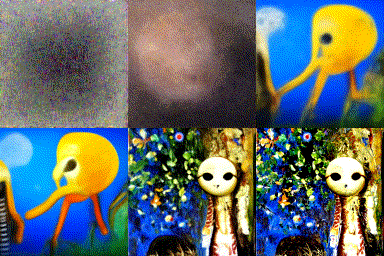
./outputswill contain all intermediate outputscurrent.pngwill contain the current generation.- Use
--save-as-gif/-gifto save a high-quality GIF and delete frames - Use
--save-as-video/-mp4to save a high-quality MP4 and delete frames - Use
--reduce-clip/-reducefor faster generation (see Performance Optimizations) - (optional) Provide
--wandb_project <project_name>to enable logging intermediate outputs to wandb. Requires free account. URL to run will be provided in CLI - example run ~/.cache/clip-guided-diffusion/will contain downloaded checkpoints from OpenAI/Katherine Crowson.
Usage - CLI
Text to image generation
--prompts / -txts
--image_size / -size
uv run cgd --image_size 256 --prompts "32K HUHD Mushroom"
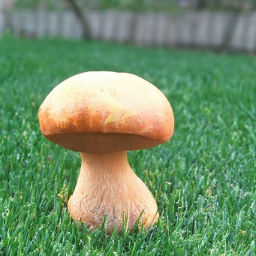
Text to image generation (multiple prompts with weights)
- multiple prompts can be specified with the
|character. - you may optionally specify a weight for each prompt using a
:character. - e.g.
cgd --prompts "Noun to visualize:1.0|style:0.1|location:0.1|something you dont want:-0.1" - weights must not sum to 0
uv run cgd -txt "32K HUHD Mushroom|Green grass:-0.1"
<img src="images/32K_HUHD_Mushroom_MIN_green_grass.png"></img>
CPU
- Using a CPU will take a very long time compared to using a GPU.
uv run cgd --device cpu --prompt "Some text to be generated"
CUDA GPU
uv run cgd --prompt "Theres no need to specify a device, it will be chosen automatically"
Iterations/Steps (Timestep Respacing)
--timestep_respacing or -respace (default: 1000)
- Uses fewer timesteps over the same diffusion schedule. Sacrifices accuracy/alignment for quicker runtime.
- options: -
25,50,150,250,500,1000,ddim25,ddim50,ddim150,ddim250,ddim500,ddim1000 - (default:
1000) - prepending a number with
ddimwill use the ddim scheduler. e.g.ddim25will use the 25 timstep ddim scheduler. This method may be better at shorter timestep_respacing values.
Existing image
--init_image/-init
- Blend an image with the diffusion for a number of steps.
--skip_timesteps/-skip
The number of timesteps to spend blending the image with the guided-diffusion samples.
Must be less than --timestep_respacing and greater than 0.
Good values using timestep_respacing of 1000 are 250 to 500.
-respace 1000 -skip 500-respace 500 -skip 250-respace 250 -skip 125-respace 125 -skip 75
(optional)--init_scale/-is
To enable a VGG perceptual loss after the blending, you must specify an --init_scale value. 1000 seems to work well.
shuv run cgd --prompts "A mushroom in the style of Vincent Van Gogh" \ --timestep_respacing 1000 \ --init_image "images/32K_HUHD_Mushroom.png" \ --init_scale 1000 \ --skip_timesteps 350
<img src="images/a_mushroom_in_the_style_of_vangogh.png?raw=true" width="200"></img>
Image size
- options:
64, 128, 256, 512 pixels (square) - Note about 64x64 when using the 64x64 checkpoint, the cosine noise scheduler is used. For unclear reasons, this noise scheduler requires different values for
--clip_guidance_scaleand--tv_scale. I recommend starting with-cgs 5 -tvs 0.00001and experimenting from around there.--clip_guidance_scaleand--tv_scalewill require experimentation. - For all other checkpoints, clip_guidance_scale seems to work well around 1000-2000 and tv_scale at 0, 100, 150 or 200
shuv run cgd --init_image=images/32K_HUHD_Mushroom.png \ --skip_timesteps=500 \ --image_size 64 \ --prompt "8K HUHD Mushroom"
<img src="images/32K_HUHD_Mushroom_64.png?raw=true" width="200"></img>
resized to 200 pixels for visibility
shuv run cgd --image_size 512 --prompt "8K HUHD Mushroom"
<img src="images/32K_HUHD_Mushroom_512.png?raw=true"></img>
New: Non-square Generations (experimental)
Generate portrait or landscape images by specifying a number to offset the width and/or height.
- offset should be a multiple of 16 for image sizes 64x64, 128x128
- offset should be a multiple of 32 for image sizes 256x256, 512x512
- may cause NaN/Inf errors.
- a positive offset will require more memory.
- a negative offset uses less memory and is faster.
<img src="images/green-hills.png">shmy_caption="a photo of beautiful green hills and a sunset, taken with a blackberry in 2004" uv run cgd --prompts "$my_caption" \ --image_size 128 \ --width_offset 32
Performance Optimizations
Three flags are available to speed up generation by 10-30 seconds:
--reduce-clip / -reduce
Reduces CLIP guidance frequency for faster generation:
- Skips first 20% of diffusion steps entirely (pure noise doesn't benefit from CLIP guidance)
- Runs CLIP guidance every 4th step during middle 50%
- Runs every step in final 30% when details matter
shuv run cgd -txt "a cat" -reduce
--progressive-cutout / -cutn_skip
Uses fewer cutouts in early steps when the image is noisy:
- First 30%: 1/4 of cutouts (e.g., 4 instead of 16)
- Middle 40%: 1/2 of cutouts (e.g., 8 instead of 16)
- Final 30%: Full cutouts
shuv run cgd -txt "a cat" -cutn_skip
--cached-cutouts / -cached_cutn
Pre-computes and reuses cutout coordinates across all steps instead of generating random positions each time. Improves GPU cache utilization.
shuv run cgd -txt "a cat" -cached_cutn
Combining optimizations
All three can be used together for maximum speedup:
shuv run cgd -txt "a cat" -reduce -cutn_skip -cached_cutn
Full Usage - Python
python# Initialize diffusion generator from cgd import clip_guided_diffusion import cgd_util cgd_generator = clip_guided_diffusion( prompts=["an image of a fox in a forest"], image_prompts=["image_to_compare_with_clip.png"], batch_size=1, clip_guidance_scale=1500, sat_scale=0, tv_scale=150, init_scale=1000, range_scale=50, image_size=256, class_cond=False, randomize_class=False, # only works with class conditioned checkpoints cutout_power=1.0, num_cutouts=16, timestep_respacing="1000", seed=0, diffusion_steps=1000, # dont change this skip_timesteps=400, init_image="image_to_blend_and_compare_with_vgg.png", clip_model_name="ViT-B/16", dropout=0.0, device="cuda", prefix_path="store_images/", wandb_project=None, wandb_entity=None, progress=True, ) prefix_path.mkdir(exist_ok=True) list(enumerate(tqdm(cgd_generator))) # iterate over generator
Full Usage - CLI
shusage: cgd [-h] [--prompts PROMPTS] [--image_prompts IMAGE_PROMPTS] [--image_size IMAGE_SIZE] [--init_image INIT_IMAGE] [--init_scale INIT_SCALE] [--skip_timesteps SKIP_TIMESTEPS] [--prefix PREFIX] [--checkpoints_dir CHECKPOINTS_DIR] [--batch_size BATCH_SIZE] [--clip_guidance_scale CLIP_GUIDANCE_SCALE] [--tv_scale TV_SCALE] [--range_scale RANGE_SCALE] [--sat_scale SAT_SCALE] [--seed SEED] [--save_frequency SAVE_FREQUENCY] [--diffusion_steps DIFFUSION_STEPS] [--timestep_respacing TIMESTEP_RESPACING] [--num_cutouts NUM_CUTOUTS] [--cutout_power CUTOUT_POWER] [--clip_model CLIP_MODEL] [--uncond] [--noise_schedule NOISE_SCHEDULE] [--dropout DROPOUT] [--device DEVICE] [--wandb_project WANDB_PROJECT] [--wandb_entity WANDB_ENTITY] [--height_offset HEIGHT_OFFSET] [--width_offset WIDTH_OFFSET] [--use_augs] [--use_magnitude] [--quiet] [--save-as-gif] [--save-as-video] [--reduce-clip] [--progressive-cutout] [--cached-cutouts] optional arguments: -h, --help show this help message and exit --prompts PROMPTS, -txts PROMPTS the prompt/s to reward paired with weights. e.g. 'My text:0.5|Other text:-0.5' (default: ) --image_prompts IMAGE_PROMPTS, -imgs IMAGE_PROMPTS the image prompt/s to reward paired with weights. e.g. 'img1.png:0.5,img2.png:-0.5' (default: ) --image_size IMAGE_SIZE, -size IMAGE_SIZE Diffusion image size. Must be one of [64, 128, 256, 512]. (default: 128) --init_image INIT_IMAGE, -init INIT_IMAGE Blend an image with diffusion for n steps (default: ) --init_scale INIT_SCALE, -is INIT_SCALE (optional) Perceptual loss scale for init image. (default: 0) --skip_timesteps SKIP_TIMESTEPS, -skip SKIP_TIMESTEPS Number of timesteps to blend image for. CLIP guidance occurs after this. (default: 0) --prefix PREFIX, -dir PREFIX output directory (default: outputs) --checkpoints_dir CHECKPOINTS_DIR, -ckpts CHECKPOINTS_DIR Path subdirectory containing checkpoints. (default: /home/samsepiol/.cache/clip-guided-diffusion) --batch_size BATCH_SIZE, -bs BATCH_SIZE the batch size (default: 1) --clip_guidance_scale CLIP_GUIDANCE_SCALE, -cgs CLIP_GUIDANCE_SCALE Scale for CLIP spherical distance loss. Values will need tinkering for different settings. (default: 1000) --tv_scale TV_SCALE, -tvs TV_SCALE Controls the smoothness of the final output. (default: 150.0) --range_scale RANGE_SCALE, -rs RANGE_SCALE Controls how far out of RGB range values may get. (default: 50.0) --sat_scale SAT_SCALE, -sats SAT_SCALE Controls how much saturation is allowed. Used for ddim. From @nshepperd. (default: 0.0) --seed SEED, -seed SEED Random number seed (default: 0) --save_frequency SAVE_FREQUENCY, -freq SAVE_FREQUENCY Save frequency (default: 1) --diffusion_steps DIFFUSION_STEPS, -steps DIFFUSION_STEPS Diffusion steps (default: 1000) --timestep_respacing TIMESTEP_RESPACING, -respace TIMESTEP_RESPACING Timestep respacing (default: 1000) --num_cutouts NUM_CUTOUTS, -cutn NUM_CUTOUTS Number of randomly cut patches to distort from diffusion. (default: 16) --cutout_power CUTOUT_POWER, -cutpow CUTOUT_POWER Cutout size power (default: 1.0) --clip_model CLIP_MODEL, -clip CLIP_MODEL clip model name. Should be one of: ('ViT-B/16', 'ViT-B/32', 'RN50', 'RN101', 'RN50x4', 'RN50x16') or a checkpoint filename ending in `.pt` (default: ViT-B/32) --uncond, -uncond Use finetuned unconditional checkpoints from OpenAI (256px) and Katherine Crowson (512px) (default: False) --noise_schedule NOISE_SCHEDULE, -sched NOISE_SCHEDULE Specify noise schedule. Either 'linear' or 'cosine'. (default: linear) --dropout DROPOUT, -drop DROPOUT Amount of dropout to apply. (default: 0.0) --device DEVICE, -dev DEVICE Device to use. Either cpu or cuda. (default: ) --wandb_project WANDB_PROJECT, -proj WANDB_PROJECT Name W&B will use when saving results. e.g. `--wandb_project "my_project"` (default: None) --wandb_entity WANDB_ENTITY, -ent WANDB_ENTITY (optional) Name of W&B team/entity to log to. (default: None) --height_offset HEIGHT_OFFSET, -ht HEIGHT_OFFSET Height offset for image (default: 0) --width_offset WIDTH_OFFSET, -wd WIDTH_OFFSET Width offset for image (default: 0) --use_augs, -augs Uses augmentations from the `quick` clip guided diffusion notebook (default: False) --use_magnitude, -mag Uses magnitude of the gradient (default: False) --quiet, -q Suppress output. (default: False) --save-as-gif, -gif Save output as high-quality GIF using ffmpeg. Deletes individual frames. (default: False) --save-as-video, -mp4 Save output as high-quality MP4 video using ffmpeg. Deletes individual frames. (default: False) --reduce-clip, -reduce Reduce CLIP guidance frequency for faster generation. Skips early steps, runs every 4th step in middle. (default: False) --progressive-cutout, -cutn_skip Use fewer cutouts in early steps (4->8->16) for faster generation. (default: False) --cached-cutouts, -cached_cutn Cache cutout coordinates for reuse across steps. (default: False)
Development
shgit clone https://github.com/afiaka87/clip-guided-diffusion.git cd clip-guided-diffusion uv sync
Run integration tests
- Some tests require a GPU; you may ignore them if you dont have one.
shuv run python -m unittest discover
Contributors
Showing top 3 contributors by commit count.


Related Repositories

Significant-Gravitas/AutoGPT
AutoGPT is the vision of accessible AI for everyone, to use and to build on. Our mission is to provide the tools, so that you can focus on what matters.

f/prompts.chat
f.k.a. Awesome ChatGPT Prompts. Share, discover, and collect prompts from the community. Free and open source — self-host for your organization with complete privacy.

rasbt/LLMs-from-scratch
Implement a ChatGPT-like LLM in PyTorch from scratch, step by step

hacksider/Deep-Live-Cam
real time face swap and one-click video deepfake with only a single image

thedotmack/claude-mem
Persistent Context Across Sessions for Every Agent – Captures everything your agent does during sessions, compresses it with AI, and injects relevant context back into future sessions. Works with Claude Code, OpenClaw, Codex, Gemini, Hermes, Copilot, OpenCode + More

OpenHands/OpenHands
🙌 OpenHands: AI-Driven Development