

Nvim
Nvim Config for Full Stack Web Development
Welcome to my personal Neovim configuration, built on top of [NvChad](https://github.com/NvChad/NvChad) for a modern, fast, and minimal Neovim setup tailored for **web development**, **JavaScript/TypeScript**, and general-purpose programming. The project is written primarily in Lua, distributed under the The Unlicense license, first published in 2024. Key topics include: config, dotfiles, lazynvim, lua, mern.
🖥️ Neovim Config (NvChad-Based)
Welcome to my personal Neovim configuration, built on top of NvChad for a modern, fast, and minimal Neovim setup tailored for web development, JavaScript/TypeScript, and general-purpose programming.
⚡ Designed for speed, productivity, and ease of maintenance with VSCode compatibility.
📷 Screenshots
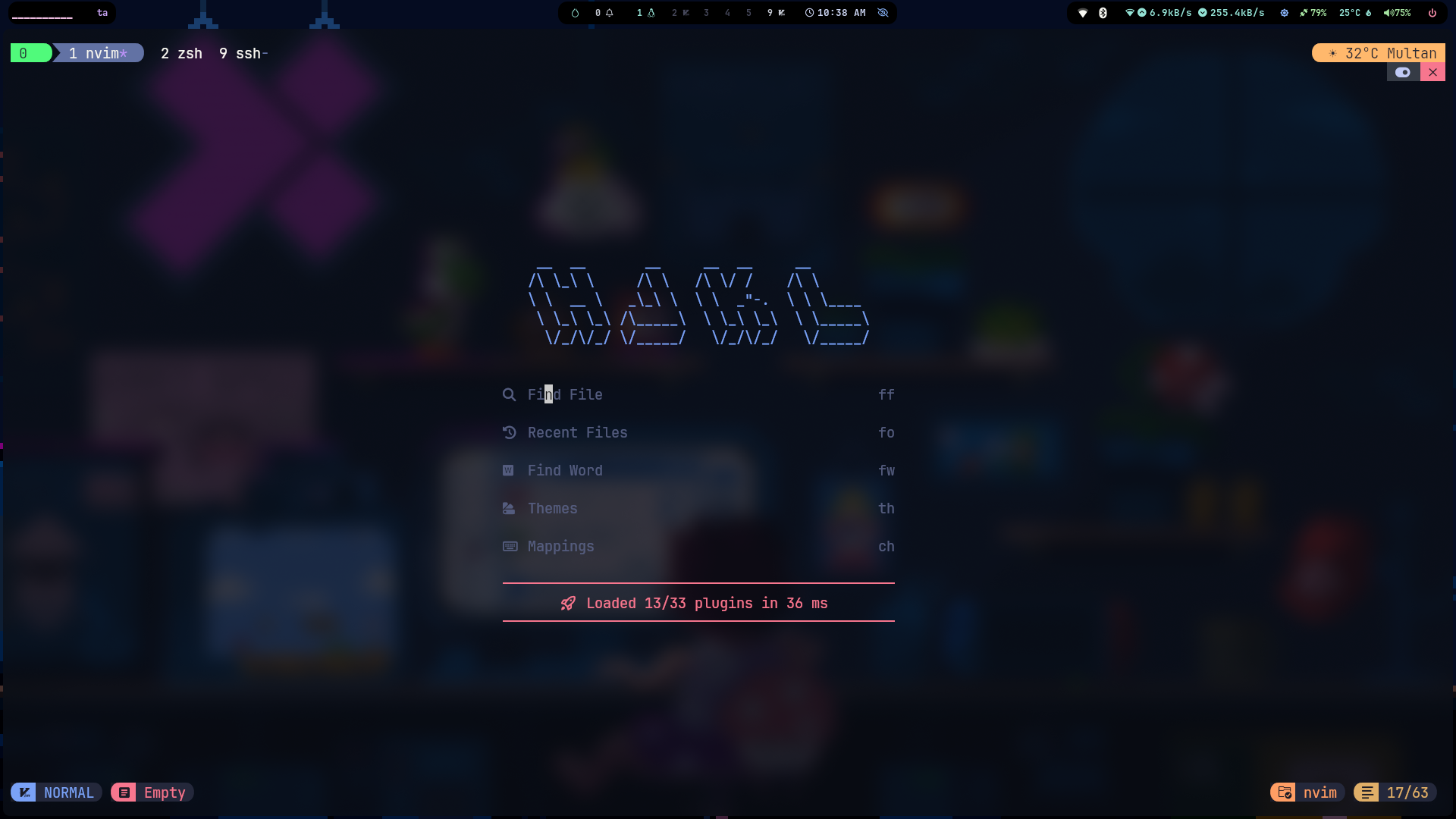
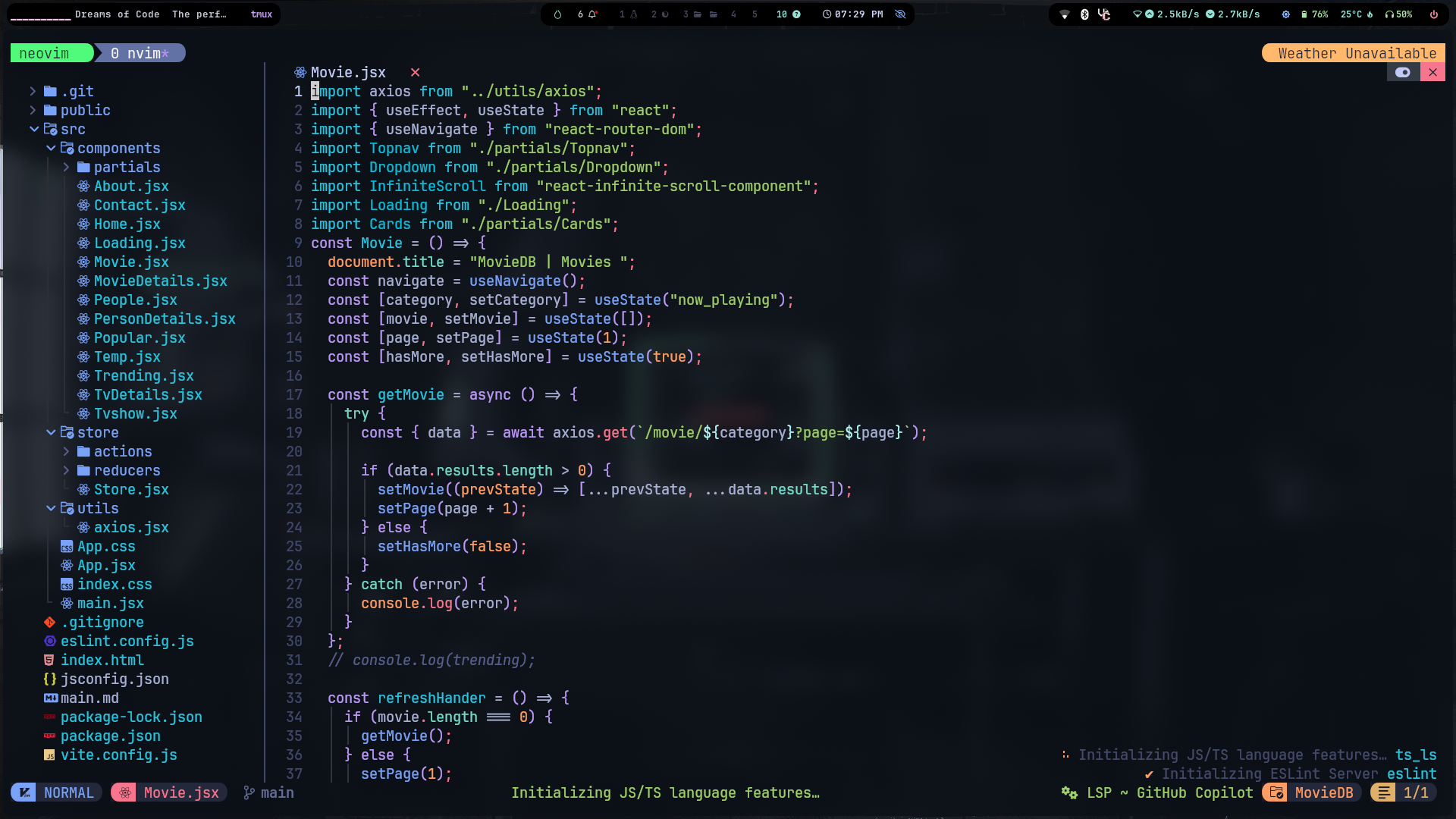
✨ Key Features
- 🚀 Lazy-loaded plugin architecture via NvChad v2.5
- 🎨 Tokyo Night theme with transparency and custom dashboard
- 🧠 Intelligent code formatting with Prettier, Stylua, and format-on-save
- 🔧 Comprehensive LSP support for modern web development
- 🧵 Template string auto-conversion (VS Code-like behavior)
- 🏷️ Auto HTML/JSX tag closing and renaming
- 🔍 Enhanced Telescope UI with dropdown selections
- 🧑🔧 LazyGit integration for seamless Git workflow
- 🖥️ Tmux navigation support for terminal multiplexing
- 📝 Markdown rendering with live preview
- 👨💻 VSCode-Neovim compatibility with dedicated config
- ⌨️ Custom key mappings for productivity
- ��� BlVink completion engine for fast autocompletion
- 🌲 Enhanced Treesitter with auto-install for syntax highlighting
🛠️ Plugin Ecosystem
| Plugin | Purpose | Status |
|---|---|---|
| Core & UI | ||
NvChad/NvChad | Base configuration framework | ✅ Active |
folke/which-key.nvim | Key binding helper with helix preset | ✅ Active |
| LSP & Completion | ||
neovim/nvim-lspconfig | Language Server Protocol configuration | ✅ Active |
nvchad.blink.lazyspec | Fast completion engine | ✅ Active |
| Formatting & Linting | ||
stevearc/conform.nvim | Code formatting with Prettier, Stylua | ✅ Active |
| Git Integration | ||
kdheepak/lazygit.nvim | LazyGit terminal UI integration | ✅ Active |
| Navigation & Movement | ||
christoomey/vim-tmux-navigator | Seamless Tmux pane navigation | ✅ Active |
nvim-telescope/telescope-ui-select.nvim | Telescope dropdown for vim.ui.select | ✅ Active |
| Language-Specific | ||
axelvc/template-string.nvim | Auto-convert quotes to template strings | ✅ Active |
windwp/nvim-ts-autotag | Auto-close and rename HTML/JSX tags | ✅ Active |
MeanderingProgrammer/render-markdown.nvim | Live markdown rendering | ✅ Active |
| Syntax & Parsing | ||
nvim-treesitter/nvim-treesitter | Advanced syntax highlighting with auto-install | ✅ Active |
| Optional/Commented | ||
github/copilot.vim | AI code suggestions | 🔄 Commented out |
folke/noice.nvim | Enhanced command line and notification UI | 🔄 Commented out |
rcarriga/nvim-notify | Beautiful notification system | 🔄 Commented out |
🌐 Language Support
Full LSP Support
- JavaScript/TypeScript - Complete IntelliSense, auto-imports, refactoring (ts_ls)
- React (JSX/TSX) - Component intelligence, prop validation
- HTML/CSS - Tag completion, CSS properties, validation
- JSON - Schema validation, formatting
- Lua - Neovim API awareness, diagnostics with vim globals
- Markdown - Live rendering with Marksman LSP
- TailwindCSS - Class completion and validation
- Bash/Shell - Script validation and completion
- Emmet - Abbreviation expansion for web technologies
Enhanced Features
- TailwindCSS - Class completion and validation
- Emmet - Fast HTML/CSS abbreviation expansion for HTML, CSS, JS/TS React
- Template Strings - Auto-conversion for JS/TS/React/Vue/Svelte/Python/C#
- Auto-tagging - Smart HTML/JSX tag management with Treesitter
- Bash/Shell - LSP support for shell scripting
- Markdown - Enhanced support with Marksman LSP and live rendering
Formatting Support
- Prettier/Prettierd - JavaScript, TypeScript, HTML, CSS, JSON, Markdown, YAML
- Stylua - Lua code formatting
- Shfmt - Shell script formatting
- Format on Save - Automatic formatting with 500ms timeout and LSP fallback
⚙️ Custom Configuration Highlights
Theme & UI
- Tokyo Night theme with transparency enabled
- Custom dashboard with ASCII art header
- Minimal statusline with rounded separators
- Relative line numbers for better navigation
Key Mappings
;→:(Quick command mode access)jk→<ESC>(Fast insert mode exit)<C-s>→ Save file (works in all modes)<C-a>→ Select all text<A-hjkl>→ Navigate in insert mode<leader>lg→ Open LazyGit<A-i>→ Toggle floating terminal with custom styling<C-hjkl>→ Tmux navigation<C-\>→ Go to previous Tmux paneg1-g9→ Switch between buffers (g0 for last buffer)- Visual mode selections:
<leader>i{,<leader>a{, etc. for brackets/quotes
Advanced Features
- VSCode compatibility - Dedicated minimal config for VSCode-Neovim extension
- Floating terminal - Customized with rounded borders (80% width/height)
- Smart diagnostics - Virtual text enabled globally
- Auto-formatting - Format on save with 500ms timeout and LSP fallback
- Template strings - Auto-convert quotes to backticks in JS/TS/React
- Blink completion - Fast completion engine integrated with NvChad
- Relative line numbers - Enhanced navigation experience
- Buffer switching - Quick buffer navigation with g1-g9 keys
🧰 Prerequisites
Required
- Neovim v0.9+ (v0.10+ recommended)
- Git
- Node.js and
npm(for LSP servers and formatters)
Optional but Recommended
- LazyGit - Git UI integration
- Tmux - Terminal multiplexer for navigation
- Nerd Font - For proper icon display
Language Servers & Formatters
The following LSP servers are configured and can be installed via Mason:
bash# LSP Servers (install via :Mason or manually) npm install -g typescript-language-server # JavaScript/TypeScript npm install -g vscode-langservers-extracted # HTML, CSS, JSON npm install -g @tailwindcss/language-server # TailwindCSS npm install -g emmet-ls # Emmet abbreviations npm install -g bash-language-server # Bash/Shell npm install -g marksman # Markdown # Formatters (for conform.nvim) npm install -g prettier # JS/TS/HTML/CSS/JSON/MD/YAML npm install -g @fsouza/prettierd # Faster Prettier daemon cargo install stylua # Lua formatting npm install -g shfmt # Shell script formatting
🚀 Installation
Method 1: Fresh NvChad Installation
bash# Backup existing config (if any) mv ~/.config/nvim ~/.config/nvim.backup # Clone this config git clone https://github.com/ahmad9059/nvim ~/.config/nvim # Start Neovim (plugins will auto-install) nvim # Install LSP servers and formatters :Mason # Then install the servers you need, or run: :MasonInstallAll # Sync plugins if needed :Lazy sync
Method 2: VSCode-Neovim Users
This config includes dedicated VSCode compatibility. Simply install the VSCode-Neovim extension and point it to this config.
🎯 Usage Guide
First Launch
- Open Neovim - plugins will automatically install
- Wait for Lazy.nvim to finish downloading plugins
- Restart Neovim for full functionality
- Run
:checkhealthto verify everything is working
Key Workflows
Git Integration
<leader>lg- Open LazyGit for visual Git operations- Use LazyGit's intuitive interface for staging, committing, and pushing
Code Formatting
- Automatic - Format on save (500ms timeout)
- Manual - Use LSP formatting commands
- Supported - JS, TS, HTML, CSS, JSON, Markdown, Lua
Terminal Usage
<A-i>- Toggle floating terminal with custom styling- Terminal opens with 80% width, 70% height, rounded borders
- Positioned at 10% from top, 8% from left for optimal viewing
Tmux Integration
<C-h/j/k/l>- Navigate between Neovim and Tmux panes seamlessly<C-\>- Go to previous Tmux pane
🔧 Troubleshooting
Common Issues
LSP not working?
bash# Check if language servers are installed :LspInfo # Install missing servers via Mason :Mason
Formatting not working?
bash# Check formatter availability :ConformInfo # Install formatters manually npm install -g prettier @fsouza/prettierd cargo install stylua npm install -g shfmt
Plugins not loading?
bash# Check plugin status :Lazy # Force plugin sync :Lazy sync
Tmux navigation not working?
- Ensure Tmux is installed and running
- Check if
christoomey/vim-tmux-navigatorplugin is loaded
📁 Project Structure
~/.config/nvim/
├── init.lua                 # Main entry point with VSCode compatibility
├── lazy-lock.json          # Plugin version lock file
├── .stylua.toml            # Stylua formatter configuration
├── lua/
│   ├── autocmds.lua        # Auto commands
│   ├── chadrc.lua          # NvChad theme and UI configuration
│   ├── mappings.lua        # Custom key mappings
│   ├── options.lua         # Neovim options (relative numbers, etc.)
│   ├── configs/
│   │   ├── conform.lua     # Formatter configuration (Prettier, Stylua, etc.)
│   │   ├── lazy.lua        # Lazy.nvim setup
│   │   └── lspconfig.lua   # LSP server configurations
│   └── plugins/
│       └── init.lua        # Plugin specifications
└── preview/
    ├── preview.png         # Screenshot 1
    └── preview-2.png       # Screenshot 2
🎨 Customization
Changing Theme
Edit lua/chadrc.lua:
luaM.base46 = { theme = "tokyonight", -- Current theme (change to your preferred theme) transparency = true, -- Current setting (set to false to disable) hl_override = { Comment = { italic = true }, ["@comment"] = { italic = true }, }, }
Adding New LSP
Edit lua/configs/lspconfig.lua:
lua-- Example: Python LSP lspconfig.pyright.setup { on_attach = on_attach, capabilities = capabilities, }
Custom Key Mappings
Edit lua/mappings.lua:
lua-- Example: Add your custom mappings map("n", "<leader>custom", "<cmd>YourCommand<CR>", { desc = "Your description" }) -- Current custom mappings include: -- Buffer navigation with g + numbers -- Visual mode selections for brackets/quotes -- Tmux navigation integration -- Custom terminal toggle with styling
🤝 Contributing
Feel free to:
- Report bugs or issues
- Suggest new features or improvements
- Submit pull requests
- Share your customizations
Development Setup
- Fork the repository
- Create a feature branch
- Test your changes thoroughly
- Submit a pull request with clear description
🙌 Credits & Acknowledgments
Core Dependencies
- NvChad - Amazing Neovim configuration framework
- Lazy.nvim - Modern plugin manager
- Telescope - Fuzzy finder and UI
Key Plugins
- conform.nvim - Formatter integration
- nvim-lspconfig - LSP configuration
- LazyGit - Git terminal UI
- template-string.nvim - Smart template strings
- noice.nvim - Enhanced UI components
Community
- All the amazing open-source contributors
- NvChad community for the solid foundation
- Neovim core team for the incredible editor
👨💻 Author
Ahmad Hassan
Software Engineer & Full Stack Developer


📄 License
This project is open source and available under the MIT License.
MIT License - Feel free to use, modify, and distribute
⭐ Show Your Support
If this configuration helped you, please consider:
- ⭐ Starring the repository
- 🍴 Forking for your own customizations
- 📢 Sharing with fellow developers
- 🐛 Reporting issues or suggesting improvements
Happy coding with Neovim! 🚀
Contributors
Showing top 1 contributor by commit count.

Related Repositories

ddgksf2013/ddgksf2013
墨鱼去广告计划 | QuantumultX 去广告 | 去开屏广告 | 应用净化 | 会员解锁 | 墨鱼配置 | 应用增强 | 网页优化 | 网盘资源 | 模块去广告 | 圈 X 配置 | Shadowrocket配置 | 墨鱼规则 | Clash配置 | 小火箭去广告 | 资源库 | AdBlock | 网页广告 | 不完全指北

h5bp/server-configs-nginx
Nginx HTTP server boilerplate configs

apple/pkl
A configuration as code language with rich validation and tooling.

timarney/react-app-rewired
Override create-react-app webpack configs without ejecting

TomWright/dasel
Unified querying, transformation, and modification of JSON, TOML, YAML, XML, INI, HCL, KDL and CSV.

google/jsonnet
Jsonnet - The data templating language