

Android boot image editor
Parsing and re-packing Android boot.img/vbmeta.img/payload.bin, supporting Android 16
Make sure you have [JDK17+](https://www.oracle.com/java/technologies/downloads/#java17) and [Python3](https://www.python.org/downloads/). The project is written primarily in Java, distributed under the Apache License 2.0 license, first published in 2016. It has gained significant community traction with 1,298 stars and 291 forks on GitHub. Key topics include: android-boot, avb, mkboot, mkbootimg, recovery.
Android_boot_image_editor


A tool for reverse engineering Android ROM images.
Requirements
Make sure you have JDK17+ and Python3.
-
Linux / WSL:
sudo apt install git device-tree-compiler lz4 xz-utils zlib1g-dev openjdk-17-jdk gcc g++ python3 python-is-python3 p7zip-full android-sdk-libsparse-utils erofs-utils -
Mac:
brew install lz4 xz dtc -
Windows: Install openssl and device-tree compiler with chocolate
choco install openssl dtc-msys2 zip vim gzip 7zip
Getting Started
Put your boot.img to current directory, then start gradle 'unpack' task:
bashcp <original_boot_image> boot.img ./gradlew unpack
Your get the flattened kernel and /root filesystem under ./build/unzip_boot:
build/unzip_boot/
├── boot.json     (boot image info)
├── boot.avb.json (AVB only)
├── kernel
├── second        (2nd bootloader, if exists)
├── dtb           (dtb, if exists)
├── dtbo          (dtbo, if exists)
└── root          (extracted initramfs)
Then you can edit the actual file contents, like rootfs or kernel.
Now, pack the boot.img again
./gradlew pack
You get the repacked boot.img at $(CURDIR):
boot.img.signed
Well done you did it! The last step is to star this repo :smile
live demo
<!--  --> <p align="center"> <img src=doc/op.gif width="615" height="492"> </p>Supported ROM image types
| Image Type | file names | platforms | note |
|---|---|---|---|
| boot | boot.img, init_boot.img, boot-debug.img, boot-test-harness.img | all | |
| vendor boot | vendor_boot.img, vendor_boot-debug.img, vendor_kernel_boot.img | all | |
| recovery | recovery.img, recovery-two-step.img | all | |
| vbmeta | vbmeta.img, vbmeta_system.img etc. | all | |
| dtbo | dtbo.img | linux & mac | |
| dtb | *.dtb | linux & mac | |
| sparse images | system.img, vendor.img, product.img etc. | linux | |
| OTA payload | payload.bin | all | Windows git-bash |
Please note that the boot.img MUST follows AOSP verified boot flow, either Boot image signature in VBoot 1.0 or AVB HASH footer (a.k.a. AVB) in VBoot 2.0.
compatible devices
| Device Model | Manufacturer | Compatible | Android Version | Note |
|---|---|---|---|---|
| Pixel 7 (panther) | Y | 13 (TQ2A.230505.002) <Br>2023) | ||
| ADT-3 (adt3) | Askey/Google | Y | 12 (spp2.210219.010) | amlogic inside, <Br>Android TV |
| Pixel 3 (blueline) | Y | 12 (spp2.210219.008, <Br>2021) | ||
| Pixel 3 (blueline) | Y | 11 (RP1A.200720.009, <Br>2020) | more ... | |
| Pixel 3 (blueline) | Y | Q preview (qpp2.190228.023, <Br>2019) | more ... | |
| Redmi K30 4G (phoenix[n]) | XiaoMi | Y | 10 | verified by @eebssk1 |
| TS10 | Topway | Y | 10 | car headunit, @mariodantas |
| Pixel XL (marlin) | HTC | Y | 9.0.0 (PPR2.180905.006, <Br>Sep 2018) | more ... |
| K3 (CPH1955) | OPPO | Y for recovery.img<Br> N for boot.img | Pie | more |
| Z18 (NX606J) | ZTE | Y | 8.1.0 | more... |
| Nexus 9 (volantis/flounder) | HTC | Y(with some tricks) | 7.1.1 (N9F27M, Oct 2017) | tricks |
| Nexus 5x (bullhead) | LG | Y | 6.0.0_r12 (MDA89E) | |
| Moto X (2013) T-Mobile | Motorola | N | ||
| X7 (PD1602_A_3.12.8) | VIVO | N | ? | Issue 35 |
| Realme GT Neo 3 | Realme | N | 12 | Issue 105 |
more examples
<details> <summary>working with recovery.img</summary>Please remember to clean the work directory first.
</details> <details> <summary>working with vbmeta.img</summary>bashrm *.img cp <your_recovery_image> recovery.img ./gradlew unpack ./gradlew pack
</details> <details> <summary>clean workspace</summary> When you finished current work and need to clean the workspace for next image, it's a good idea to call the `clear` command:bashrm *.img cp <your_vbmeta_image> vbmeta.img ./gradlew unpack ./gradlew pack
</details> <details> <summary>working with boot.img and vbmeta.img</summary>bash./gradlew clear
If your vbmeta.img contains hash of boot.img, you MUST update vbmeta image together.
bashrm *.img cp <your_boot_image> boot.img cp <your_vbmeta_image> vbmeta.img ./gradlew unpack ./gradlew pack
Your boot.img.signed and vbmeta.img.signd will be updated together, then you can flash them to your device.
</details> <details> <summary>working with vendor_boot.img + vbmeta.img (Pixel 5 etc.)</summary> Most devices include hash descriptor of vendor_boot.img in vbmeta.img, so if you need to modify vendor_boot.img, you need to update vbmeta.img together.bashrm *.img cp <your_vendor_boot_image> vendor_boot.img cp <your_vbmeta_image> vbmeta.img ./gradlew unpack ./gradlew pack ./gradlew flash
Please note that to use 'gradle flash', your host machine must be connectted to your DUT with adb, and you already 'adb root'.
</details> <details> <summary>How to edit device tree blob(dtb) inside vendor_boot.img</summary>If you want to edit the device-tree blob in place:
bashcp <your_vendor_boot_image> vendor_boot.img cp <your_vbmeta_image> vbmeta.img ./gradlew unpack ==> now you can edit build/unzip_boot/dtb.dts directly ./gradlew pack
During unpack stage, dtb will be dumped to file build/unzip_boot/dtb, dts will be decompiled to build/unzip_boot/dtb.dts.
You can edit dtb.dts directly, and it will be compiled to dtb duing repack stage.
If you just want to replace the dtb with the one that is compiled outside this tool, please
</details> <details> <summary>How to pull device tree blob(dtb) from a rooted device</summary>bashcp <your_vendor_boot_image> vendor_boot.img cp <your_vbmeta_image> vbmeta.img ./gradlew unpack rm build/unzip_boot/dtb.dts cp <your_dtb> build/unzip_boot/dtb ./gradlew pack
If you have a rooted device and want to pull /proc/device-tree
bashtouch fake.dtb ./gradlew pull
This tool will copy dtc to the target device via adb, and dump the dtb and dts file. Eventually you should get something like this
+--------+------------------------------+
|  What  |            Where             |
+--------+------------------------------+
| source | /proc/device-tree            |
+--------+------------------------------+
| DTB    | panther.dtb                  |
+--------+------------------------------+
| DTS    | build/unzip_boot/panther.dts |
+--------+------------------------------+
If you have a dtb file and want to edit its content
bashcp <your_dtb_file> . ./gradlew unpack
This tool will decompile it and put the decompiled source to build/unzip_boot.
                        Unpack Summary of panther.dtb
+------+------------------------------+
| What |            Where             |
+------+------------------------------+
| DTB  | panther.dtb                  |
+------+------------------------------+
| DTS  | build/unzip_boot/panther.dts |
+------+------------------------------+
bashcp <your_system_image> system.img ./gradlew unpack
You get system.img.unsparse, that's a plain ext4 filesystem data.
The idea is to set flag=2 in main vbmeta.
bashrm *.img cp <your_vbmeta_image> vbmeta.img ./gradlew unpack vim -u NONE -N build/unzip_boot/vbmeta.avb.json -c ":19s/0/2/g" -c ":wq" ./gradlew pack
Then flash vbmeta.img.signed to your device.
</details> <details> <summary>How to merge init_boot.img into boot.img</summary>- unpack init_boot.img and copy out "build/unzip_boot/root".
- clear workspace by
gradle clear, then unpack boot.img - copy back the "build/unzip_boot/root"
- edit build/unzip_boot/boot.json
- change
ramdisk.sizeto 1 - change
ramdisk.filefrom "build/unzip_boot/ramdisk.img" to "build/unzip_boot/ramdisk.img.lz4"
- extract everything
Usage:
gradle unpack
- extract only 1 specified partition
Usage:
gradle unpack -Dpart=<part_name>
Example:
    gradle unpack -Dpart=boot
    gradle unpack -Dpart=system
Note:
"build/payload/" will be deleted before each "unpack" task
AOSP already has tools like apexer, deapexer, sign_apex.py, these should suffice the needs on .apex and .capex.
Refer to Issue https://github.com/cfig/Android_boot_image_editor/issues/120
- For those who may be interested in apex generation flow, there is a graph here
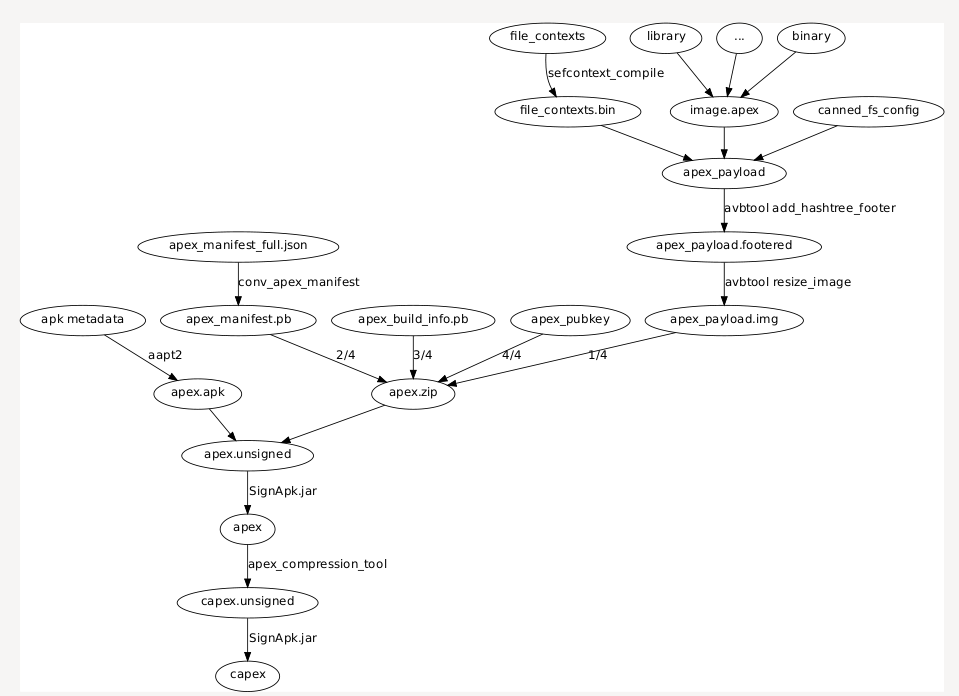
bashcp <your_vendor_dlkm.img> vendor_dlkm.img cp <your_vbmeta_image> vbmeta.img ./gradlew unpack # replace your .ko ./gradlew pack
Then flash vbmeta.img.signed and vendor_dlkm.img.signed to the device.
boot.img layout
Read boot layout of Android boot.img and vendor_boot.img.
Read misc layout of misc.img
References and Acknowledgement
<details> <summary>more ...</summary>Android version list https://source.android.com/source/build-numbers.html<br/>
Android build-numbers https://source.android.com/setup/start/build-numbers
cpio & fs_config<br>
https://android.googlesource.com/platform/system/core<br/>
https://www.kernel.org/doc/Documentation/early-userspace/buffer-format.txt<br/>
AVB<br/>
https://android.googlesource.com/platform/external/avb/<br/>
boot_signer<br/>
https://android.googlesource.com/platform/system/extras<br/>
mkbootimg<br/>
https://android.googlesource.com/platform/system/tools/mkbootimg/+/refs/heads/master/<br/>
boot header definition<br/>
https://android.googlesource.com/platform/system/tools/mkbootimg/+/refs/heads/master/include/bootimg/bootimg.h<br/>
kernel info extractor<br/>
https://android.googlesource.com/platform/build/+/refs/heads/master/tools/extract_kernel.py<br/>
mkdtboimg<br/>
https://android.googlesource.com/platform/system/libufdt/<br/>
libsparse<br/>
https://android.googlesource.com/platform/system/core/+/refs/heads/master/libsparse/<br/>
Android Nexus/Pixle factory images<br/>
https://developers.google.cn/android/images<br/>
Contributors
Showing top 12 contributors by commit count.


