

Navigator
Android Multi-module navigator, trying to find a way to navigate into a modularized android project
Android Multi-module navigator, trying to find a way to navigate into a modularized android multi module project The project is written primarily in Kotlin, distributed under the Apache License 2.0 license, first published in 2019. Key topics include: activity, android, fragment, intent, kotlin.
Navigator
Android Multi-module navigator, trying to find a way to navigate into a modularized android multi module project
Import
groovyimplementation "com.github.florent37:navigator:1.0.0"
Multi module sample
project
  |
  \--app
  |
  \--routing
  |
  \--splash
  |
  \--home
  |
  \--user
And we want the next screen flow
app --[directly starts]--> Splash --> Home --[clicks on an user]--> User(id)
splashshould only knowroutinghomeshould only knowroutingusershould only knowroutingappshould only knowroutingto present the splashroutingshould not know others modules
Define routes
In a dedicated module, created shared routes into a Route object
in module routing :
kotlinobject Routes { object Splash : Route("/") object Home : Route("/home") object User : RouteWithParams<UserParams>("/user/{userId}") { class UserParams(val userId: String) : Param } }
Bind routes
You need to associate an intent to each Route in your feature's module
in module splash :
kotlinRoutes.Splash.register { context -> Intent(context, SplashActivity::class.java) }
If you want an android module to register automatically its route,
you can bind using applicationprovider's auto providers :
kotlin//automatically launched after application's onCreate() class RouteProvider : Provider() { override fun provide() { Routes.Splash.register { context -> Intent(context, SplashActivity::class.java) } } }
then declare it in your module's AndroidManifest.xml
xml<provider android:authorities="${applicationId}.splash.RouteProvider" android:name=".RouteProvider"/>
Navigation
Push
You can push a route from an activity (or fragment) using
kotlinNavigator.of(this).push(Routes.Home)
or by its path
kotlinNavigator.of(this).push("/home/")
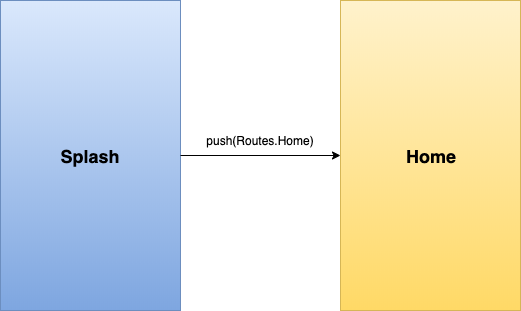
You can also change the route from anywhere (eg: an android ViewModel) using Navigator.current()
kotlinNavigator.current()?.push(Routes.Home)
A route with parameters
Navigating to a route with parameters forces to specify values
kotlinNavigator.of(this).push(Routes.User, UserParams(userId= "3"))
You can retrieve them using kotlin's delegated properties
kotlinclass UserActivity : Activity { private val args by parameter<Routes.User.Params>() override fun onCreate(savedInstanceState: Bundle?) { super.onCreate(savedInstanceState) val userId = args.userId
You can also call it by path's params
kotlinNavigator.of(this).push("/user/3")
It will use moshi to create the parameter from path params
Pop
kotlinNavigator.of(this).pop()
PushReplacement
If you want to replace the current screen
kotlinNavigator.current()?.pushReplacement(Routes.Splash)
Route Flavors
A flavor is an endpoint of a route, you can use them to navigate to an Activity's BottomNavigation item
kotlinobject Home : Route("/home/") { object UserTabs : Flavor<Home>(this,"home/tabUsers") object PostsTabs : FlavorWithParams<Home, PostsTabs.Params>(this,"home/tabPosts") { class Params(val userId: Int?) : Parameter() } }
You can push this like a route
kotlinNavigator.current()?.push(Routes.Home.UserTabs)
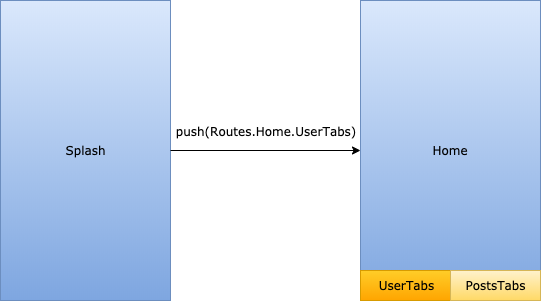
And bind this into your Activity
kotlinclass HomeActivity : AppCompatActivity(R.layout.activity_home) { override fun onCreate(savedInstanceState: Bundle?) { super.onCreate(savedInstanceState) viewPager.adapter = ViewPagerAdapter( supportFragmentManager ) bottomNav.setupWithViewPager(viewPager) bindFlavor(Routes.Home.UserTabs, intent) .withBottomNav(bottomNav, R.id.tabUsers) bindFlavor(Routes.Home.PostsTabs, intent) .withBottomNav(bottomNav, R.id.tabPosts) } }
And to retrieve a flavor parameter
kotlinclass PostsFragment : Fragment { private var args by optionalFlavorParameter<Routes.Home.PostsTabs.Params>() override fun onViewCreated(view: View, savedInstanceState: Bundle?) { super.onViewCreated(view, savedInstanceState) val userId = args.userId
Credits
Author: Florent Champigny http://www.florentchampigny.com/
License
Copyright 2019 Florent37, Inc.

Licensed under the Apache License, Version 2.0 (the "License");
you may not use this file except in compliance with the License.
You may obtain a copy of the License at

   http://www.apache.org/licenses/LICENSE-2.0

Unless required by applicable law or agreed to in writing, software
distributed under the License is distributed on an "AS IS" BASIS,
WITHOUT WARRANTIES OR CONDITIONS OF ANY KIND, either express or implied.
See the License for the specific language governing permissions and
limitations under the License.
Contributors
Showing top 3 contributors by commit count.



Related Repositories

Abdenasser/neohtop
💪🏻 Blazing-fast system monitoring for your desktop (built with Rust, Tauri & Svelte)

zfdang/Android-Touch-Helper
AdSkip — an Android assistant for automatically skipping app launch ads

calimarkus/JDStatusBarNotification
Highly customizable & feature rich notifications. Interactive dismiss. Custom Views. SwiftUI. Tap-to-hold. Progress. Written in Swift, compatible for ObjC!

gautamkrishnar/blog-post-workflow
Show your latest blog posts from any sources or StackOverflow activity or Youtube Videos on your GitHub profile/project readme automatically using the RSS feed

dalibo/pg_activity
pg_activity is a top like application for PostgreSQL server activity monitoring.

bytedance/scene
Android Single Activity Framework compatible with Fragment.