

OneDrive SDK java
OneDrive SDK for Java
[한국어 (korean)](https://github.com/isac322/OneDrive-API-java/blob/master/README.kor.md) | **English** The project is written primarily in Java, distributed under the MIT License license, first published in 2016. Key topics include: java, onedrive, onedrive-sdk, sdk, sdk-java.
한국어 (korean) | English
OneDrive API for Java
purse fast, easy to use, intuitive API.
Supported Operation
- Auto login authorization check and refresh
- Fetching metadata of folder, file (by id and path)
- Folder or file's metadata (size, name, path, children list and etc.)
- Downloading file (sync and async)
- Delete, copy, move, change metadata(name, description) of folder or file
- Creating folder
- Resources that OneDrive support like image, video..
- Inquiring shared folder
- Basic RemoteItem handling
- Inquiring Drives
- Creating file and upload it (async)
- Support Microsoft Graph 1.0
- Support OneDrive for Business (not fully tested)
TODO
- Searching file or folder (by name or content)
- Sharing folder or file
- Documentation
- Support custom redirect url when login
- REST-api response error handling
- JRE6 version
- HTTPS GZIP support for synchronized operation
Environment
- JRE7
Dependency
These are already included in gradle configuration file 'build.gradle'.
Build
jar files will be located on build/libs after build
Windows
cmdgradlew.bat build
Linux, MacOS
bash./gradlew build
if gradle is installed in your computer
bashgradle build
Simple example
You can see little bit more complicated examples in TestCode.java
1. Construct Client object
- All OneDrive jobs are performed via
Clientobject. - A program can contain multiple different
Clientobject. - Basically
Clientobject check expiration and refresh authorization automatically. but it can be done manually. - All parameters that pass to
Client's constructor can obtain if you fallow OneDrive app instruction of authentication.
javaimport com.bhyoo.onedrive.client.Client; String clientId = "xxxxxxxx-xxxx-xxxx-xxxx-xxxxxxxxxxxx"; String[] scope = {"files.readwrite.all", "offline_access"}; String redirectURL = "http://localhost:8080/"; String clientSecret = "xxxxxxxxxxxxxxxxxxxxxxx"; // with login Client client = new Client(clientId, scope, redirectURL, clientSecret); // without login Client client = new Client(clientId, scope, redirectURL, clientSecret, false); client.login(); // With tokens provided from outside source String accessToken = "<access_token>"; String refreshToken = "<refresh_token>" String tokenType = "bearer"; long expiresIn = 0; Client client = new Client(clientId, scope, redirectURL, clientSecret, accessToken, refreshToken, tokenType, expiresIn);
2. Folder, file fetch
- It can conduct via either ID or path.
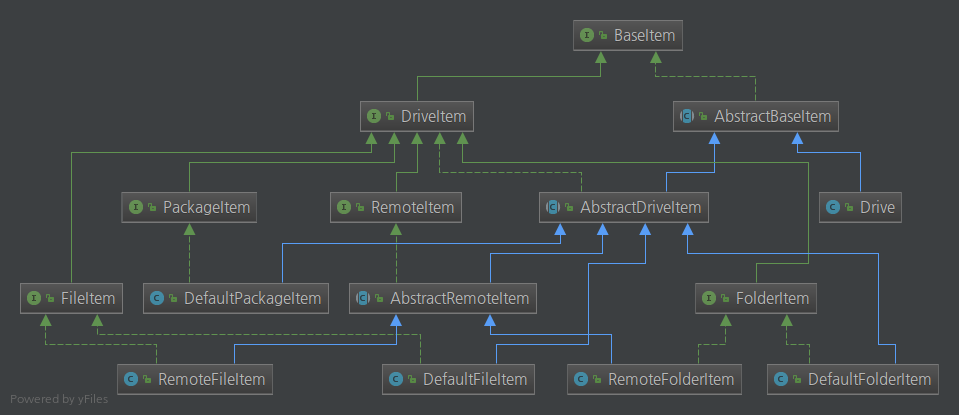
FolderItemandFileItemare represent folder and file respectively.FolderItemandFileItemare child class ofDriveItem.
javaimport com.bhyoo.onedrive.container.items.DriveItem; import com.bhyoo.onedrive.container.items.FileItem; import com.bhyoo.onedrive.container.items.FolderItem; // assume that Client object is already constructed // get root directory FolderItem root = client.getRootDir(); // get folder by ID FolderItem folder = client.getFolder("XXXXXXXXXXXXXXXX!XXXX"); // get folder by path FolderItem folder1 = client.getFolder(new PathPointer("/{item-path}")); // get file by ID FileItem file = client.getFile("XXXXXXXXXXXXXXXX!XXXX"); // get file by path FileItem file1 = client.getFile(new PathPointer("/{item-path}/{file-name}")); // or if you don't know whether ID is file or folder DriveItem item = client.getItem("XXXXXXXXXXXXXXXX!XXXX"); // or if you don't know whether path is file or folder DriveItem item1 = client.getItem(new PathPointer("/{item-path}"));
3. get children of a folder
FolderItemareIterable. (it will returns child asDriveItem)- Basically if
FolderItemobject is fetched byClient's methodgetFolderorgetRootDir, the object automatically fetchs children too. (If children list is very long, it could take long time) - If you call
FolderItem's methodgetAllChildrenorgetFolderChildrenorgetFileChildren, you can getListof all children, only folder children, only file children respectively. - if you call above methods, it will load children data and cache it. so First call of those methods can take long time.
javaimport com.bhyoo.onedrive.container.items.DriveItem; import com.bhyoo.onedrive.container.items.FileItem; import com.bhyoo.onedrive.container.items.FolderItem; // assume that Client object is already constructed FolderItem root = client.getRootDir(); DriveItem[] children = root.allChildren(); FolderItem[] folderChildren = root.folderChildren(); FileItem[] fileChildren = root.fileChildren();
4. Create folder
- It can create via either parent's
FolderItemobject orClientobject. - It will return created folder's
FolderItemobject.
javaimport com.bhyoo.onedrive.container.items.FolderItem; import com.bhyoo.onedrive.container.items.pointer.PathPointer; // assume that Client object is already constructed FolderItem root = client.getRootDir(); // create folder by parent folder object FolderItem newFolder = root.createFolder("test"); // create folder by client with parent folder id FolderItem newFolder1 = client.createFolder("XXXXXXXXXXXXXXXX!XXXX", "test1"); // create folder by client with parent folder path FolderItem newFolder2 = client.createFolder(new PathPointer("/"), "test2");
5. Copy folder or file
- It can copy via either source item's object or
Clientobject.
javaimport com.bhyoo.onedrive.container.items.*; import com.bhyoo.onedrive.container.items.pointer.*; // assume that Client object is already constructed FileItem item = (FileItem) client.getItem("XXXXXXXXXXXXXXXX!XXXX"); FolderItem destination = client.getFolder("XXXXXXXXXXXXXXXX!XXXX"); // direct copy item.copyTo(destination); // direct copy with new name item.copyTo(destination, "newName"); // copy by reference object item.copyTo(destination.newReference()); // copy by reference object with new name item.copyTo(destination.newReference(), "newName"); // copy by path string item.copyTo(destination.getPathPointer()); // copy by path string with new name item.copyTo(destination.getPathPointer(), "newName"); // copy by id string item.copyTo(destination.getId()); // copy by id string with new name item.copyTo(destination.getId(), "newName"); // using `Client`, copy by path client.copyItem(new PathPointer("/{item-path}"), new IdPointer("XXXXXXXXXXXXXXXX!XXXX"));
6. Download file synchronously
javaimport java.nio.file.Paths; import com.bhyoo.onedrive.container.items.FileItem; // assume that Client object is already constructed FileItem file = client.getFile("XXXXXXXXXXXXXXXX!XXXX"); String path = "/home/isac322/download"; // download by system path string with original file name file.download(path); // download by system path string with new name file.download(path, "newName"); // download by path object with original file name file.download(Paths.get(path)); // download by path object with new name file.download(Paths.get(path), "newName"); client.download(new PathPointer("/{item-path}"), Paths.get(path));
7. Download file asynchronously
- all async job use Future & Promise mechanism.
- more detail of
DownloadFuturewill explain later at wiki...
javaimport java.nio.file.Paths; import com.bhyoo.container.items.FileItem; import com.bhyoo.network.async.DownloadFuture; // assume that Client object is already constructed FileItem file = client.getFile("XXXXXXXXXXXXXXXX!XXXX"); String path = "/home/isac322/download"; // download by path object with original file name file.downloadAsync(Paths.get(path)); // download by path object with new name file.downloadAsync(Paths.get(path), "newName"); DownloadFuture future = client.downloadAsync("{file-id}", Paths.get(path), "newName"); // wait until download is done future.sync();
8. Move folder or file
- It can move via either source item's object or
Clientobject.
javaimport com.bhyoo.onedrive.container.items.FileItem; import com.bhyoo.onedrive.container.items.FolderItem; import com.bhyoo.onedrive.container.items.pointer.*; // assume that Client object is already constructed FileItem item = client.getFile("XXXXXXXXXXXXXXXX!XXXX"); FolderItem destination = client.getFolder("XXXXXXXXXXXXXXXX!XXXX"); // direct move item.moveTo(destination); // move by reference object item.moveTo(destination.newReference()); // move by path string item.moveTo(destination.getPathPointer()); // move by id string item.moveTo(destination.getId()); // using `Client` object, move by folder path client.moveItem(new PathPointer("/{item-path}"), new IdPointer("XXXXXXXXXXXXXXXX!XXXX"));
9. Update folder or file's metadata & Refresh
refreshwill update all variable with fetched latest metadata.- That is, if
refreshis invoked, all variable can be changed, even if the current program did not modify the variables.
javaimport com.bhyoo.onedrive.container.items.DriveItem; // assume that Client object is already constructed DriveItem item = client.getItem("XXXXXXXXXXXXXXXX!XXXX"); // change item's name and flush to server. item.rename("new name"); // change item's description and flush to server. item.updateDescription("blah blah"); // refresh item's all variable to latest value item.refresh();
10. Upload file (asynchronously)
- like asynchronous downloading, it uses Future & Promise mechanism.
- more detail of
UploadFuturewill explain later at wiki...
javaimport java.nio.file.Path; import com.bhyoo.onedrive.network.async.UploadFuture; // assume that Client object is already constructed UploadFuture future; // start to upload file future = client.uploadFile("{remote-folder-id}", Paths.get("local-file-path")); // wait until uploading is done future.syncUninterruptibly();
*Item diagram
Contributors
Showing top 3 contributors by commit count.


Related Repositories

CyC2018/CS-Notes
:books: 技术面试必备基础知识、Leetcode、计算机操作系统、计算机网络、系统设计

Snailclimb/JavaGuide
Java 面试 & 后端通用面试指南,覆盖计算机基础、数据库、分布式、高并发、系统设计与 AI 应用开发

iluwatar/java-design-patterns
Design patterns implemented in Java

Stirling-Tools/Stirling-PDF
#1 PDF Application on GitHub that lets you edit PDFs on any device anywhere

macrozheng/mall
mall项目是一套电商系统,包括前台商城系统及后台管理系统,基于Spring Boot+MyBatis实现,采用Docker容器化部署。 前台商城系统包含首页门户、商品推荐、商品搜索、商品展示、购物车、订单流程、会员中心、客户服务、帮助中心等模块。 后台管理系统包含商品管理、订单管理、会员管理、促销管理、运营管理、内容管理、统计报表、财务管理、权限管理、设置等模块。

spring-projects/spring-boot
Spring Boot helps you to create Spring-powered, production-grade applications and services with absolute minimum fuss.