Android gpuimage plus
Android Image & Camera Filters Based on OpenGL.
A C++ & Java library for `Image`/`Camera`/`Video` filters. PRs are welcomed. The project is written primarily in C, distributed under the MIT License license, first published in 2015. It has gained significant community traction with 1,924 stars and 475 forks on GitHub. Key topics include: android-gpuimage, cge, compute-shader, filter, image-processing.
Android-GPUImage-Plus


A C++ & Java library for Image/Camera/Video filters. PRs are welcomed.
New Features
v3.x adds CameraX support (CameraXProvider) and a unified zoom API (ICameraProvider.setZoomRatio).

Gradle dependency
gradleallprojects { repositories { maven { // Use github hosted maven repo for now. // Repo url: https://github.com/wysaid/android-gpuimage-plus-maven url 'https://maven.wysaid.org/' } } } // Choose only one of them dependencies { // Page size: 4KB (default) // Architectures: armeabi-v7a, arm64-v8a, x86, x86_64 // Full-featured with FFmpeg bundled implementation 'org.wysaid:gpuimage-plus:3.1.2' // Page size: 16KB // Architectures: armeabi-v7a, arm64-v8a, x86, x86_64 // Full-featured with FFmpeg bundled implementation 'org.wysaid:gpuimage-plus:3.1.2-16k' // Page size: 4KB (default) // Architectures: armeabi-v7a, arm64-v8a, x86, x86_64 // Image-only version (no video features or FFmpeg) implementation 'org.wysaid:gpuimage-plus:3.1.2-min' // Page size: 16KB // Architectures: armeabi-v7a, arm64-v8a, x86, x86_64 // Image-only version (no video features or FFmpeg) implementation 'org.wysaid:gpuimage-plus:3.1.2-16k-min' }
To compile other versions of ffmpeg, see: https://github.com/wysaid/FFmpeg-Android.git
Build
Quick start with Android Studio:
- Add
usingCMakeCompile=truetolocal.properties - Open the project in Android Studio
- Wait for NDK/CMake initialization
- Build and run
For detailed build instructions, configuration options, and alternative build methods (VS Code, command line, ndk-build), see docs/build.md.
Precompiled libraries: android-gpuimage-plus-libs
iOS version: ios-gpuimage-plus
Manual
1. Usage
Apply a filter with a rule string:
javaBitmap srcImage = ...; // HSL Adjust (hue: 0.02, saturation: -0.31, luminance: -0.17) String ruleString = "@adjust hsl 0.02 -0.31 -0.17"; Bitmap dstImage = CGENativeLibrary.filterImage_MultipleEffects(srcImage, ruleString, 1.0f); // Save result ImageUtil.saveBitmap(dstImage);
2. Custom Shader Filter
2.1 Writing a Filter
Custom filters inherit from CGEImageFilterInterface:
cpp// A simple color reversal filter class MyCustomFilter : public CGE::CGEImageFilterInterface { public: bool init() { CGEConstString fragmentShaderString = CGE_SHADER_STRING_PRECISION_H ( varying vec2 textureCoordinate; uniform sampler2D inputImageTexture; void main() { vec4 src = texture2D(inputImageTexture, textureCoordinate); src.rgb = 1.0 - src.rgb; // Reverse all channels gl_FragColor = src; } ); return m_program.initWithShaderStrings(g_vshDefaultWithoutTexCoord, fragmentShaderString); } };
See customFilter_N.cpp for a complete example.
2.2 Running a Custom Filter
In C++:
cpp// Assumes GL context exists CGEImageHandlerAndroid handler; auto* customFilter = new MyCustomFilter(); customFilter->init(); handler.initWithBitmap(env, bitmap); handler.addImageFilter(customFilter); // Handler takes ownership handler.processingFilters(); jobject resultBitmap = handler.getResultBitmap(env);
If no GL context exists, use
CGESharedGLContext.
In Java:
Use CGENativeLibrary.cgeFilterImageWithCustomFilter or CGEImageHandler directly.
3. Filter Rule Strings
Filter effects are defined by text-based rule strings. See docs/filter-rules.md for complete syntax reference.
Quick example:
java// Chain multiple filters with @ separator String filter = "@curve RGB (0,0) (128,150) (255,255) " + "@adjust hsl 0.02 -0.31 -0.17 " + "@blend overlay texture.jpg 80";
4. Key Classes & Threading
| Class | Purpose |
|---|---|
CGENativeLibrary | Main entry — static filter methods |
CGEImageHandler | Image handler wrapper |
CGEFrameRenderer | Real-time camera/video renderer |
CGEFrameRecorder | Video recording (requires FFmpeg) |
Important: GL operations must run on the GL thread:
javaglSurfaceView.queueEvent(() -> { // Your GL operations here });
Documentation
- docs/build.md — Full build guide and configuration options
- docs/filter-rules.md — Complete filter syntax reference
- .github/CONTRIBUTING.md — Contributing guidelines
- .github/RELEASE.md — Release process
Tool
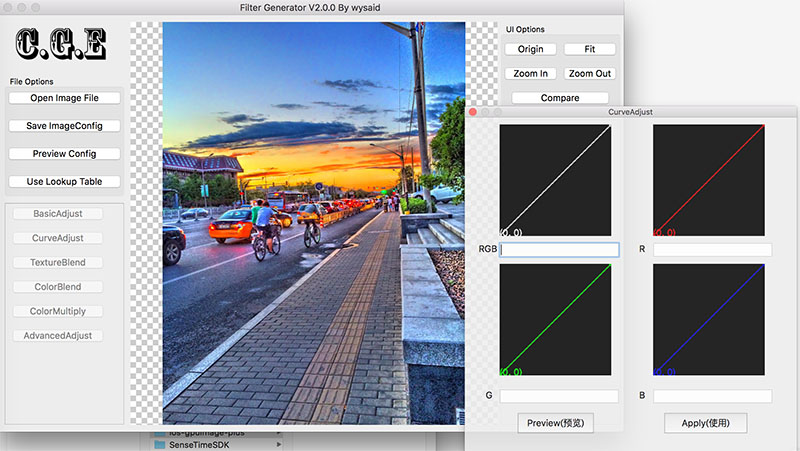
CGE-Tools — open-source desktop companion for creating and previewing CGE filter rules (macOS / Linux / Windows). Latest release: v2.0.0.
Contributors
This project is built with help from the open-source community. Contributions of code, documentation, tests, bug reports, and reviews are all welcome.
License
Contributors
Showing top 11 contributors by commit count.